


An electronic seal (eSeal) helps establish where an electronic document came from and whether its contents changed after sealing. Under the EU's eIDAS rules, it represents a legal entity, such as a company. In the United States, the term also appears in notary and professional licensing rules. This article explains how seals work, what different laws require, and how Signeasy protects completed signed PDFs.
What is an electronic seal?
The electronic seal definition in the EU's eIDAS regulation covers electronic data linked to other electronic data to establish its origin and integrity. Its creator is a legal person, meaning an organization rather than an individual signer. For example, an organization may seal an invoice batch so recipients can verify where the records originated and whether they were altered after sealing.
In the United States, the term is also used for an electronic notary's official seal or a licensed professional's seal on a drawing. Those uses do not follow one nationwide set of requirements. A notary's electronic stamp, an engineer's seal, and a certificate-backed organization seal serve different legal purposes.
A visual company stamp may show a familiar logo, but its appearance does not prove who applied it. Cryptographic document sealing adds verification beyond the image. That difference also explains why an electronic signature and a digital signature should not be treated as interchangeable terms.
How an electronic seal works
A certificate-backed seal uses Public Key Infrastructure (PKI). This is a system of certificates and related private and public keys used to create and verify cryptographic signatures. The process connects a particular file to a sealing key; it does not simply place a stamp image on a page.
Here is the usual sequence:
- Prepare the record. The organization finalizes the report, invoice, or other file that needs verification.
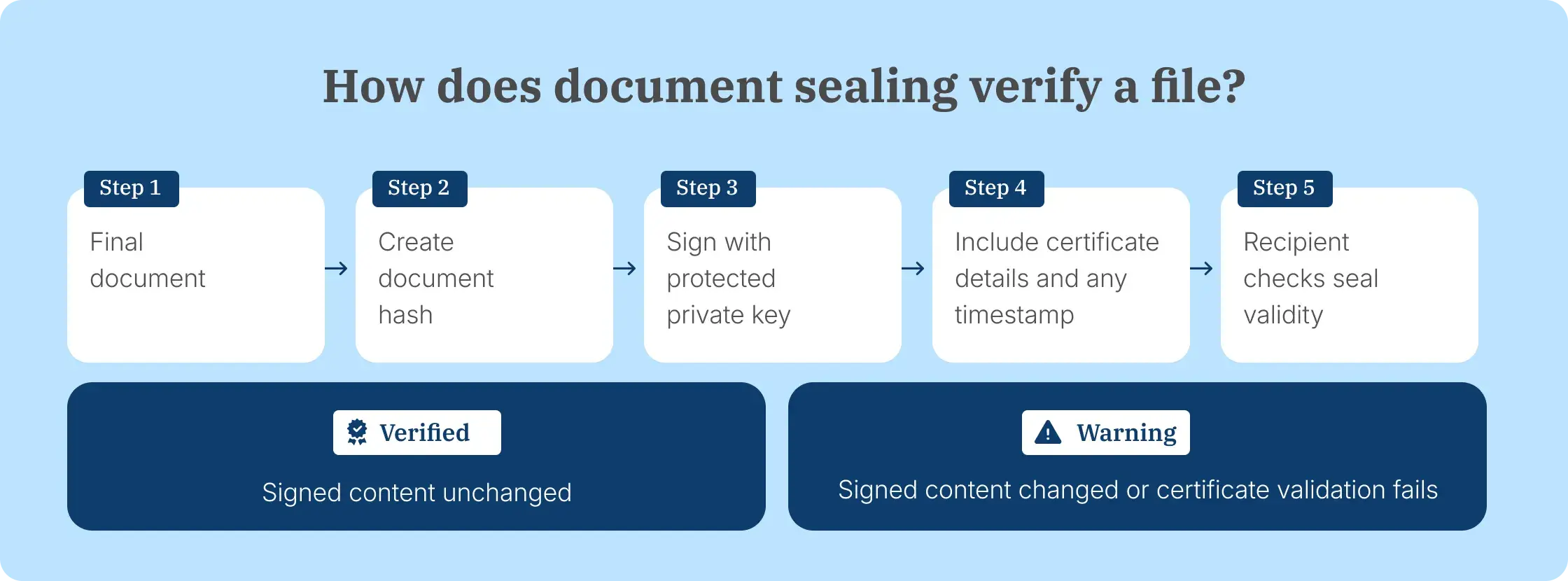
- Create a document fingerprint. The sealing software calculates a cryptographic hash representing the document's contents.
- Apply the seal. A protected private key signs the relevant data. The document carries the signature and certificate details needed for validation; a timestamp may also be attached.
- Share and verify. The recipient's PDF software or validation service checks the signature with the corresponding public key and reviews the certificate's trust status. Changes to protected content cause verification to fail or display a warning.
- Keep the final file. The organization stores the sealed version and any related signing or issuance record for future verification.
This process provides tamper evidence, not automatic confidentiality. A sealed PDF still needs appropriate access permissions and secure storage. For more detail on the underlying technology, see how digital signatures are created.
Electronic seal vs. electronic signature vs. notary seal: What’s the difference?
An electronic signature shows a person's intent to approve a record. An organization seal addresses the origin and integrity of a file. A notary seal has a separate official purpose: identifying a commissioned notary's act. The following comparison keeps these roles separate:
The electronic seal definition under eIDAS concerns a legal entity and the origin and integrity of its data, while a cryptographic seal describes the underlying verification technology. Neither an organizational eSeal nor a commercial document-integrity feature automatically replaces an official notary seal.
What are the three eIDAS seal levels?
Under EU eIDAS, electronic seals fall into three categories: simple, advanced, and qualified. The distinction comes from the requirements for organizational identification, control of sealing credentials, and document integrity, not the appearance of the stamp.
Simple seal
A simple seal falls within the broad eIDAS electronic seal definition without the specific technical requirements imposed on advanced and qualified seals. It does not automatically provide certificate-backed identity verification or cryptographic tamper detection. A logo pasted into a document is not proof, by itself, that the organization issued or protected that document.
Advanced seal
An advanced seal must be uniquely linked to its creator and identify that organization. The creator must control the seal-creation data with a high degree of confidence, and changes to the associated document must be detectable. PKI certificates and cryptographic signatures are commonly used to achieve those properties.
Qualified seal
A qualified electronic seal meets the advanced requirements and uses a qualified certificate for sealing and a qualified seal-creation device. Under eIDAS Article 35, it receives a presumption that the linked data originated from the identified organization and has not been altered. That presumption is not the same as a blanket guarantee that a contract is enforceable or that a specific person approved it.
The levels above apply to the EU framework. U.S. notary and professional requirements need to be assessed separately.
Electronic seal validity in the EU and United States
The legal effect of a seal comes from its applicable rules and the role it performs. EU eIDAS addresses sealing by legal persons; U.S. notarial and professional seals are regulated through state law and licensing requirements.
Under the EU's eIDAS regulation
Under Article 35 of eIDAS, an electronic seal cannot be rejected as evidence solely because it is electronic or nonqualified. A qualified seal also receives a legal presumption concerning the origin and integrity of the linked data. A company-stamp image does not gain that status simply by appearing on a PDF.
An organization sending certified records may need an eIDAS-qualified service, while routine contracts may instead require signatures from authorized individuals. For the distinction between consent and an organization seal, see when electronic signatures are legally valid.
For U.S. notaries and licensed professionals
There is no single U.S. organization-seal category identical to the EU eIDAS model. In practice, the word seal also refers to regulated credentials. Texas, for example, permits qualifying engineers to use computer-generated seals, subject to its board's rules on seal details and signing engineering work.
Notaries have different obligations from engineers. An ordinary business PDF seal cannot serve as an authorized notarization. Our electronic notarization overview explains the distinction between electronically signing a document and performing a notarial act.
For electronic notaries in Virginia
Virginia provides a concrete example of why the intended seal must be identified before selecting software. A Virginia notary must first hold a notary commission, then register to become an electronic notary. The state's official guidance requires a digital certificate and an electronic official signature and seal showing the notary's name, registration number, commission expiry, and prescribed Virginia wording.
The state currently lists a $45 electronic-notary application fee, separate from obtaining seal supplies or a digital certificate. A downloaded seal image alone does not meet the state's electronic-notarization standards. The notary retains exclusive control of the official signature and seal. Specific requirements should be checked against the Virginia Secretary of the Commonwealth's eNotary instructions before ordering.
Where organizations use seals
An electronic seal is useful when an organization needs recipients to verify where a completed record came from or detect changes to that record. It serves a different purpose from collecting an individual's consent to an agreement.
Common examples include:
- Corporate records and invoices: An organization issues financial statements or batches of invoices that recipients need to authenticate against the sender's certificate.
- Government and education: An authorized issuer applies verification to permits, certificates, or transcripts, subject to the receiving institution's accepted format.
- Banking and business agreements: A company keeps a verifiable version of the final loan or vendor agreement while the parties' individual signatures record consent.
- Healthcare and regulated records: A provider protects the integrity of completed reports when the relevant system and regulations call for sealing; a seal alone does not satisfy privacy or consent requirements.
- Engineering and construction: Licensed professionals apply the seals and signatures required for plans or drawings by their state licensing board.
- Electronic notarization: A commissioned notary applies the required official seal and digital signature through a compliant notarization workflow.
- Supply chain and quality records: A business issues test certificates or shipping records and provides a way for recipients to detect later edits.
For ordinary agreements, signing a PDF online records an individual's consent. An electronic seal adds verification of the completed file when recipients need it.
Need to see how Signeasy seals a completed agreement? We'll demonstrate the finished PDF and its validation status.
How to create a verifiable electronic seal
Before creating a seal, identify whether it will represent an organization, a licensed professional, or an electronic notary. That determines who is allowed to apply it and which credentials are required.
The practical setup follows these steps:
- Identify the document and rule. Confirm whether the receiver needs a basic document-integrity seal, an advanced or qualified EU organization seal, or a state-regulated official seal.
- Get the correct credential. For certificate-backed sealing, arrange the required certificate or supported trust service. Notaries and licensed professionals also need their authorization and prescribed seal details.
- Set control of sealing. Limit who can apply the seal or trigger an approved automated workflow. Protect the private key or use a trusted managed service.
- Apply it to the final record. Create or finalize the PDF, then use the certificate-based sealing process. A logo or image alone does not create cryptographic verification.
- Test verification. Reopen the finished file in a compatible viewer. Check the certificate, signature status, and any warning after a controlled test edit. Save the final file and relevant records.
A paid certificate is not needed to draw a decorative stamp, but an image-only stamp does not become a trusted organizational, professional, or notarial seal. For documents already signed by other people, Signeasy offers a separate workflow for adding a tamper-evident seal to the completed PDF.
Want to see how Trust Seal works in a signature request? We'll show the Apply Trust Seal setting and how the completed PDF displays its validation status.
How Signeasy Trust Seal protects completed agreements
Our eSignature software helps business teams prepare documents, collect recipients' signatures, and retain completed agreements. An audit trail records signing activity. Signeasy Trust Seal adds a separate cryptographic check on the finished PDF, helping recipients identify later changes to its protected contents.
According to Signeasy's Trust Seal documentation, the feature is available on the Signeasy Business Plus plan. When enabled for a signature request, it applies a PKI-based seal after every recipient has signed. The completed PDF uses the PAdES-BLT signature standard, which includes a timestamp and verification data for long-term validation.
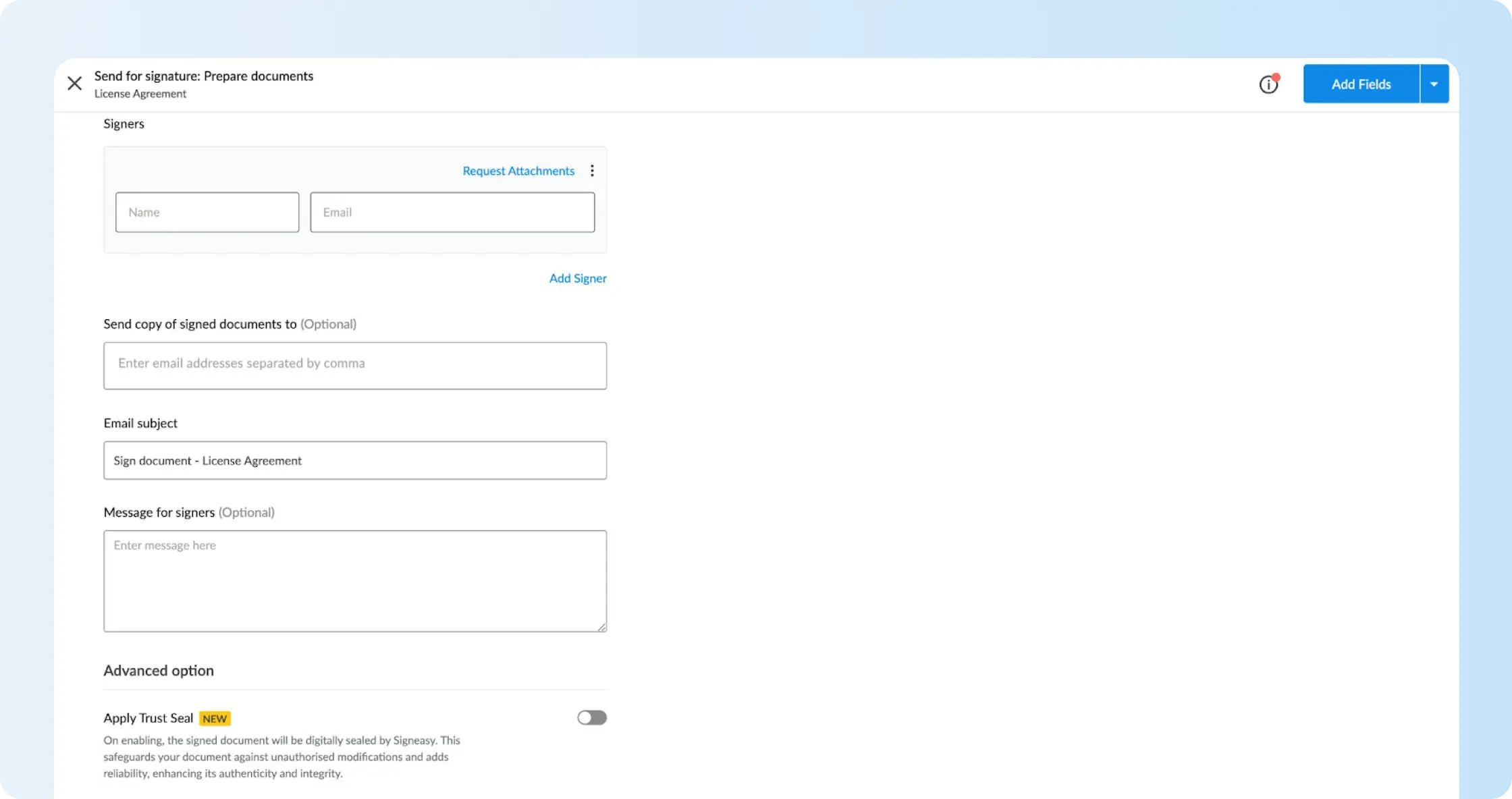
To use it for a signature request:
- Upload your document and add the recipients in Signeasy.
- Open the Advanced option section and enable Apply Trust Seal.
- Add signing fields and send the request. Once the recipients complete signing, Signeasy seals the final PDF.
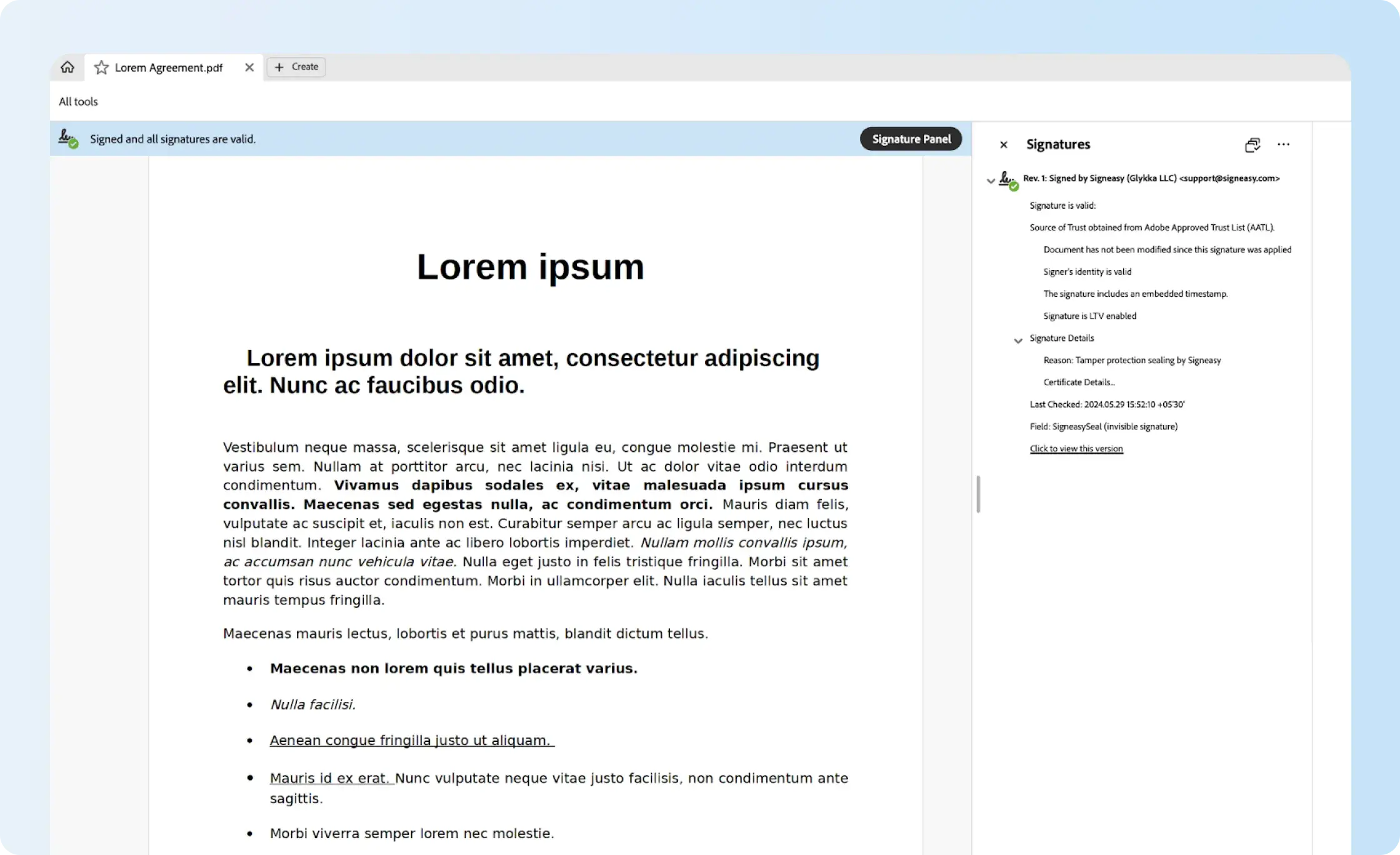
- Open the completed file in a standard PDF reader to check the seal's validation status and whether the signed contents have changed.
The seal verifies the Signeasy-sealed document; it is not described as a qualified EU organization seal, a Virginia notary seal, or a licensed engineer's professional stamp. Those formal uses need their own credentials and authorizations. For the actual product experience, the interactive Trust Seal demo shows how the validation works.
Want to check a finished agreement for later edits? We'll demonstrate Trust Seal alongside the signing record, using a sample document.
What to check before using a sealing solution
A sealing provider needs to match the type of record you're issuing and what the recipient expects to verify. The checklist below focuses on what to confirm before enabling a new workflow:
- Certificate identity: Which organization or service appears in the certificate, and does that meet the recipient's required evidence of origin?
- Required status: Does the file need a basic integrity check, an eIDAS-qualified organization seal, or a separate state-regulated official seal?
- Verification: Will the recipient's usual PDF reader validate the file, and how are changes or certificate problems displayed?
- Team process: Who is permitted to apply seals, and at what point in the signing or approval process?
- Records and packaging: Does your plan include sealing, and can the team retain completed files and activity history? Compare the relevant security features and eSignature plans against that need.
For repeated agreements, reusable templates reduce the need to rebuild signer fields each time. That solves document preparation, while the seal verifies the final output. If the recipient wants to investigate a signed file, our electronic signature verification guide covers the evidence available from signing services.