With Signeasy, you can create your electronic signature within minutes and easily sign pdf online anywhere, anytime, and on any device.
Key Takeaways
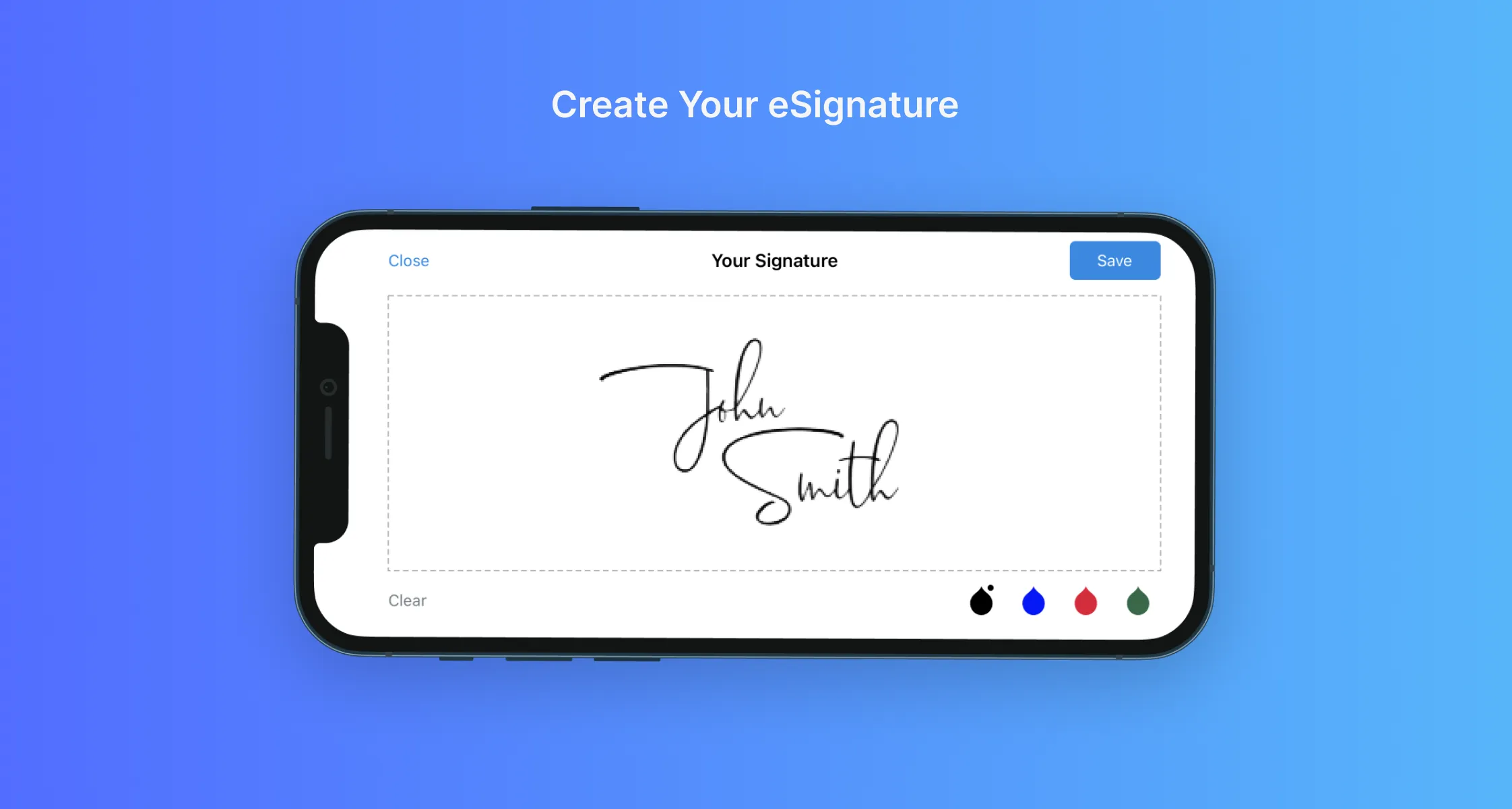
Create your electronic signature in seconds by drawing it, typing your name with a custom font, or uploading an image of your handwritten signature.
Once created, your signature is securely saved to your Signeasy account and can be reused instantly across all documents and devices.
Verify your identity with a one-time email code to ensure your signatures are legally binding and meet compliance standards.
Electronic signatures offer major advantages over wet signatures.They save time and cost, support remote work, speed up approvals, and provide better document security through encryption and audit trails.
With Signeasy, users can create an online signature in seconds and sign or send documents like invoices, sales contracts, and agreements from anywhere.
Signeasy combines convenience with strong security. Its customization options, integrations, and robust security features help businesses confidently manage transactions, collaboration, and communication in a fully digital way.
To create an electronic signature online, use an online signature generator (type or draw your name in your browser), a PDF filler tool (upload a document, sign, and download), a handwritten scan (photo your signature and upload it), or direct drawing on a touch device. Platforms like Signeasy, Adobe Acrobat, and Canva support all four methods. Electronic signatures are legally binding under the U.S. ESIGN Act.
eSignatures are easy, fast, and convenient
No matter where you are located, an electronic signature makes paperwork easy! With Signeasy, it takes just seconds to create an online signature and send documents, such as customer invoices, sales contracts, and agreements, for approval. Our powerful electronic signature solution can be customized to meet the needs of users across various industries, from freelancers to HR professionals to sales executives and beyond.
Methods to create an electronic signature online
There are four ways to create an electronic signature online, regardless of which platform you use:
1. Online Signature Generators: Visit a signature generator website, type your name, and select a font style — or draw your signature using a mouse or touchscreen. Tools like Signeasy, Canva, and Signaturely offer this instantly in your browser.
2. PDF Filler Tools: Upload a document directly to an e-signature platform (Adobe Acrobat, Signeasy), sign it within the browser, and download the signed version — no software installation required.
3. Handwritten Scan: Sign your name on paper, scan it or photograph it with your phone, and upload the image file to your e-signature tool to create a reusable signature image.
4. Direct Drawing: On touch-enabled devices (phones, tablets, stylus-enabled laptops), use the "draw" function within signature apps to draw your signature directly with your finger or stylus.
Steps to apply an electronic signature to a document
Regardless of the platform you use, the process follows three universal steps:
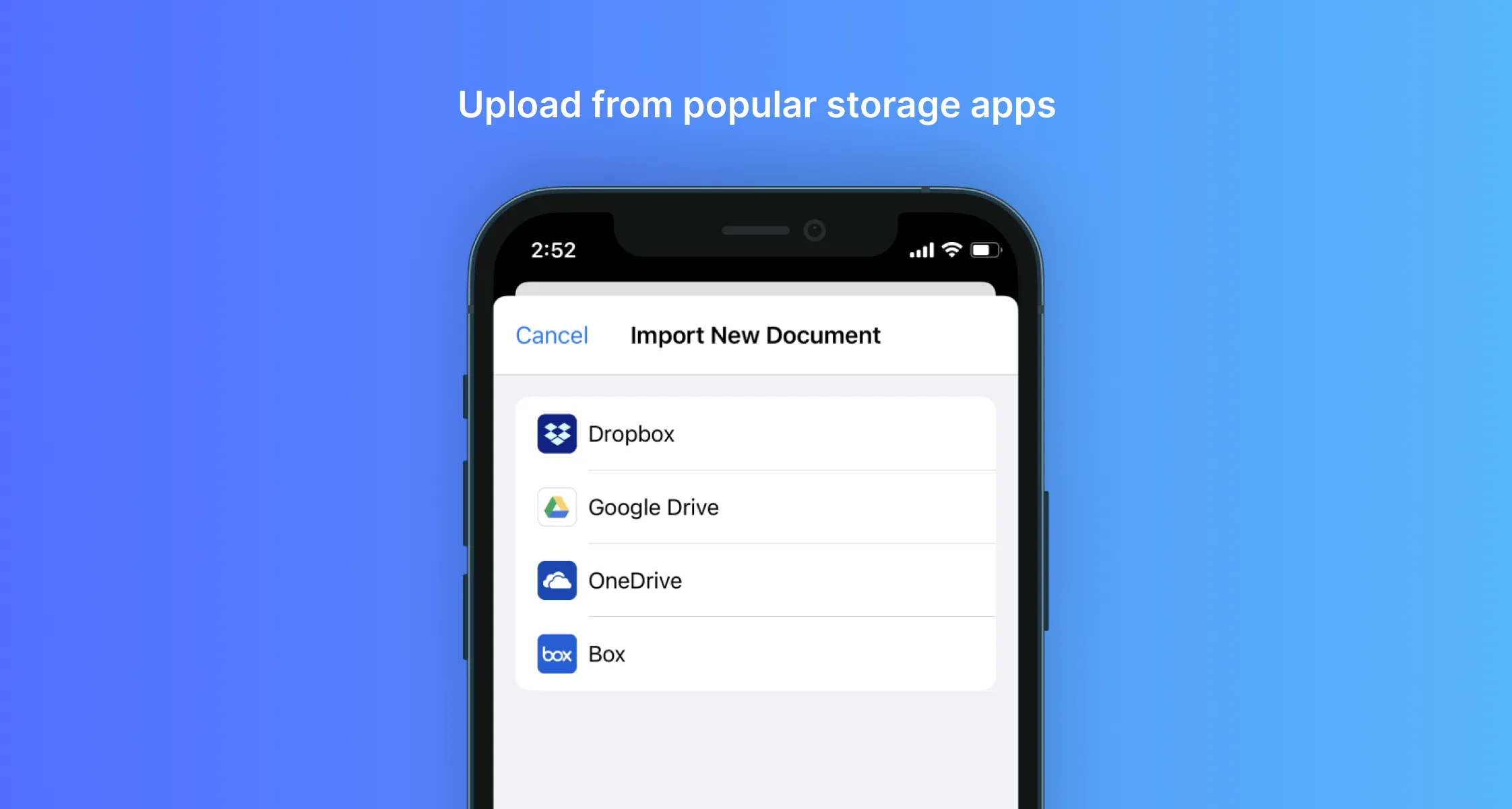
1. Upload the document: Open the file — usually a PDF — in your e-signature tool of choice, either by uploading from your device or importing from cloud storage.
2. Create your signature: Draw with a mouse or stylus, type your name and select a font, or upload a photo of your handwritten signature.
3. Apply and download: Place the signature on the correct field in the document, save the finalized version, and download or share the signed file
How to create an electronic signature on your desktop?
Step 1: Log into your Signeasy account
Open a new tab or window on your browser and log into your Signeasy account. You can sign up for free within seconds if you haven’t registered for an account yet.
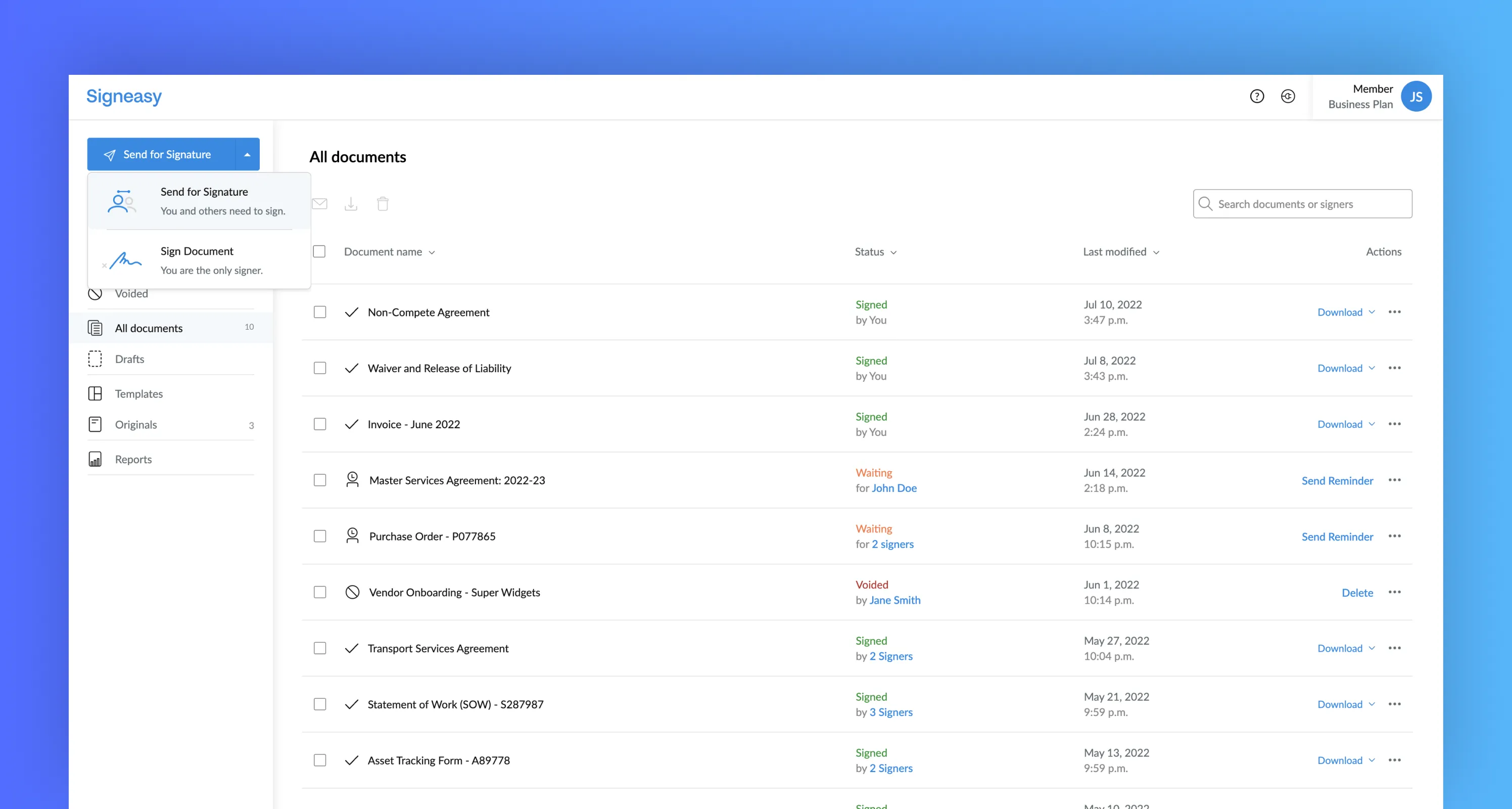
Step 2: Click ‘Start Signing’
In the top left corner of your screen, click the "Start Signing" button, then choose the "Sign Document" option from the mini drop-down menu. If you need to request an electronic signature from one or more collaborators, choose the other menu option.
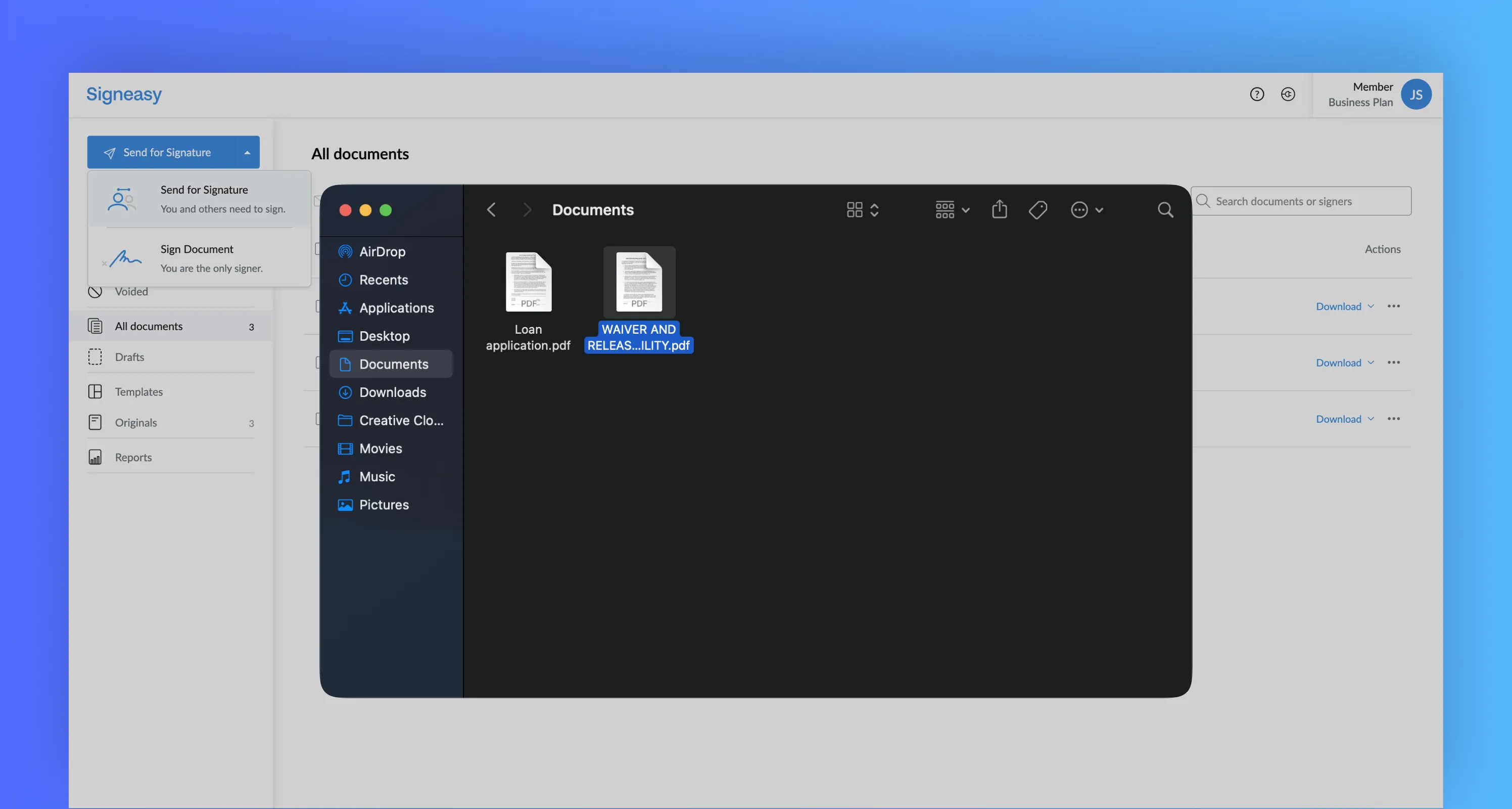
Step 3: Import document for signature
Once the screen refreshes, you will be prompted to import a document from your device. Signeasy is compatible with all major document types, including Word, PDF, and Excel. No matter what type of file you upload to our online signature creator, Signeasy will automatically transform it into a PDF.
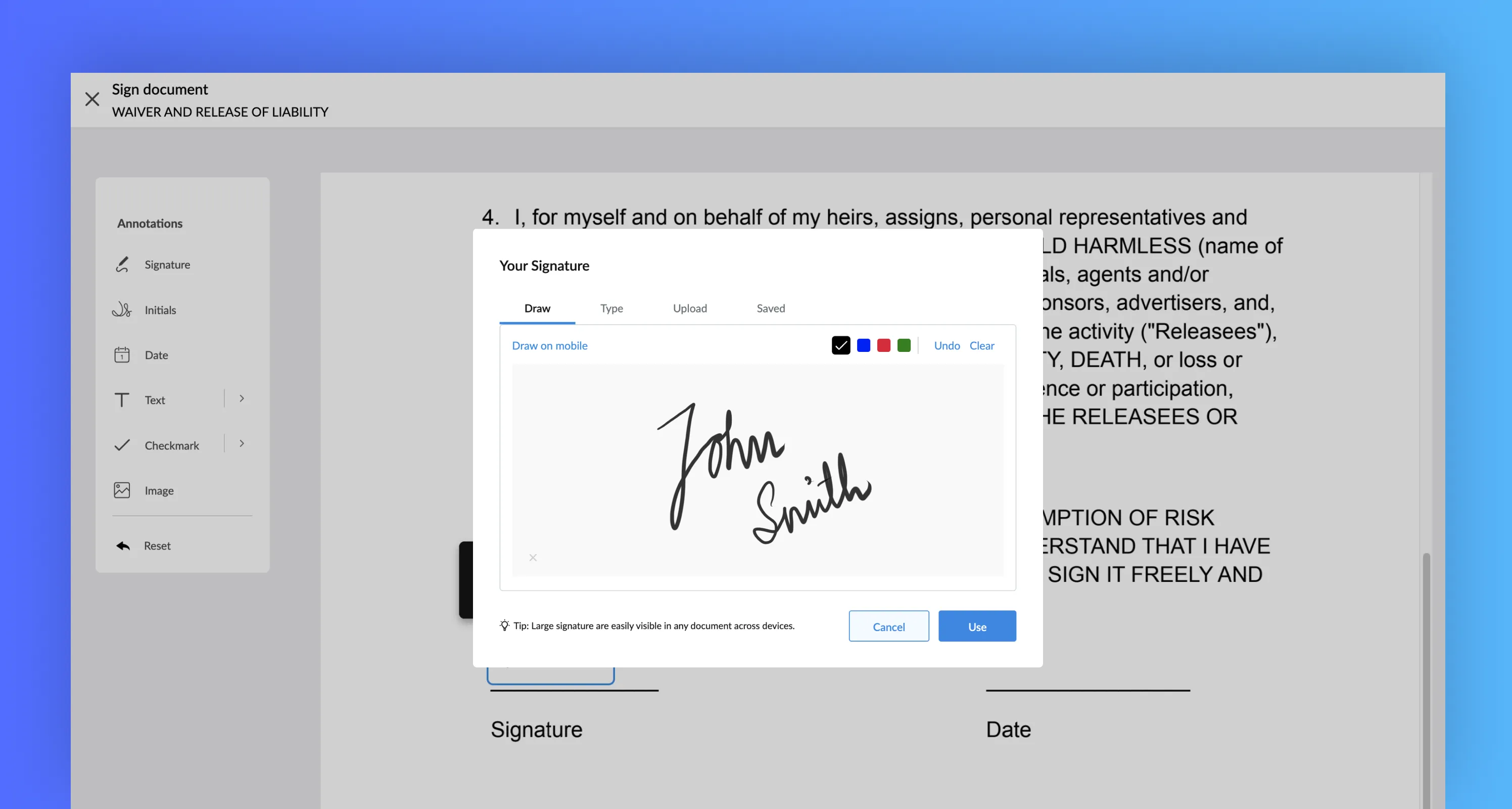
Step 4: Create signature
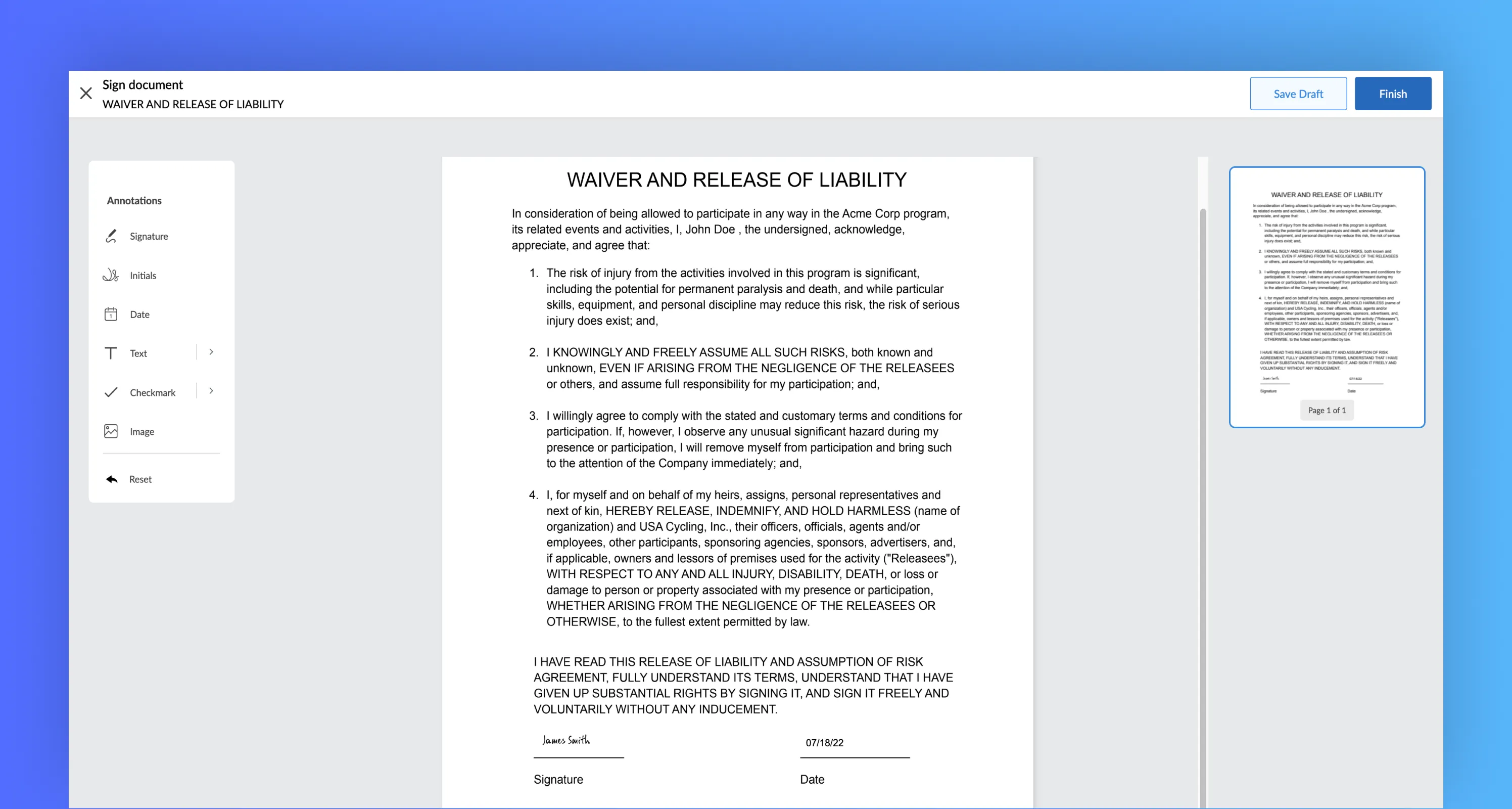
After successfully uploading your document, it will be time to create your digital signature using an online signature generator. Click the "signature" button in the left-hand toolbar, and you will be prompted to choose between a few different signature fonts. Select the one that best suits you, or draw a handwritten signature using your finger, a mouse, or a stylus or scan your handwritten signature to use digitally. Once you have created a signature, you can either drag and drop it into the document or place it with a click.
Alternatively, you can upload a handwritten signature image:
1. Sign your name on a blank white piece of paper.
2. Take a clear photo or scan it using your phone or scanner.
3. Crop and save the image as a PNG or JPG file.
4. In Signeasy's signature creator, choose "Upload Image" and select your saved signature file.
This option is ideal for replicating your exact handwritten style in a digital format.
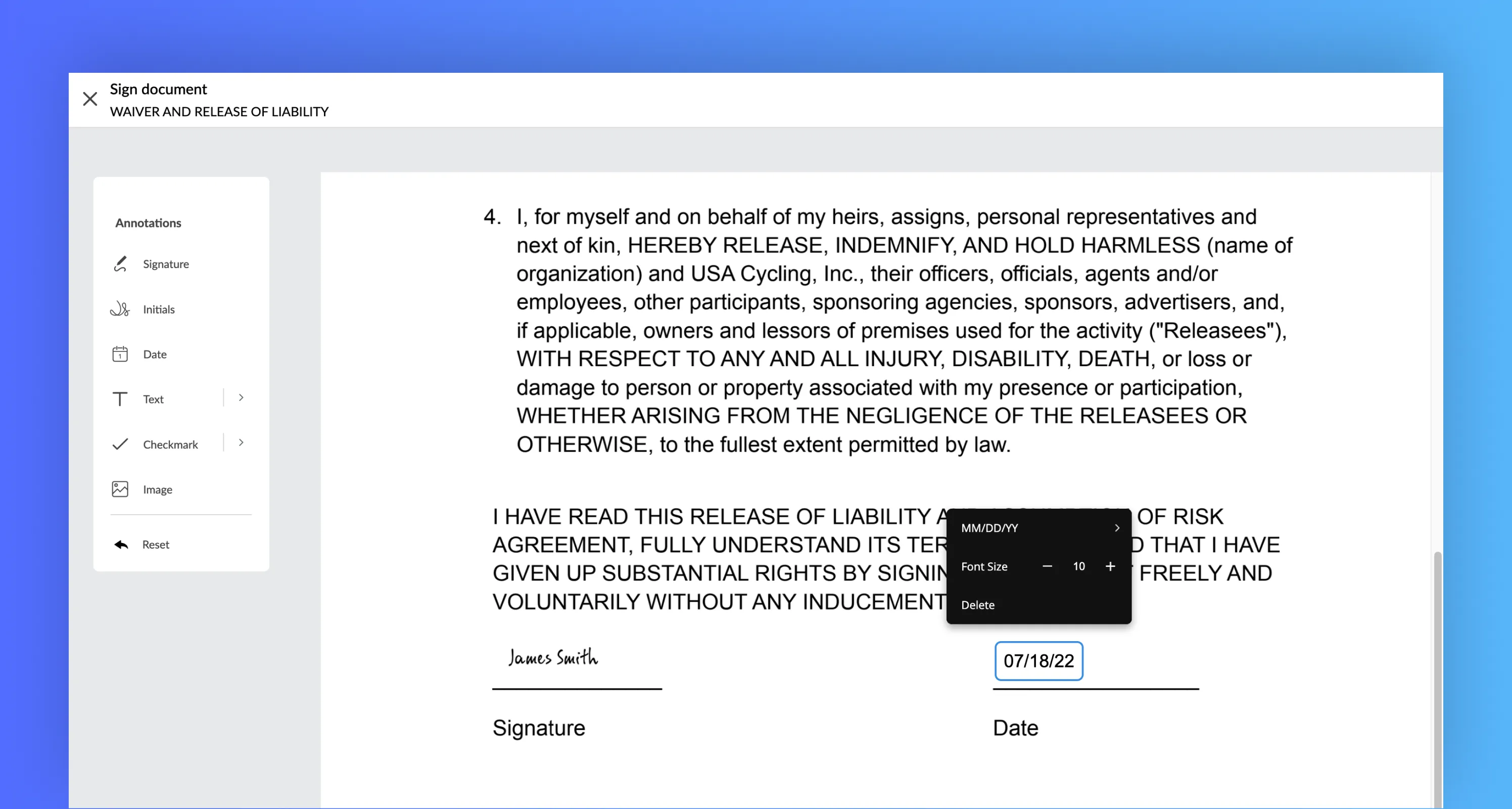
Step 5: Add other fields
Once you’re satisfied with your digital signature and have placed it into the document, you will be able to add more document fields, including the date, your name, and your initials.
Step 6: Finish up and download
When you’re ready to finalize your document, click the “Download” button in the top right corner of the screen. This will save a signed PDF file to your device. That’s it - you’ve officially created an electronic signature with our free signature generator!
How to create an electronic signature on your mobile?
Step 1: Download Signeasy app and create an account.
It’s very simple!
Step 2: Upload a new document within Signeasy.
We support popular file formats such as PDF, Word, Excel, Pages, JPG, PNG, etc.
Step 3: Tap ‘Sign’, and choose where to add signature
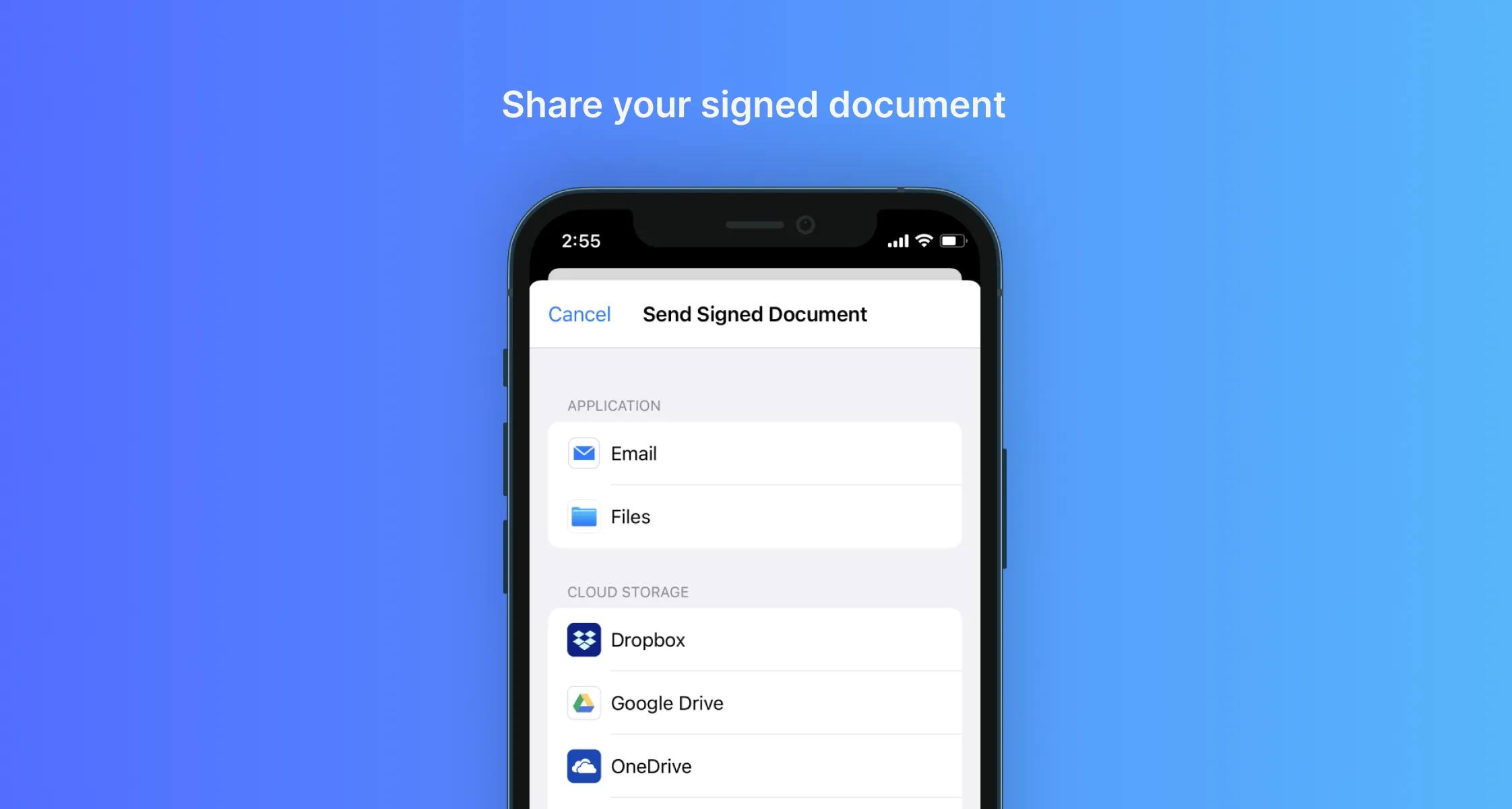
Step 4: Click ‘Finish’ and the final document will be generated.
Now, this file can be shared with others and stored in the cloud.
What is the differences between electronic signatures and handwritten signatures?
Electronic signatures and handwritten signatures have notable distinctions in their characteristics and usage. Although their primary purpose is to signify consent or agreement, several factors differentiate them. Handwritten signatures involve physically signing a document using a pen or similar tool, whereas electronic signatures are created using digital methods like a stylus, keyboard, or touchscreen. Handwritten signatures tend to be unique to individuals, varying in style and appearance, while electronic signatures are often standardized and consistent. Moreover, electronic signatures offer additional security features like encryption and digital certificates to ensure the integrity and authenticity of the signed document. Handwritten signatures often necessitate physical presence, while electronic signatures allow for remote signing from any location and at any time. Furthermore, electronic signatures can be easily replicated and stored digitally, whereas handwritten signatures rely on physical copies. Both types of signatures possess legal validity, yet the use of electronic signatures provides convenience, efficiency, and heightened security in today's digital landscape.
Importance of Electronic Signatures:
Electronic signatures have a significant role in the digital world, providing a secure and legally recognized method for signing documents and conducting transactions. Their importance can be summarized as follows:
Legally Valid: Electronic signatures hold the same legal weight as handwritten signatures in many jurisdictions. They are legally binding under the ESIGN Act and recognized as valid and enforceable in legal, business, and personal contexts.
Time and Cost Efficiency: By eliminating physical paperwork, printing, scanning, and shipping, electronic signatures streamline document workflows, resulting in considerable time and cost savings for individuals and organizations.
Convenient and Accessible: Electronic signatures allow individuals to sign documents remotely from anywhere, anytime, eliminating the need for in-person meetings or physical presence.
Improved Efficiency: Electronic signatures expedite the signing process, reducing delays associated with traditional paper-based methods. This enables faster decision-making, collaboration, and contract execution.
Enhanced Document Security: Electronic signatures employ encryption and digital certificate technology, ensuring the integrity and authenticity of signed documents during transmission and storage.
Benefits of Using Electronic Signatures:
Adopting electronic signatures brings numerous benefits to individuals, businesses, and organizations, including:
Increased Productivity: Streamlining document processes reduces manual tasks and paperwork, enabling individuals and teams to focus on value-added activities, enhancing overall productivity.
Faster Turnaround Times: Real-time signing and instant document delivery through electronic signatures accelerate transactions and approvals, reducing delays and improving business cycles.
Enhanced Customer Experience: Organizations can provide a seamless and convenient signing experience for customers, leading to improved satisfaction and loyalty, as agreements and contracts can be signed remotely without hassle.
Global Reach: Electronic signatures transcend geographical boundaries, facilitating cross-border transactions, international collaborations, and expansion opportunities by enabling engagement with customers, partners, and suppliers worldwide.
Environmental Sustainability: By eliminating paper-based processes, electronic signatures contribute to environmental sustainability efforts by reducing paper consumption, carbon footprint, and promoting eco-friendly practices aligned with corporate social responsibility.
Compliance and Audit Trail: Electronic signatures offer built-in audit trails and verification capabilities, ensuring transparency in the signing process, aiding compliance with regulatory requirements, legal obligations, and internal governance standards.
Integration and Automation: Electronic signature solutions seamlessly integrate with document management systems, workflow tools, and business applications, automating document processes, enhancing operational efficiency, and enabling smooth integration with existing systems.
Using Electronic Signatures:
Integration with Document Management Systems or Platforms: One of the key advantages of electronic signatures is their ability to seamlessly integrate with document management systems or platforms, and Signeasy is a powerful tool that offers such integration. By incorporating Signeasy into your workflow, you can experience the benefits of a streamlined and automated signing process. The integration allows you to access and sign documents online directly within your preferred document management system or platform, eliminating the need for manual printing, signing, and scanning. With Signeasy, you can save valuable time and resources while maintaining an efficient and organized workflow. Additionally, Signeasy's integration capabilities facilitate document tracking, version control, and archival, ensuring a comprehensive and structured approach to document management.
Signing Electronic Documents: Signeasy simplifies the process of signing various types of electronic documents, making it a versatile tool in your electronic signature toolkit. Let's explore how Signeasy can be used to sign different document formats:
Signing PDF Documents: PDF (Portable Document Format) is widely used for electronic documents, and Signeasy seamlessly integrates with PDF files. Using Signeasy, you can open a PDF document and easily select the area where your signature should be placed. Signeasy provides customization options to personalize the appearance of your signature, whether it's using a stylized font or incorporating an image of your handwritten signature. Once you apply your electronic signature using Signeasy, the PDF document becomes digitally signed, preserving its integrity and authenticity. You can then securely share the signed document electronically, ensuring a smooth and reliable document exchange process.
Signing Word Documents: Signeasy also supports the signing of Word documents, which are commonly used for creating and sharing electronic files. With Signeasy, you can conveniently sign Word documents using its user-friendly interface. Whether you utilize the built-in signature features of your word processing software or rely on Signeasy's specialized electronic signature tools, the process remains straightforward. Open the Word document, navigate to the designated signature area, and apply your electronic signature seamlessly. Signeasy ensures that your signature is securely embedded within the document, protecting it from any unauthorized modifications.
Signing email attachments and Email correspondence: In addition to formal documents, Signeasy empowers you to add electronic signatures to your email correspondence. By including a digital representation of your signature, along with your name, contact information, and any necessary disclaimers or legal notices, you can enhance the authenticity and credibility of your electronic communications. Signeasy allows you to conveniently add your electronic signature to outgoing emails, providing recipients with assurance regarding the origin and integrity of the email. This feature establishes a professional and trustworthy communication channel, making your email correspondence more reliable and credible.
By incorporating Signeasy into your document workflows, you can efficiently and securely leverage electronic signatures. The seamless integration with document management systems or platforms, coupled with the ability to sign different document formats, enables you to conduct business transactions, collaborate on projects, and communicate electronically with confidence and ease. Signeasy's intuitive features make it a valuable tool for simplifying the electronic signature process and enhancing your overall productivity.
How secure is it to use electronic signatures to sign documents?
Electronic signatures are safer than traditional documents. Along with the signature, they have verifiable details on who signed the document, when they signed it, and where. Changes made to contracts after signing are easily detectable, and that's far more powerful and efficient than your typical paper-based trade. Electronic signatures are tamper-proof and can be archived. eSignatures provide biometric and two-factor authentication to protect both sender and receiver from fraudulent activities.
Electronic signatures are tamper-proof and can be archived. eSignatures provide biometric and two-factor authentication to protect both sender and receiver from fraudulent activities.
Signeasy revolutionizes electronic signatures by seamlessly integrating with document management systems or platforms, simplifying the signing process and increasing efficiency. See how Signeasy compares to DocuSign for electronic signatures.It eliminates the need for physical document handling, saving time and resources while maintaining an organized workflow. With Signeasy, users can conveniently sign PDF, Word documents, and even add electronic signatures to emails, ensuring convenience and security. Its customizable options and robust security measures empower businesses and individuals to conduct transactions, collaborate effectively, and communicate confidently.
Frequently asked questions
How do I create a free electronic signature online?
You can create a free electronic signature online using Signeasy's free trial, Canva's signature generator, or Adobe Acrobat's online tool. The fastest method is to visit an online signature generator, type your name, select a font, and download your signature — no account required on some platforms. For a reusable, legally binding signature tied to your identity, create a free Signeasy account and complete email verification.
Is an electronic signature legally binding?
Yes. Electronic signatures are legally binding in the United States under the ESIGN Act (2000) and UETA, and internationally under the EU's eIDAS Regulation. They carry the same legal weight as handwritten signatures for most documents, provided the signer demonstrates clear intent to sign and consent to do business electronically. Certain document types — including wills, adoption papers, and court orders — are excluded.
What is the difference between an electronic signature and a digital signature?
An electronic signature is any digital mark indicating intent to sign — including typed names, drawn signatures, or uploaded images. A digital signature is a specific type of electronic signature that uses cryptographic technology (a unique digital certificate) to verify the signer's identity and detect any post-signing tampering. All digital signatures are electronic signatures, but not all electronic signatures are digital signatures.
Can I create an electronic signature on my phone?
Yes. On iPhone, use Signeasy's iOS app or Adobe Fill & Sign. On Android, use Signeasy's Android app or Google Drive's built-in signature feature. All major e-signature apps support drawing your signature with your finger or stylus directly on the touchscreen, typing it, or uploading a photo of your handwritten signature. The signed document can be downloaded or shared directly from the app.




.webp)


.webp)

