

“The team at Signeasy listened to the improvements we wished to see as users and have implemented these promptly. We’re impressed with the commitment of their sales, implementation, and development teams — they work hard to ensure that the application serves our needs well. We are a happy customer!”
— Emelda Thompson | Managing Director, Human Resources
When we think of eSignatures, Docusign has long been the go-to option. But being in business for a long time, there are too many features for which they charge a lot. Your businesses often don’t need all of these. This is why businesses look for Docusign alternatives that better match their needs and budgets.
This blog explores top Docusign alternatives, each offering unique perks such as enhanced customization, easier integration with existing tools, or more flexible pricing plans. If you're already using Docusign and considering a switch, understanding the Docusign migration process can help you transition smoothly to a platform that better fits your needs and budget.
Whether you’re a startup looking for a no-barrier solution, a growing company needing scalable options, or an enterprise prioritizing top-tier security, there’s an alternative that’s just right for you.
Having been in the eSignature industry for almost 14 years, we’ve spoken to many businesses looking for alternatives. Based on these conversations, we’ve highlighted these platforms’ key features, benefits, and potential drawbacks, giving you the insights needed to make the right decision.
Discover how these alternatives can streamline your document signing processes, boost productivity, and ultimately support your business growth.
Join us as we uncover the best eSignature and contract management solutions beyond Docusign.
Why should you look for Docusign alternatives?
While Docusign offers products and services such as Contract Lifecycle Management, Multi-channel Delivery, AI-based Contract Generation, etc., other tools in the market provide similar or better features - and they’re at a fraction of the cost.
Here are a few reasons why businesses might look for alternatives
1. Pricing
The cost structure can be restrictive for small and fast-growing businesses or individuals. Especially if you have a smaller team and only need to use the services occasionally. For a detailed breakdown of each plan, check out our complete docusign price guide.
Another drawback is that teams are charged per envelope after they exceed the limit, which is a hefty price tag.
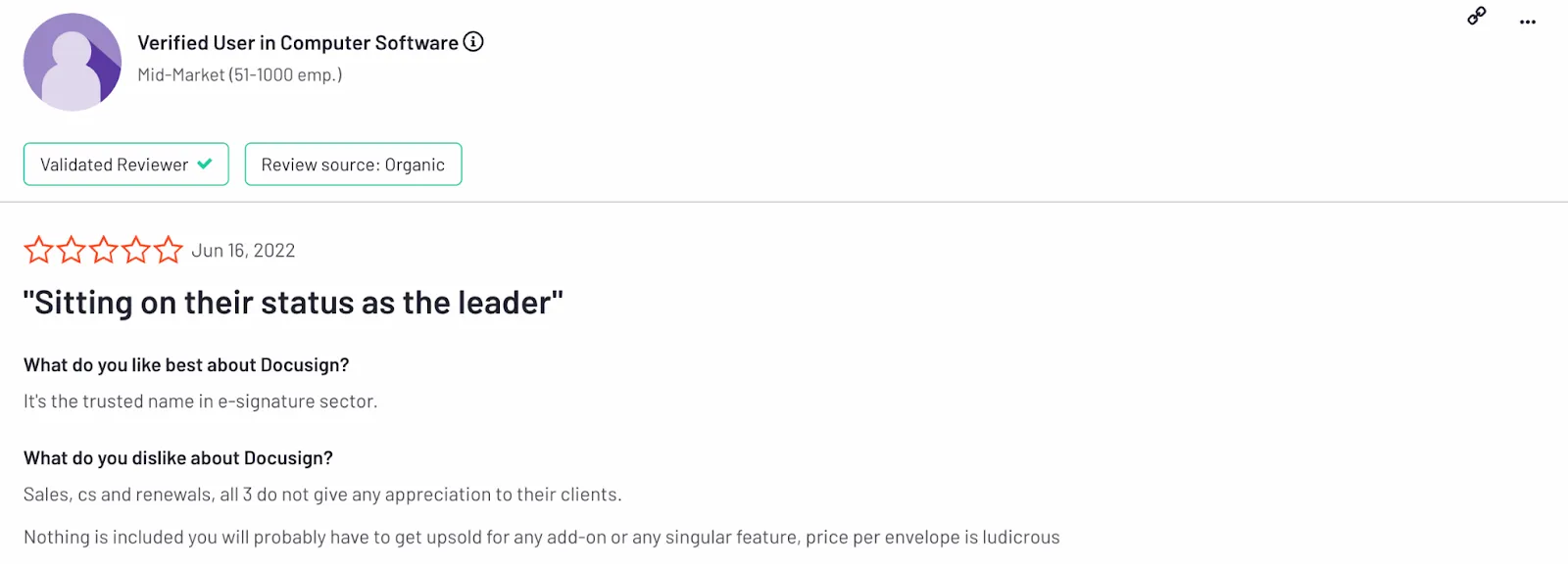
Docusign has a few hidden costs, so you must be careful when choosing your plan. Docusign pricing includes additional fees for extra envelopes or advanced features, which can quickly add up, making it more expensive than initially anticipated. It's important to fully understand the pricing structure before committing.
2. User-experience
Docusign offers many features and standalone products, but its interface and functionality can be overwhelming.
While using an eSigning and contract management platform, you would want a simpler UI that helps you prepare documents without fuss.
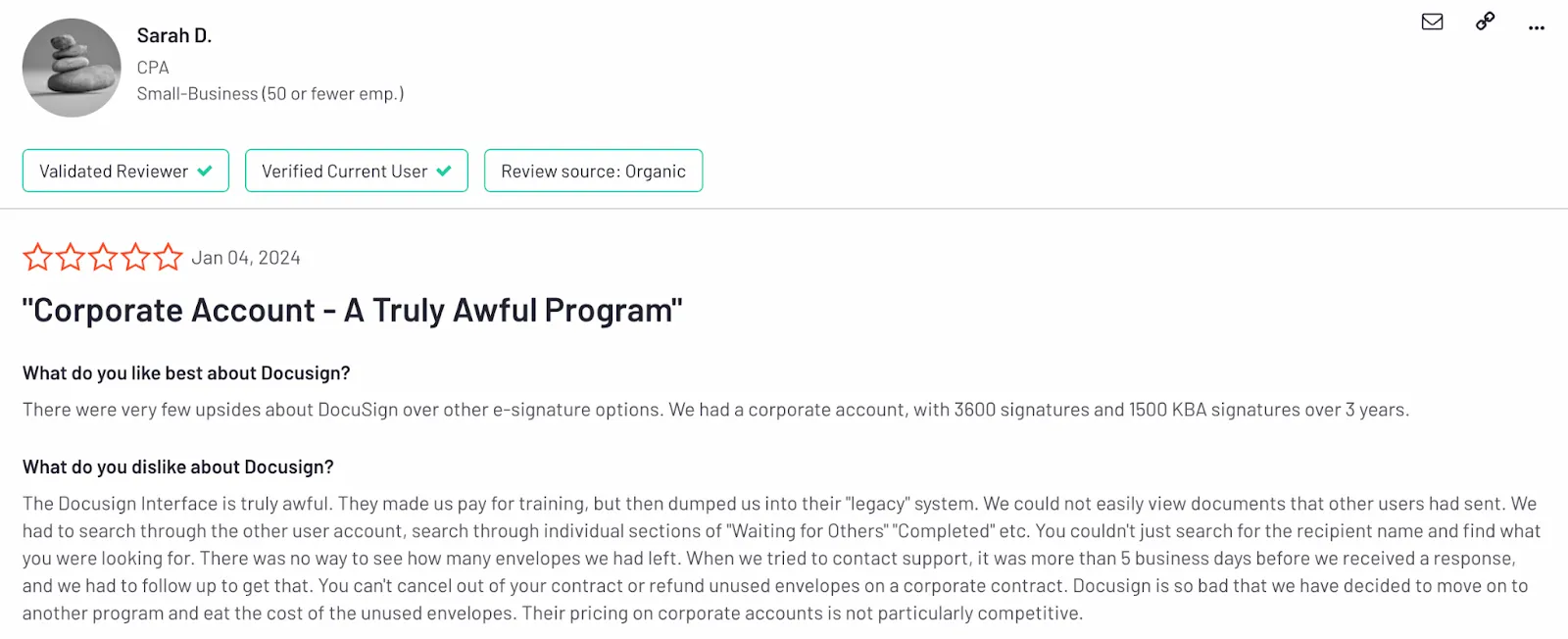
If you’re looking for a quicker setup - the number of options, customizations, etc. will only complicate your onboarding.
3. Overload of features
Due to the rigidity of the document preparation process in Docusign, it becomes difficult to make frequent corrections as you spot errors.
The extensive range of features can also lead to a steeper learning curve, making it harder for new users to get up to speed.
Most alternatives we’ll cover below are known for their uncomplicated features and interface.
4. Customer support
Nobody likes delayed responses, especially if they’re from a customer support team.
Your business is put on pause because your documents have not been signed. Docusigns’ team takes days to respond to a problem.
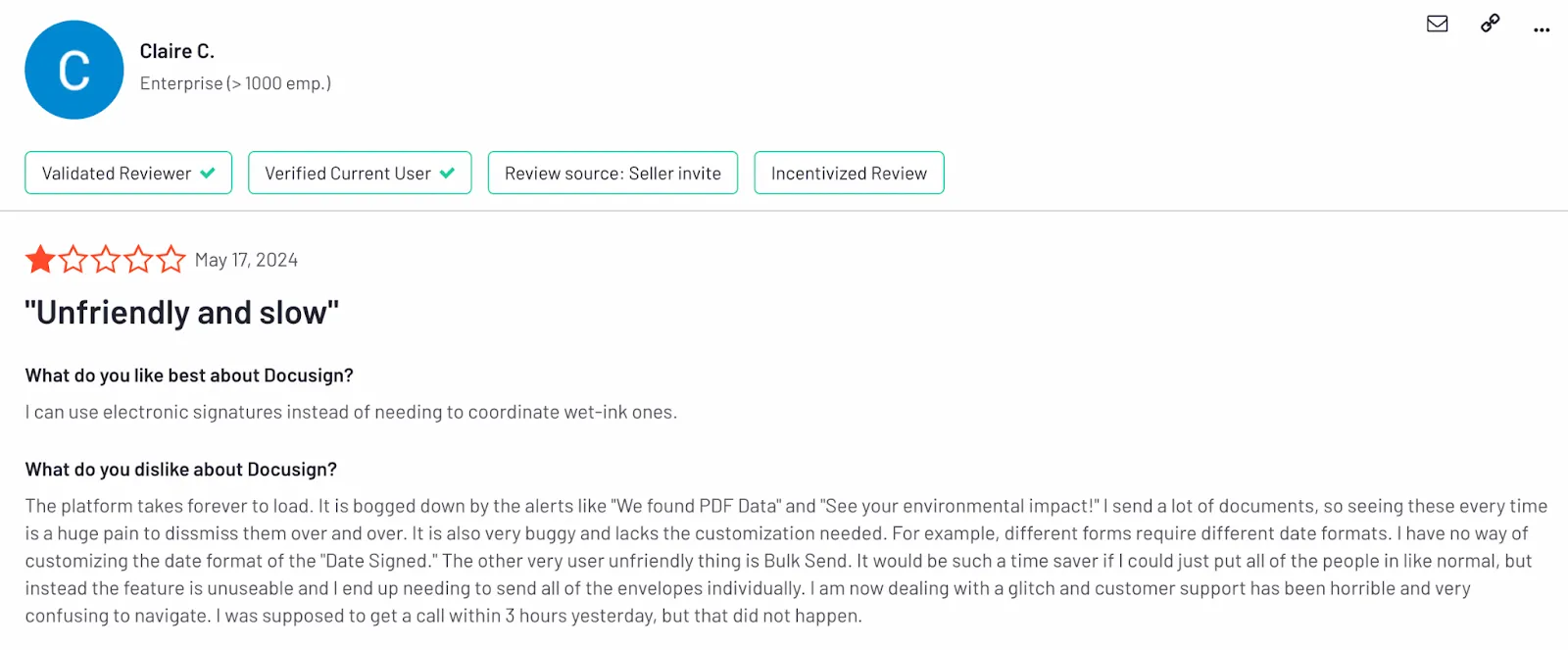
That can be concerning if you want to close the loop faster and collect all the necessary signatures before time runs out.
Other solutions offer speedier resolution times, and their teams are mostly one call away from solving all your issues.
5. Mobile-app
Docusign's mobile app is often criticized for its complexity and lack of user-friendliness, making it difficult for businesses to sign documents on the go.
You might catch frequent performance issues, causing interruptions in the signing process.
Trying to sign the documents anytime, anywhere, can be challenging due to improper app updates and a choppy interface.
Having covered why Docusign might not meet all your needs, it’s time to explore other eSignature and contract workflow platforms that could be a better fit for your business.
1. Signeasy
Cost: Free forever; Personal ($10); Business ($20). This is for individuals and small teams. Signeasy also offers Business Pro ($30) plan, ideal for larger teams. Signeasy’s eSign Pricing is based on the monthly rate per user.
Free Trial: 14 days
Platform availability: Website (all devices); mobile app (iOS/Android/iPad)
Ease of use: Clean and straightforward interface that makes it easier for admins to set up and enable integrations in no time.
Support options: Instant support and a great product knowledge base.
Document limits: Unlimited documents and templates
Total cost of ownership: The most economical platform in the market with comprehensive plans that include all necessary features such as integrations, round-the-clock support, complete document preparation, tracking, and management.
Best for: growing teams seeking unlimited usage.
Why should you pick Signeasy?
Endless documents - Unlike Docusign, Signeasy allows teams to prepare and send a high volume of documents without hitting any limits.
Exceptional support - Ensures users get support whenever they need it, offering assistance with a quicker turn-around time.
Easy interface - Helps users share documents in just a few clicks. With Signeasy, you can experience a painless user interface.
Transparent pricing - Plans are catered to fast-growing businesses in the mid-market. Pay in one sitting, without paying for indirect costs.
If you’re looking for the best Docusign competitor, Signeasy is a strong contender. It’s easier to learn, simple to use, and streamlines the entire process of preparing and managing documents. Plus, Signeasy's pricing makes it easier for fast-growing teams to scale, without the weight of high costs.
We guarantee a hassle-free experience in managing eSignature workflows and contract management. With a gentle learning curve, you can start sharing paperwork without extensive training or onboarding.
The platform supports 25+ file types (such as PDF, HTML, PNG), allows you to send multiple-document envelopes, and supports 24 languages. Talk about versatility.
Most users find Docusign not just expensive, but also overloaded with features they rarely use. Signeasy's Business Pro plan is an affordable Docusign alternative. Check out our eSignature software pricing to see how it offers a more balanced, budget-friendly option at $30/month/user compared to Docusign's $40 or even $45 plans.
With unlimited documents and users, Signeasy is a smarter and scalable solution for growing teams looking for affordable Docusign alternatives that don’t compromise on functionality.
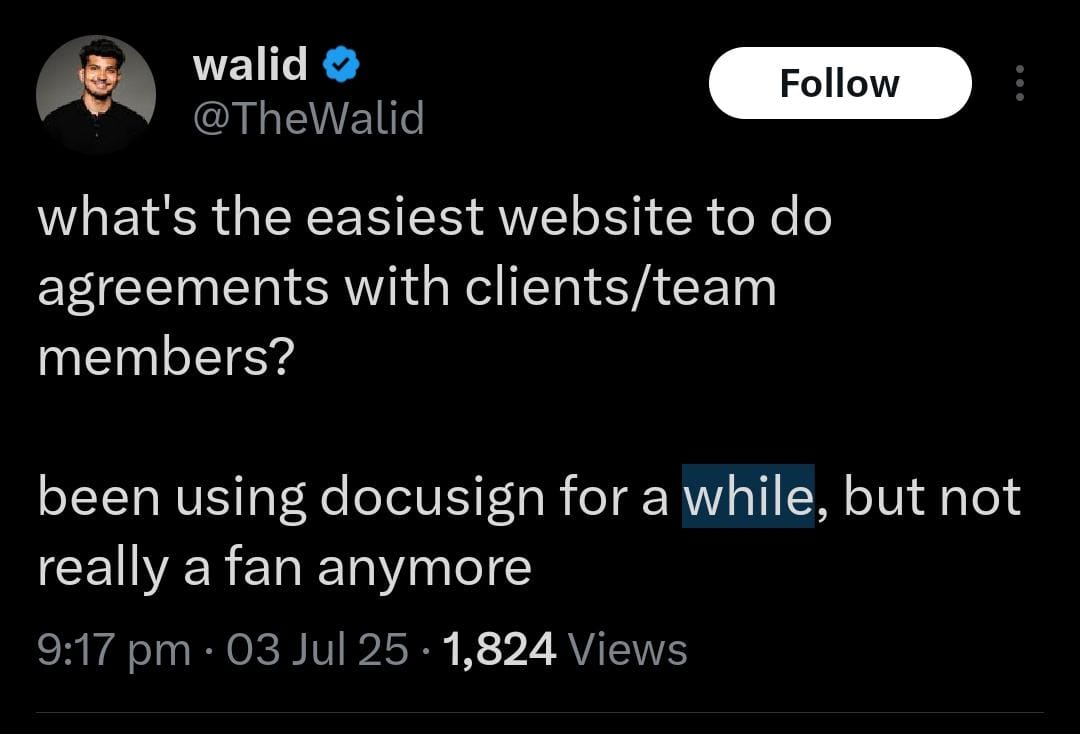
Signeasy offers better value with its flat, transparent pricing. The plan includes essential team management features like usage reports, transferrable ownership, shared templates, and admin controls, all built into the plan without extra fees.
Take the example of TransCold Distribution here. They switched from Docusign to Signeasy after realizing Docusign’s pricing and limited support didn’t suit their fast-growing HR needs. With Signeasy, they gained intuitive contract workflows, transparent pricing, and reliable support, without upgrading to an enterprise plan.
Teams looking to add AI-powered analysis to their signing workflows should also explore the best ai contract review tools available today.This shift helped TransCold eliminate paper processes, boost HR efficiency, and save hours daily across onboarding and employee document workflows.

When it comes to flexible signatures, Signeasy allows you to build reusable templates, collect supporting files while contract sharing, and facilitate signing using the guided or self-signing options.
You can track the status of your documents with a real-time dashboard and foster a collaborative workspace through integrations with your daily favorites such as Google, Microsoft, Salesforce, Hubspot, and Outlook. Or you could use our Webhooks or APIs to integrate the signing interface directly onto your website.
If you’re thinking about the legal aspects, we have that covered too. Signeasy is in check with all the required compliances (eIDAS, ESIGN, HIPAA, SOC 2) and ensures enterprise-grade security for your documents, including digital signatures. You’re always in safe hands.
Docusign charges separately for dedicated support, which means if you want faster help or onboarding assistance, you’ll need to upgrade or pay more. With Signeasy, you get responsive support and essential admin tools within your preferred plan.


eSignature
(IAM/CLM)


eSignature
(IAM/CLM)
eSignature
(IAM/CLM)
Signeasy vs Docusign - API Comparison
(Transparent)
(Requests completed)
(Requests initiated)
Signeasy vs Docusign - Security Comparison
Signeasy vs Docusign - Support Comparison
2. DropBox Sign
Cost: Essentials ($19/month); Standard ($25/month/user); Premium (Custom Quote)
Free Trial: 30 days
Platform Availability: Website (all devices); mobile app (iOS/Android)
Ease of use: It’s simple and allows users to obtain signatures without any hurdles.
Support options: All plans come with chat and email support. The Standard and Premium plans provide additional support options for an extra cost beyond the included chat and email support. They also have a knowledge base.
Document Limits: Unlimited signing, but limited templates for the first two plans.
Total cost of ownership: It’s a cost-effective alternative compared to Docusign, but many essential features require users to pay more out of their pocket.
Best for: Teams already using Dropbox.
Intuitive UI - Effortless interface that eliminates chaos and helps clients sign documents quickly.
Smooth integrations - Integrates with other productivity tools and offers real-time collaboration.
Mobile forms - Helps you gather data on the go with mobile-responsive forms, no coding required.
Dropbox Sign is a great alternative to Docusign, built to simplify your everyday signing needs. It’s intuitive, fast, and user-friendly for both senders and signers.
It integrates seamlessly with its parent company Dropbox, and with other powerful tools such as Slack, Google, Microsoft, and HubSpot.
This is a powerful feature compared to Docusign’s integrations, as it allows documents to be directly saved onto Dropbox and eliminates the need to download a copy each time.
While you can easily input variables into a document, Dropbox Sign does not allow you to edit the client details once the file is sent for a signature.
In contrast, Signeasy or Docusign allows for document edits as soon as errors are detected, even after sharing the paperwork.
However, since the overall features are relatively basic, if you have larger documents with multiple signature requests or need to manage hundreds of documents, you might need to look elsewhere for a more robust eSignature and contract management platform.

- Unlimited templates
- Transparent pricing
- Dedicated success manager
- Unlimited templates
- Transparent pricing
- Dedicated success manager
Features that stood out
DropBox Sign vs Docusign - API Comparison
(Requests initiated)
(Upon request)
DropBox Sign vs Docusign - Security Comparison
DropBox Sign vs Docusign - Support Comparison
3. Adobe Sign
Cost: Acrobat Standard ($12.99/mo); Acrobat Pro for Individuals ($19.99/mo); Acrobat Standard for teams ($14.99/mo); Acrobat Pro for teams ($23.99/mo). All plans require an annual commitment. See our full Adobe Sign pricing breakdown for more details.
Free Trial: 7 days
Platform Availability: Website (all devices); iOS/Android
Ease of use: It’s fairly easy to use, as it’s compatible with different devices and doesn’t require a sign-in every time.
Support options: Users must upgrade to higher plans for 24/7 customer support. Otherwise, they provide email/ticketing support and a knowledge base.
Document Limits: Acrobat Standard and Acrobat Pro individual and team plans include unlimited transactions per user per year. Acrobat Sign for SMBs and Enterprise has a limit of 150 transactions per year.
Total cost of ownership: Although it’s simple to set up documents for signing, the cost structure of the platform makes it difficult for teams on a budget.
Best for: PDF-heavy workflows.
Cloud signatures - Seamlessly integrates with Adobe Acrobat Pro and other daily platforms for quick document sending.
Editable PDFs - Provides dedicated features for teams to share PDFs for e-signing, including text editing, commenting, and page reorganization.
Bulk sending - Users can send personalized documents to multiple signers simultaneously.
Adobe Sign uses a cloud-based system for signing and sharing documents. It allows users to request signatures directly through Adobe Acrobat and integrates perfectly with other document management tools such as Microsoft and Salesforce. Curious how it stacks up against Signeasy? Check out our Adobe Sign vs Signeasy comparison. For many businesses, Adobe Sign may serve as the best Docusign competitor if they’re already deep into Adobe’s ecosystem and need strong PDF capabilities.
Users don’t have to save the document to their system, which saves considerable time. Signers can store their signatures on the platform for future use, and recipients don’t have to be logged in to the system to add their signatures.
One of the most talked-about features in Adobe Sign is the ability to edit PDFs directly without needing to convert them into another format. Teams can edit, protect, add comments, compare document versions, or even redact sensitive information.
The PDF editing features provide users with maximum flexibility while sharing such documents.
However, Adobe places many features behind a payment barrier, requiring upgrades for full PDF features, APIs, industry-specific regulations, 24/7 customer support, and security certificates. If API capabilities matter to your team, our in-depth adobe sign api review breaks down what developers can expect from Adobe's eSignature integration.
Adobe Sign’s security and compliance measures are not uniform across all plans. If you want legally compliant documents, you must choose their Acrobat Sign plan. This will matter if legality isn’t a big issue in your business.
Some plans limit transactions to 150 per year, potentially restricting team performance. To get unlimited documents and transactions, Signeasy is your best choice.
Adobe also offers plans for individuals without an annual commitment. These are basic features to prepare and share documents - which could be enough if you’re just dipping your toes into the business world. These plans are at a lower cost, compared to Docusign.
However, as your team grows and you start handling a higher volume of contracts, the total cost of ownership with Adobe can climb quickly. To manage and maintain the platform at scale, you'll likely need premium support, and that comes at an extra cost, since it’s not included in the base plan.
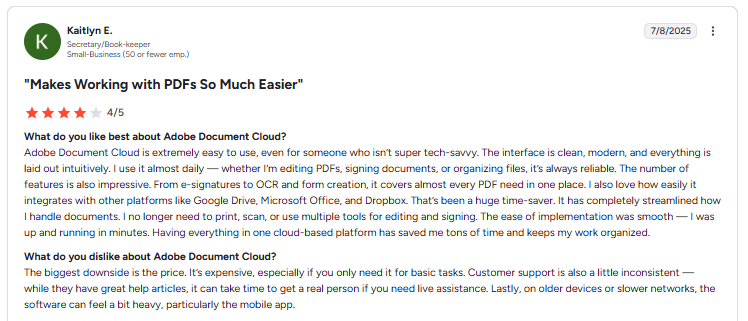
Many users on G2 have also pointed out inconsistent support experiences, with delays in reaching a real person when live help is needed. So, while Adobe might be more affordable upfront, it’s worth weighing the long-term cost and support quality if you're thinking of scaling.


- User-friendly interface
- Transparent pricing
- Dedicated success manager
- User-friendly interface
- Transparent pricing
- Dedicated success manager
Features that stood out
Adobe Sign vs Docusign - API Comparison
(Hidden with Add-ons)
(upon request)
(Requests initiated)
(upon request)
(Upon request)
Adobe Sign vs Docusign - Security Comparison
Adobe Sign vs Docusign - Support Comparison
4. airSlate SignNow
Cost: Business ($20); Business Premium ($30); Enterprise ($50); Site License ($1.50/signature invite). Pricing is based on the monthly rate per user.
Free Trial: 7 days
Platform availability: Website (all devices); iOS, Android
Ease of use: It’s simple to set up signature workflows by dragging and dropping multiple fields into the documents.
Support options: Live chat and their knowledge base are available for all plans. However, phone support is only available for teams taking the Site License plan.
Document Limits: Unlimited templates
Total cost of ownership: There are no hidden fees at renewal, but you must upgrade to access more features.
Best for: Budget option for SMBs.
Document conversion - Converts any Docx or PDF file into a document using the no-code drag-and-drop editor, fillable fields, and tags.
Mobile compatibility - Helps teams share and collect signatures by enabling the kiosk mode on their devices.
Shared access - Lets you create specific groups for sharing, collaborating, and adding new members.
airSlate SignNow is one of the most affordable Docusign alternatives, ideal for SMBs and individuals on a tight budget. Their annual plans start from $8 a month, whereas Docusign’s plans start from $10 per month.
There is a considerable difference between SignNow's and Docusign's various tier plans. The former is cheaper and more affordable by a good margin. For a full breakdown, see our SignNow vs Docusign comparison.
Although the support options are restrictive, their resolution times have been splendid, with teams getting their tickets closed in hours.
With SignNow, users can easily drag and drop fields onto documents, expediting the paperwork generation process. However, unlike Signeasy or Docusign, teams cannot edit their documents once they send them for a signature.
This leads to double work as users are forced to edit the documents in Google Docs or Word, download them, and re-upload them on SignNow. This whole cycle creates more friction.
The platform offers unlimited templates, smart fillable fields, and bulk-sending options for various teams. Users can easily use it on the go and convert their mobile devices into kiosks to improve the signing experience.
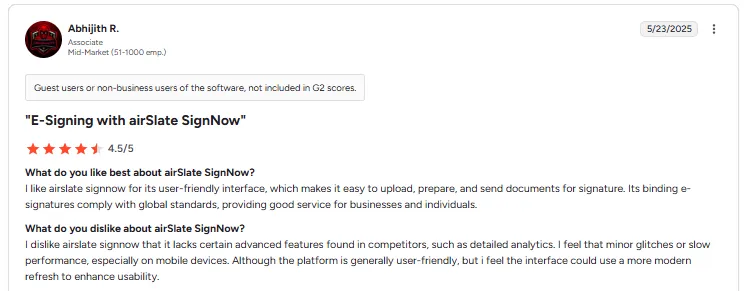
The mobile application isn’t as intuitive as the website, as you can experience some lag while navigating through documents. SignNow also lacks some advanced features found in Docusign competitors, like detailed reports and analytics. While the overall interface is user-friendly, it could benefit from a more modern refresh to improve usability and responsiveness, particularly on mobile.For teams specifically weighing signnow alternatives, Signeasy stands out with better customer support ratings, AI-powered contract management, and a more complete feature set even on its entry-level plans.

- Unlimited templates
- Ease of use
- Unified Google integration
- Unlimited templates
- Ease of use
- Unified Google integration
Features that stood out
airSlate SignNow vs Docusign - API Comparison
(Requests initiated)
(Upon request)
(Upon request)
airSlate SignNow vs Docusign- Security Comparison
airSlate SignNow vs Docusign - Support Comparison
5. PandaDoc
Cost: Essentials ($35); Business ($65); Enterprise (Customized). Pricing is based on the monthly rate per user.
Free Trial: 14 days
Platform availability: Website (all devices); mobile app (iOS/Android)
Ease of use: Easy to learn the interface and manage documents.
Support options: 24/7 web, chat, knowledge base, and email support. For a dedicated CRM, you have to speak to their sales team.
Document Limits: Unlimited documents and eSignatures
Total cost of ownership: PandaDoc has a wide range of features, but many of them are locked behind a paywall—understanding pandadoc pricing is key before committing.
Best for: Sales teams needing proposal tools.
Document repository - Helps you import files in bundles, locate documents faster, and get the information at a glance without opening files.
Interactive documents - Enriches your documents with embedded videos, gifs, and interactive tables.
Reduced errors - Minimizes document slip-ups through templates, real-time collaboration, and automated workflows.
PandaDoc is often considered the best Docusign competitor for proposal creation, quote management, and custom forms. For a detailed pandadoc vs docusign breakdown, see our comparison guide
It’s best suited for large sales and legal teams that deal with complex contract workflows and need more than just eSignatures.
With PandaDoc’s native document generation software, users can build contracts using powerful themes, branded templates, and drag-and-drop elements straight from Canva to beautify paperwork.
Unlike Docusign, which only offers basic document preparation features, PandaDoc can be ideal for businesses starting from scratch. The content library’s customizable pre-made templates address all possible hiccups.
You can import any file into the software to store your documents, even if they weren’t built using PandaDoc. To help you locate them quickly, you can use their logical search engine for a fine-grained search.
Not just for teams, the interface also makes it easier for their clients to leave signatures.
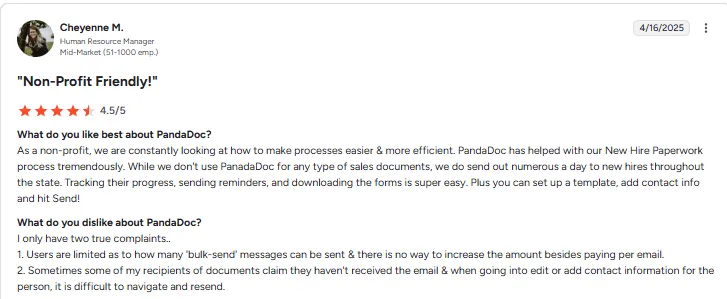
The software integrates with many favorites such as HubSpot, Salesforce, Pipedrive, and Microsoft, but access to these integrations, Webhooks, or APIs requires a costlier plan.
PandaDoc does not cap the number of documents sent for signing or to collect legally binding signatures, similar to Signeasy. Both differ from Docusign, which offers limited documents and envelopes. If PandaDoc doesn't fit your needs either, explore our list of PandaDoc alternatives.
Additionally, PandaDoc charges users considerably for features such as custom branding, content library, bulk sending options, and more.
They do not allow document edits, forcing teams to recreate and resend documents for signatures. This disruption can be avoided with Signeasy, which permits multiple edits after sending paperwork.
If teams are looking for more than just an eSigning tool, the higher pricing structure might be justified for those wanting to personalize and create contracts from start to finish.

- User-friendly interface
- Transparent pricing
- Dedicated success manager
- User-friendly interface
- Transparent pricing
- Dedicated success manager
Features that stood out
PandaDoc vs Docusign - API Comparison
(Hidden with Add-ons)
(upon request)
(Requests initiated)
(upon request)
(Upon request)
PandaDoc vs Docusign - Security Comparison
PandaDoc vs Docusign - Support Comparison
6. ShareFile
Cost: Premium($27.50); Virtual Data Room($75). Pricing is based on minimum monthly seat requirements. You can also check out our detailed Rightsignature pricing page.
Free Trial: 30 days
Platform Availability: Website (all devices)
Ease of use: It has minimal but simple eSigning features.
Support options: Dedicated onboarding specialists, email, phone support, and knowledge base.
Document Limits: Unlimited templates, and can send 1,00,000 documents for eSignatures, per license, per month.
Total cost of ownership: Secure storage and eSigning features to prepare quick documents. Multi-seat pricing can be too high for teams that only need one.
Best for: Secure file sharing at scale.
Data encryption - All documents are encrypted during storage and transmission, keeping sensitive data secure.
Version control - Keeps track of all changes made to a document, you can revert to previous versions if needed.
Minimum seats - Offers a minimum of 3 seats, making it convenient for larger teams to pay less.
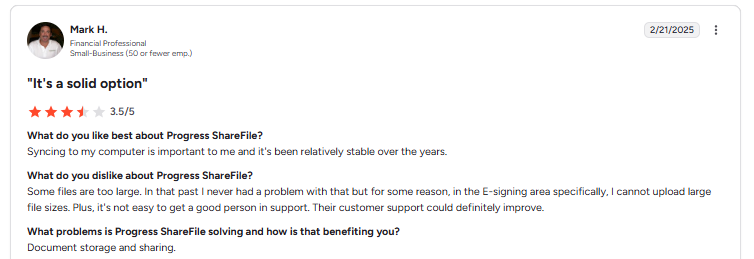
ShareFile positions itself as a secure web-based tool for sharing files with clients. It allows you to easily store, share, and sync your files from any device.
ShareFile’s Premium Plan and the Virtual Data Room Plan include eSigning options in addition to other main features such as file encryption, custom branding, 3TB storage, activity logs, and more.
The former plan requires a minimum of 3 seats, whereas the latter includes 5. This is a great feature for teams willing to use all seats.
Since the eSigning feature is a part of the platform, users can easily send and sign documents without third-party applications.
Teams can merge multiple documents and send them in one file, bulk-send documents, and create reusable templates to minimize errors.
The interface is uncomplicated, as users can quickly drag and drop signature fields and send the paperwork directly through email.
ShareFile also offers developer API, email plug-ins for Outlook and Google Workspace, and file export integrations that allow users to automate the flow of information between ShareFile and the integration.
The features are basic and not as extensive as those of Signeasy or Pandadoc, which include capabilities like document edits after sharing contracts or collecting supporting files.
Docusign is known to have a robust list of features. But ShareFile’s minimum seat pricing makes it favorable for teams who need a simple eSigning software that does the job and is affordable in large numbers.

- Minimum users3
- Unlimited templates
- Unlimited storage
- Minimum users1
- Unlimited templates
- Unlimited storage

Features that stood out
ShareFile vs Docusign - API Comparison
ShareFile vs Docusign - Security Comparison
ShareFile vs Docusign - Support Comparison
7. OneSpan Sign
Cost: Developer Sandbox (Free); Enterprise Plan (Based on the number of users and transaction volume); Professional Plan ($22/month - billed annually)
Free Trial: No trial, but a quick demo option that lets you send a sample document to e-sign.
Platform Availability: Website (all devices); mobile app (iOS/Android)
Ease of use: Clear instructions and quick-to-learn interface.
Support options: Email, phone, live chat, support center, and community portal
Document limits: Unlimited templates
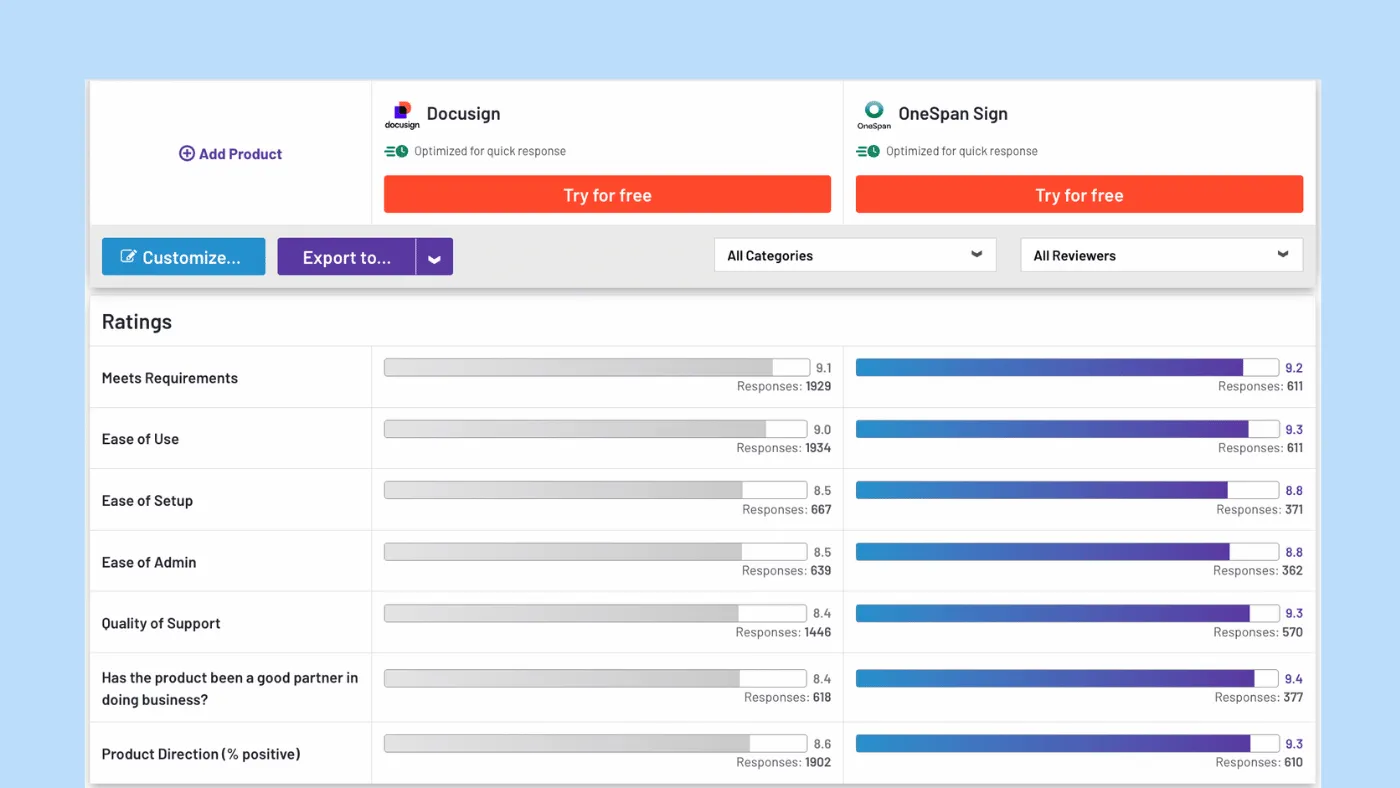
Total cost of ownership: Feature-rich and advanced security measures that might not be cut out for smaller teams.
Best for: Regulated industries (banking, insurance).
Features that stood out -
Identity assurance - Verifies identity in real-time from a suite of authentication methods such as government IDs, OTPs
Virtual rooms - Helps teams guide clients through multi-step transactions through in-person meetings
Scanning attachments - Documents are scanned for malware and blocked if any malicious activity is detected.
OneSpan Sign is perfect for developers who want to create a sandbox account to test their APIs and SDKs. Sandbox accounts have no expiry, come with all features enabled, and allow teams to go live with the solution whenever they are ready.
Users can create virtual rooms to collect eSignatures face-to-face while verifying all the signers’ identities. Clients can easily navigate complex documents, leading to a higher completion rate for teams.
The platform’s customizable workflows enable users to send documents sequentially, add custom fields, set up data validation, and assign specific roles to signers. With conditional logic, workflows can adapt based on the entries provided.
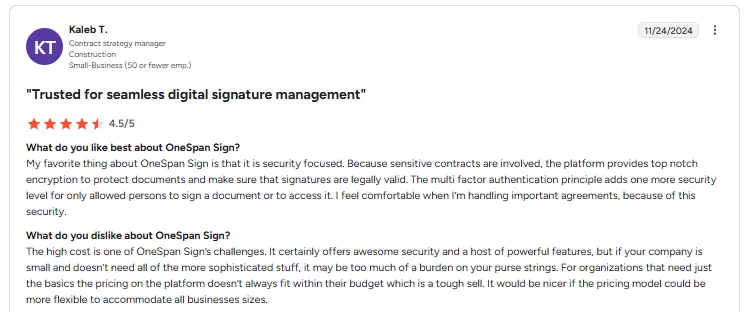
OneSpan Sign does not allow document edits after sending the files for signatures. This feature is available on Signeasy, Adobe Sign, and HelloSign.
While OneSpan Sign offers integrations, they are not as vast as other tools. Users need to subscribe to an enterprise plan to integrate tools directly.
The platform allows teams to transfer their documents to a secure vault. However, the search mechanism could be more intuitive, as it takes time to locate the right document.
OneSpan Sign makes sense for larger teams ready to optimize their APIs and use eSigning for more complex workflows.
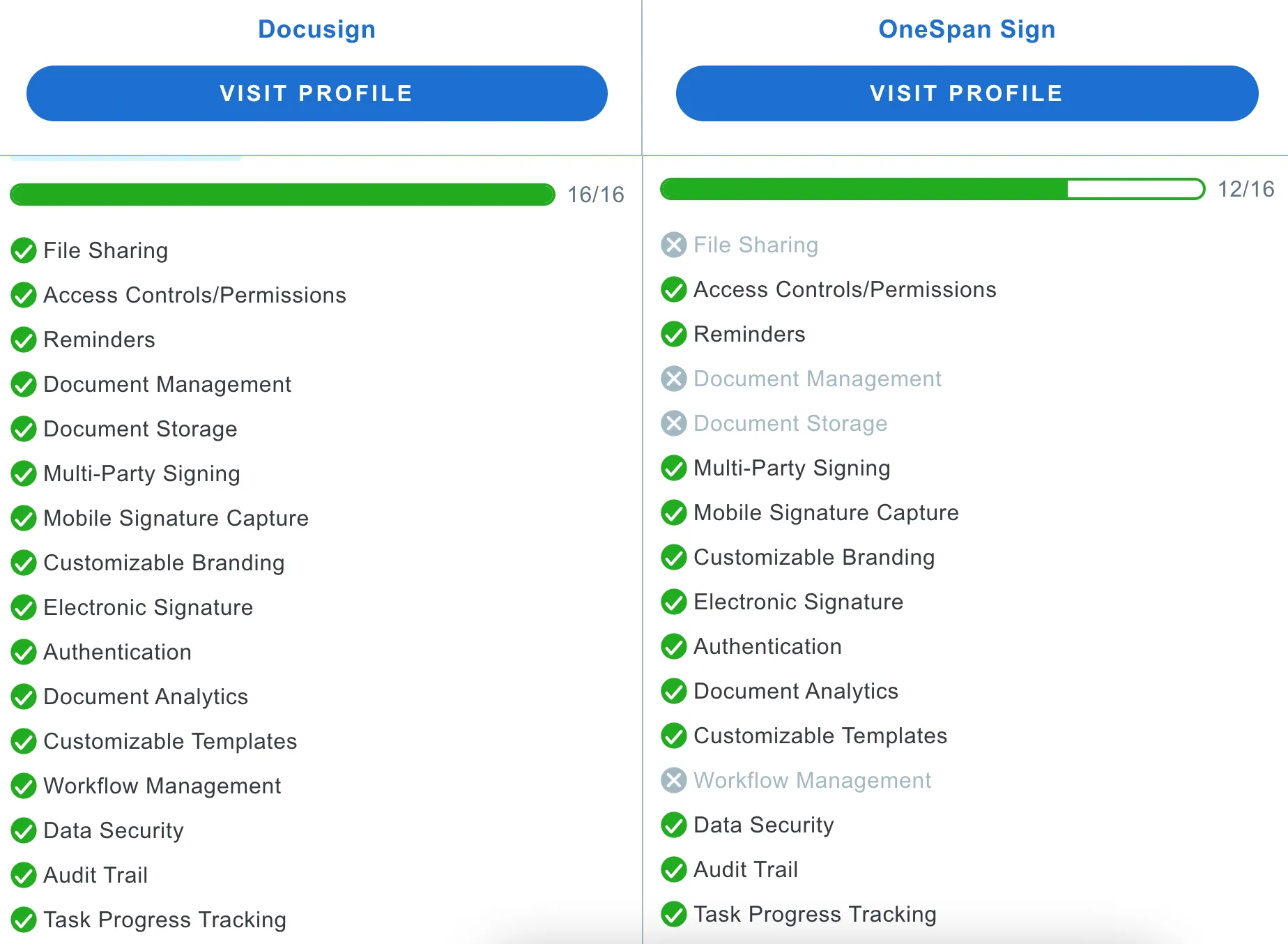
OneSpan Sign vs Docusign - Support Comparison

8. SignRequest by Box
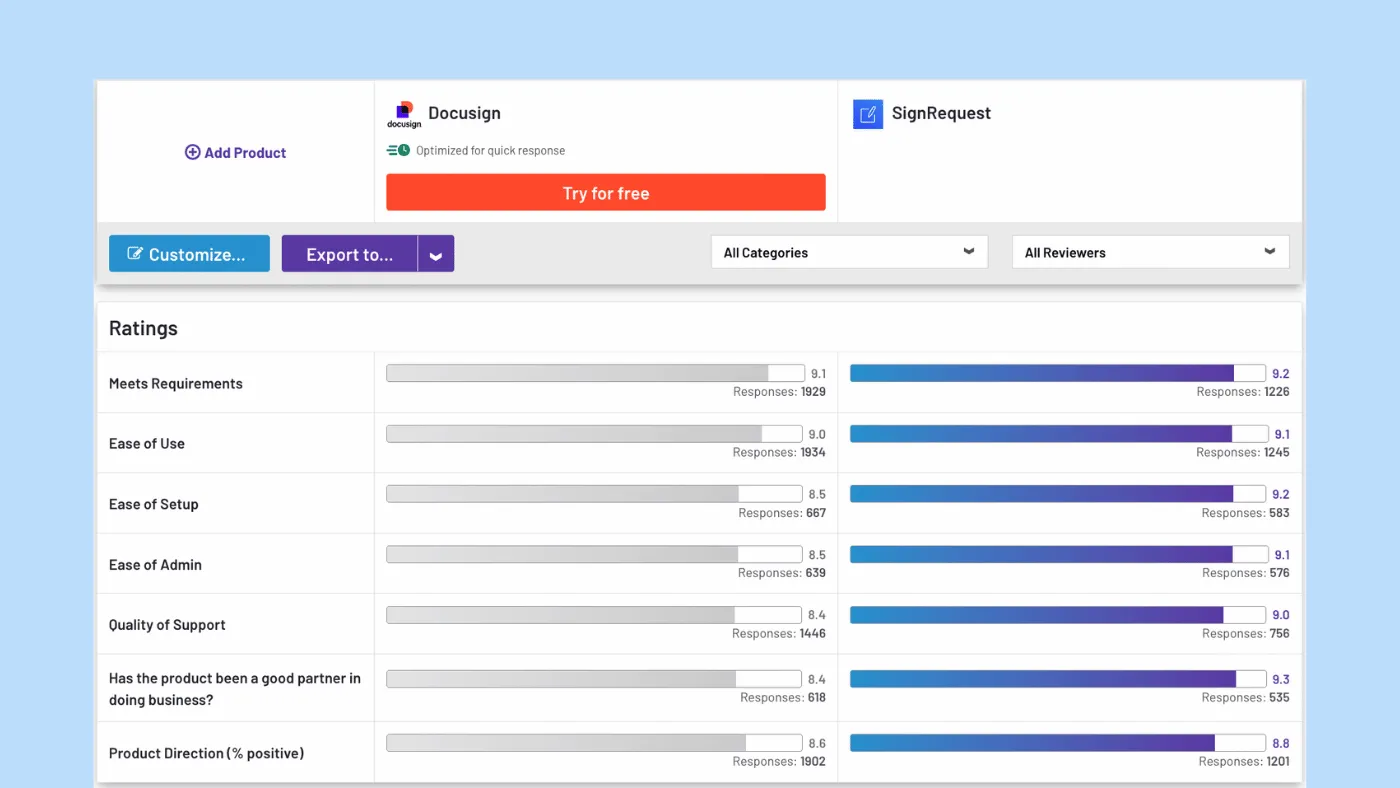
Cost: Free; Professional (€9); Business (€15)
Free Trial: 14-day
Platform Availability: Website (all devices)
Ease of use: Uncluttered interface, makes it easy to sign
Support options: Email support and knowledge base
Document Limits: Unlimited signatures and documents
Total cost of ownership: Budget-friendly solution for small and medium-sized teams. Offers essential features.
Best for: Freelancers and solopreneurs.
Features that stood out -
Flexible features - Helps users share, use custom branding, and sign in 17 different languages
Custom pages - Brings your signers to a customized landing page after they finish signing.
Trackable progress - Provides real-time tracking of the progress of each document.
SignRequest’s pricing is a great differentiator from other platforms. It offers all basic eSigning capabilities at a lower cost.
If we look at Docusign, the plans start from £61 /month, that too without envelope limitations. But SignRequest by Box provides seamless esigning workflows starting from £9 /month.
It also provides a free plan for users who send a limited number of documents each month and are fine with having the SignRequest branding on their paperwork.
Like most platforms, users can upload files, add signing fields, and send the documents for a signature.
Aside from that, teams can bulk-send documents, use templates, customized branding, and integrations. The simplicity of the platform reduces the learning curve massively.
Users can quickly send their first document without moving between multiple screens.
However, teams can only access their documents via Wi-Fi or cellular data. If they encounter an unstable network, they won’t be able to complete the eSignature process. In contrast, platforms like Adobe Sign, Docusign, and Signeasy offer an offline signing option.
Additionally, you cannot edit your paperwork once it has been sent. But again, SignRequest by Box is known for providing basic features at a budget-friendly price. And so this would be more suitable for smaller teams with limited resources.
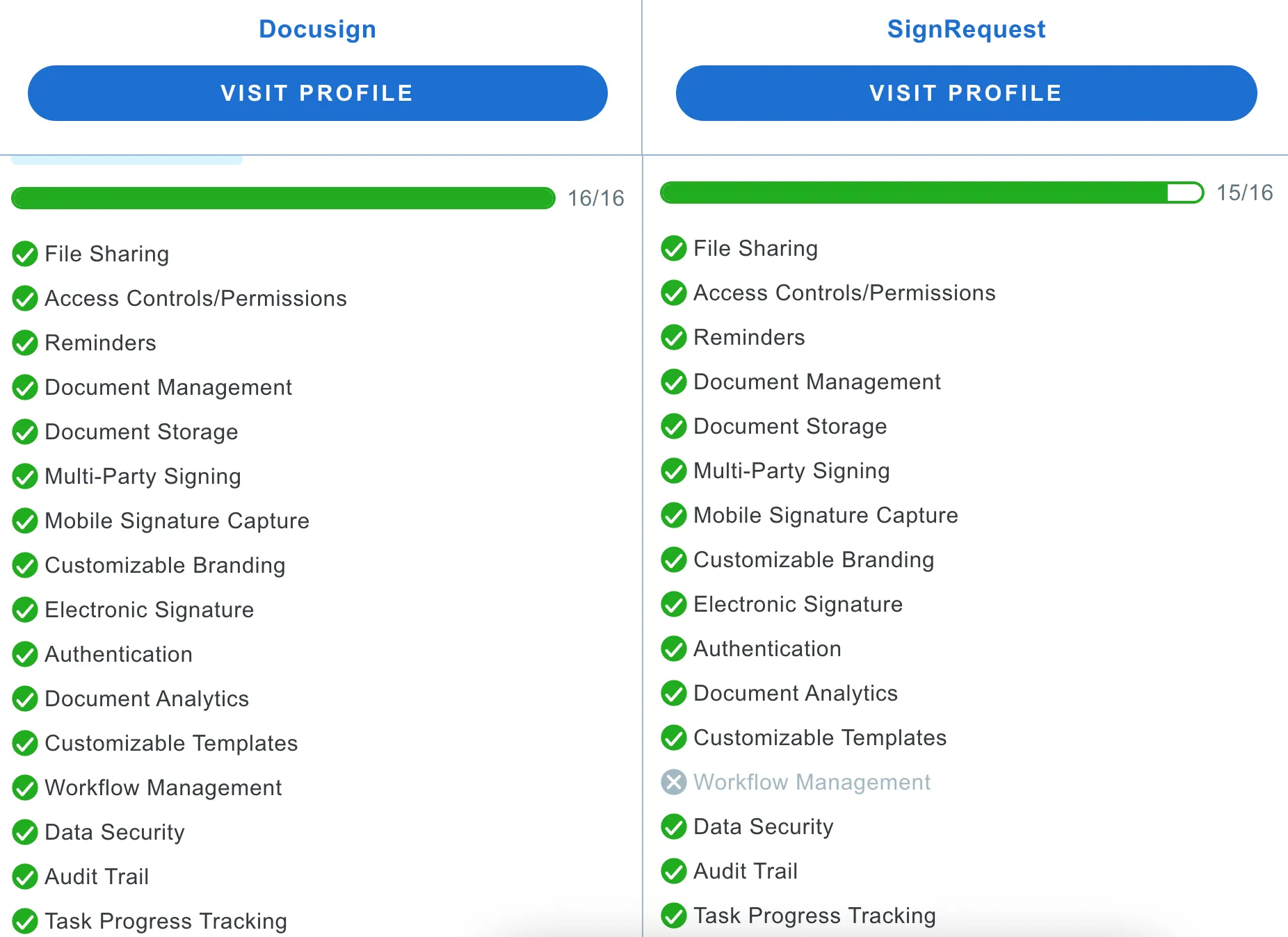
SignRequest vs Docusign - Support Comparison

9. Xodo Sign
Cost: Free; Basic ($12.99); Professional ($49.99); Professional Plus ($119.99); Enterprise (Custom). Pricing is based on the monthly rate per user.
Free Trial: 7 days
Platform Availability: Website (all devices)
Ease of use: Minimum training is required to send out documents.
Support options: Email support and knowledge base
Document Limits: Unlimited documents; and the number of templates depend on the plan
Total cost of ownership: Xodo Sign offers a cost-effective solution with no hidden fees, but some advanced features may require additional purchases or subscriptions.
Best for: Small teams on a budget.
SMS credits - Provides SMS credits in every plan for users who want to notify their clients via SMS.
In-person signing - Allows documents to be signed in the field, face-to-face, or using any device.
Multiple businesses - Helps manage different companies with specific team members, contacts, and templates.
Xodo Sign is a popular Docusign alternative that offers a user-friendly experience that suits teams new to eSignatures. Its intuitive interface and straightforward workflow creation make it easy to adopt without requiring extensive training or technical expertise.
The free plan includes a 5 documents per month cap, which is sufficient for individuals or smaller teams with intermittent eSigning needs. The other three plans offer unlimited documents, with template creation limits that increase with each upgrade.
Xodo’s seat-based pricing plan starts at $10/month, is good for individual users. The Professional plan starts at $16/month, expands on this with unlimited templates, 10 bulk sending credits, SMS credits, in-person signing, and advanced editing features.
For businesses needing API access, Xodo Sign provides a usage-based pricing model ranging from $0.12 to $2.50 per document. The Enterprise plan is custom-priced and includes advanced features like bulk document sending, additional seats, dedicated support, and volume-based templates, ideal for large teams with complex workflows.
Each business setup can store unlimited contacts, making it easy to prepare documents for signing by selecting previous contacts. The platform also allows teams to schedule documents to auto-expire, export, or permanently remove them, keeping the dashboard uncluttered.
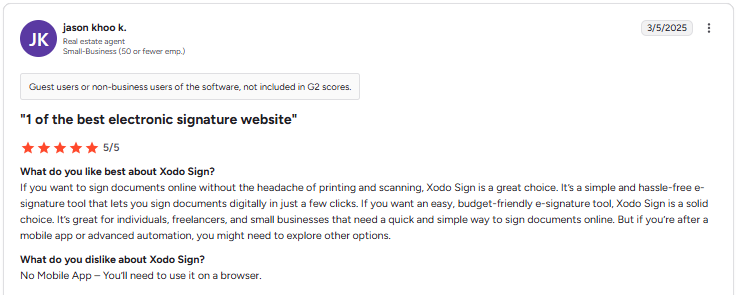
Additionally, customer support options for Xodo Sign may not be as comprehensive as those offered by other platforms, potentially leading to slower issue resolution.
Xodo Sign offers native API access with preset send limits included in standard plans, unlike Docusign, which charges separately starting at $75/month.
The platform might not be suitable for larger teams that require end-to-end contract management features.

- Unlimited templates
- Unlimited documents
- Microsoft integration
- Unlimited templates
- Unlimited documents
- Microsoft integration
Features that stood out
Xodo Sign vs Docusign - API Comparison
Xodo Sign vs Docusign - Security Comparison
Xodo Sign vs Docusign - Support Comparison
10. Signaturely
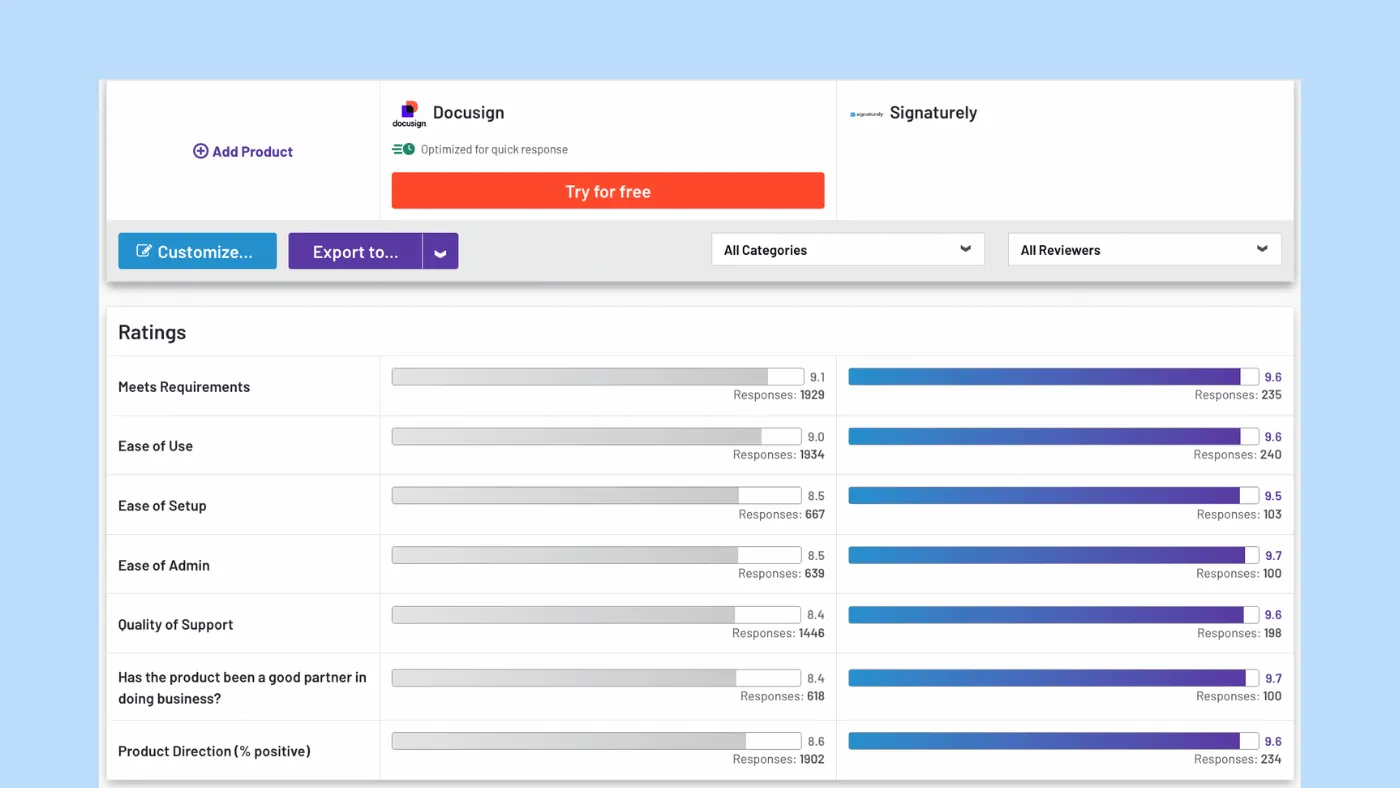
Cost: Free; Personal ($25); Business ($50/user). Pricing is based on the monthly rate.
Free Trial: 7 days plus free plan.
Platform Availability: Website (all devices).
Ease of use: Easy onboarding and workflow for preparing and sharing contracts.
Support options: Email support, and knowledge base.
Document Limits: 5/month signature requests in the Personal Plan; Unlimited signatures and templates under the Business Plan.
Total cost of ownership: Budget-friendly solution with transparent pricing, but some extra features might need an upgrade.
Best for: Basic eSignature needs.
Features that stood out -
Custom branding - Personalizes team documents with company logo, colors, and other brand elements.
Contract templates - Access various templates for free to gain insight into sharing basic contracts.
Tool integrations - Integrates with popular tools such as OneDrive, Google, Box, and DropBox.
Signaturely is one of the easy-to-use, affordable Docusign alternatives designed for individuals and small teams who want a simple eSignature experience. Signaturely covers all the basics like legally binding signatures, reminders, audit trails, and cloud storage.
Signaturely does let users stay on the free plan even after the trial, offering legally valid and secure signatures. However, unlike most free plans from other tools that allow at least three documents a month, Signaturely restricts users to just one, making it less practical even for light users.
Its paid plans are straightforward but fairly limited in scope. The Personal plan allows up to 5 documents per month with one template, while the expensive Business plan offers unlimited usage, team management, and custom branding.
Compared to Docusign or other alternatives in a similar price range, Signaturely’s features feel basic and less robust, especially if you're looking for advanced options like workflow automation, bulk sending, or detailed analytics.
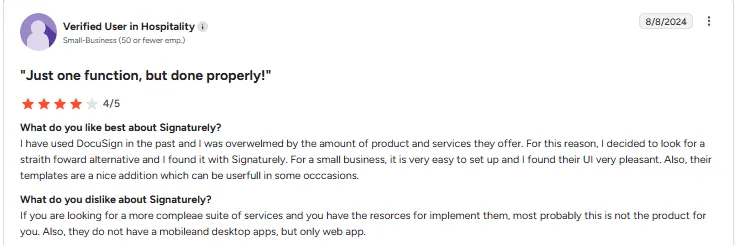
They provide a comprehensive list of contract templates that teams can download for free, including templates for founder agreements, vehicle purchase agreements, custody agreements, and more.
Signaturely does not have an in-built document editor, so users cannot edit these templates on the platform.
They have integrations with commonly used cloud storage providers, but their list of integrations doesn’t extend beyond a few names.
Signaturely is the most basic eSigning tool, ideal for users seeking essential features without needing any advanced functionalities.

Signaturely vs Docusign - Support Comparison

11. Formstack Sign
Cost: Suite ($229); Enterprise (Customized). Pricing is based on the monthly rate per user.
Free Trial: 14 days
Platform Availability: Website (all devices).
Ease of use: It’s easy for businesses and clients to complete the signing process.
Support options: Email support and knowledge base.
Document Limits: Unlimited templates and eSignatures
Total cost of ownership: The price is higher since Formstack Sign isn’t a separate product, increasing costs for users wanting only an eSignature tool.
Best for: Form + signature workflows.
Features that stood out -
Task assignment - Helps users assign tasks to ensure team members complete the necessary activities.
Single builder - Allows you to prepare, edit, and share workflows from one visual builder.
Plan power-ups - Boosts your team with the help of feature add-ons or additional users.
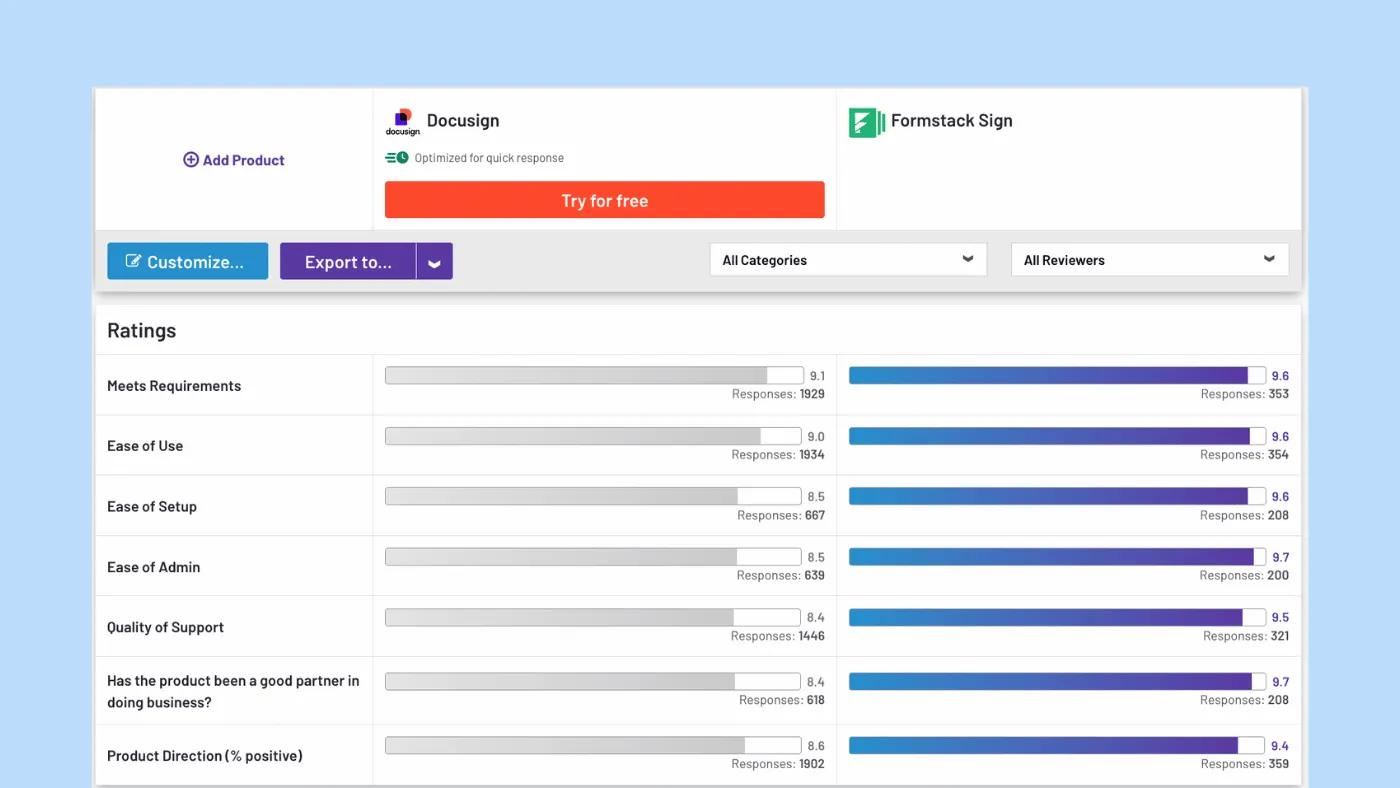
Formstack Sign is part of the Formstack Suite, which includes features for form building, no-code workflows, and document creation.
There are no separate plans for eSigning alone.
Nevertheless, teams can grow without restrictions by adding users or expanding usage limits with add-ons.
With Formstack, users can access unlimited templates and eSignatures, and efficiently manage multi-signer workflows. You can share multiple documents in one bundle, ensuring organized paperwork distribution.
It also supports many languages, making it accessible for diverse teams and international clients.
As the cost increases, so do the features, including access to APIs, real-time tracking, a dedicated customer support manager, and more.
Formstack does not include Salesforce integration in the standard plans but offers separate, higher-cost plans for Salesforce users.
Since Formstack Sign is not a standalone product, it does not cater to some advanced features available in other tools. However, it is ideal for teams focused on preparing forms and eSignatures simultaneously. For Salesforce-centric teams evaluating other options, our detailed breakdown of conga sign pricing can help compare costs and features.
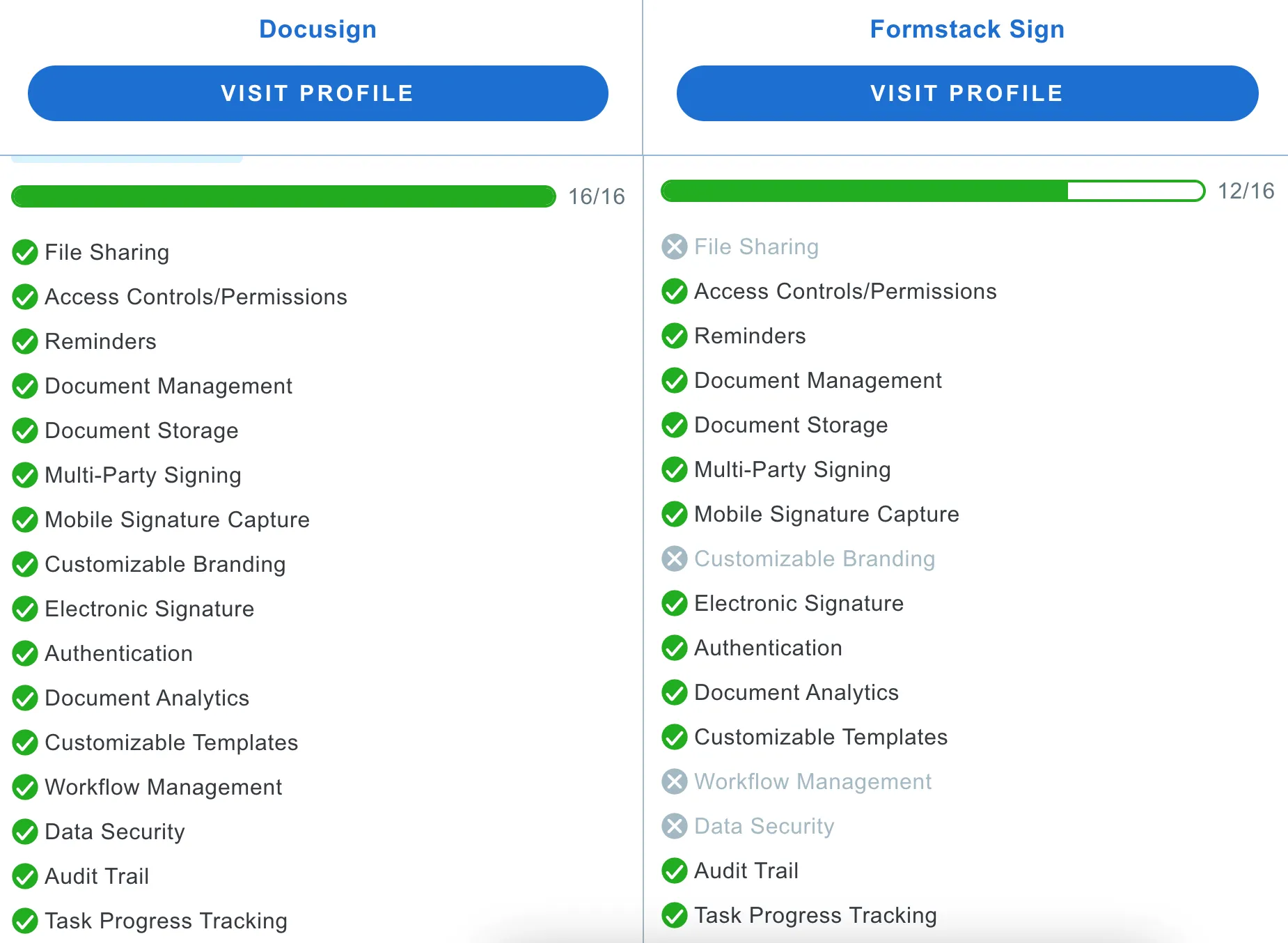
Formstack vs Docusign - Support Comparison

12. Foxit eSign
Cost: eSign ($8); eSign Pro ($25.5); eSign Enterprise (Customized). Pricing is based on the monthly rate per user.
Free Trial: 14 days
Platform Availability: Website (all devices), iOS/Android
Ease of use: Fairly easier, has clear documentation.
Support options: Live phone support, email, and knowledge base. Enterprise support includes all of the above, plus a dedicated team of developers.
Document Limits: 500/year transactions; 50 reusable templates.
Total cost of ownership: A cost-effective solution to Docusign, but many essentials need an upgrade.
Best for: Teams in the Foxit PDF ecosystem.
eSigner delegation: Recipients can delegate signatures to someone else when unavailable.
Bulk sending - Helps you send personalized versions of the same document to a group of people.
Upload stamps - Stamps can be embedded or uploaded as an image onto the platform.
Foxit is positioned as a comprehensive PDF reader and editor, offering separate plans for products like Foxit eSign.
On Foxit eSign’s lower plan, you can send multi-document envelopes, add conditional logic to your form fields, create reusable templates, and add stamps to the paperwork, among other features. This offers a reasonable bargain for the price.
You can access features like APIs, offline mode, customized branding, and integrations with Google, Zapier, Dropbox, and more, but these come at an additional cost.
However, Foxit provides flexible API options, unlike Docusign, whose APIs require a higher cost. Foxit also supports teams with a dedicated team of API experts to assist with the proof-of-concept process and the deployment phase.
Docusign users have a cap of 100 envelopes per year, but your account continues to function beyond this limit. You can speak to the sales team to pay additional fees and continue your eSigning process.
In contrast, Foxit offers a higher annual envelope limit, but the account stops operating once the limit is reached. You need to renew your subscription early to get more envelopes. On Foxit eSign’s lower plan, you can send multi-document envelopes, add conditional logic to your form fields, create reusable templates, and add stamps to the paperwork, among other features. This offers a reasonable bargain for the price.
You can access features like APIs, offline mode, customized branding, and integrations with Google, Zapier, Dropbox, and more, but these come at an additional cost.
However, Foxit provides flexible API options, unlike Docusign, whose APIs require a higher cost. Foxit also supports teams with a dedicated team of API experts to assist with the proof-of-concept process and the deployment phase.
Docusign users have a cap of 100 envelopes per year, but your account continues to function beyond this limit. You can speak to the sales team to pay additional fees and continue your eSigning process.
In contrast, Foxit offers a higher annual envelope limit, but the account stops operating once the limit is reached. You need to renew your subscription early to get more envelopes.
Foxit has a mobile app, but its interface usability is poor, and it occasionally reports glitches. Otherwise, using the software is similar to other platforms: upload a PDF, drag and drop boxes, and send it for a signature.

Users can select from different fields to add to the document, such as the accept or decline button, which lets the signers validate the information. With this feature, signers are encouraged to complete the signing process or can make the document void at the click of a button.
If the cap on transactions doesn’t affect your business, you might consider giving this platform some thought.

- Minimum users5
- Free trial
- Minimum users1
- Free trial
Features that stood out
Foxit vs Docusign - API Comparison
Foxit vs Docusign - Security Comparison
Foxit vs Docusign - Support Comparison
13. GetAccept
Cost: eSign (£ 20); Deal Room (£ 35); Contact Room (£ 45); Full Suite (£ 69) Pricing is based on the monthly rate per user.
Free Trial: 14 days plus a free account
Platform Availability: Website (all devices); iOS, Android
Ease of use: Easy to add new documents and integrations.
Support options: Chat, email, and knowledge base. A dedicated account manager is available for higher plans.
Document Limits: Unlimited transactions
Total cost of ownership: It is budget-friendly but makes more sense for teams looking for a suite of features to enhance their buyers’ journey.
Best for: Sales enablement and deal tracking.
Features that stood out -
Video personalization: Users can add personalized videos within their documents to make them more engaging.
Document tracking: Provides detailed tracking analytics to help time follow-ups better.
In-document chat - Features an in-document chat function that allows users and recipients to communicate within the document.
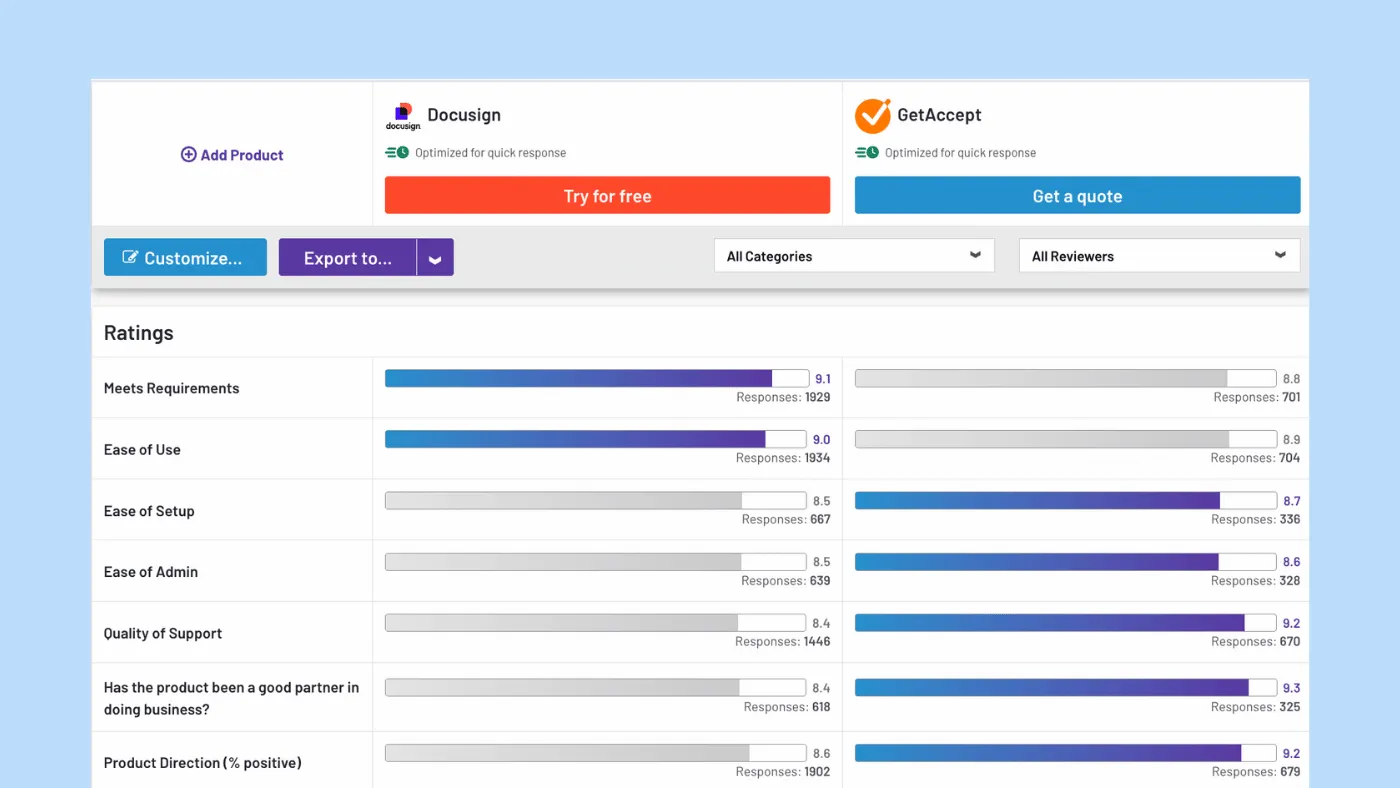
GetAccept is a comprehensive digital sales room platform with eSigning as one of its many features. You can purchase eSigning separately or as part of one of their four available plans.
All plans include legally binding signatures, though the pricing structure could be rather confusing. It's important to cross-check the details to ensure you select the right plan.
GetAccept creates a collaborative environment where sales representatives can enhance the buyer experience. Their digital sales rooms are designed to help prospects close deals faster by providing buyers with a single link to access everything they need to make a purchase decision.
You can outline the buying journey and attach mutual action plans to expedite the process.
While eSigning is a small part of the GetAccept platform, it still offers essential features such as assigning the signing order, setting up reminders, and integrating with over 500 tools.
The document tracking feature goes beyond simply indicating whether a document was opened, signed, or marked void. It also tracks time spent on each page and sends notifications based on the recipient's actions.
Additionally, GetAccept includes various sales enablement tools such as proposal templates and content libraries, designed to enhance the eSigning experience for sales reps.
This makes it an interesting choice for those looking for a one-stop solution to integrate their activities throughout the sales cycle.
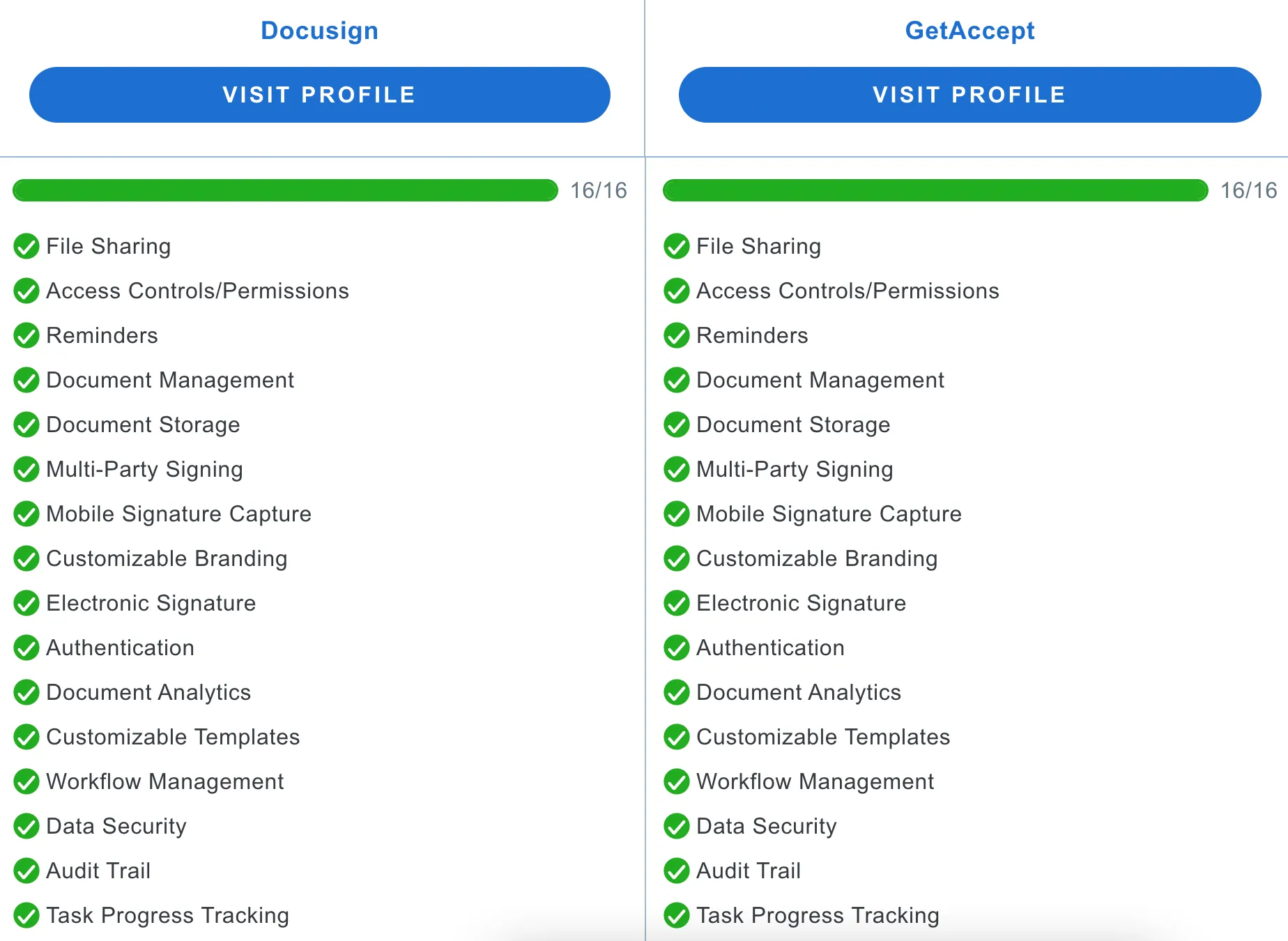
GetAccept vs Docusign - Support Comparison

How to choose the best Docusign competitor
Picking the right alternative really comes down to your business size, budget, and goals. If you're just starting out or are a solopreneur, you’ll find plenty of free Docusign alternatives that offer basic eSignature capabilities, typically capped at 3 documents per month with limited access to features. While free document signing plans aren't built for high-volume use, they're a good way to explore the platform before upgrading.
If you're part of a fast-paced sales team that needs proposal creation, custom forms, and deal-closing tools, PandaDoc or GetAccept are strong contenders. On the other hand, if your company already works within the Dropbox or Adobe ecosystem, going with Dropbox Sign or Adobe Sign might feel more practical.If you're exploring options beyond Adobe, check out these Adobe Sign alternatives.
Running a small business or tight on budget? Signaturely offers a basic plan at a lower price point that can get the job done without frills. Meanwhile, Signeasy gives growing teams room, with flexible pricing, scalable plans, and features like reusable templates, unlimited users, and built-in team management.
And beyond just features and pricing, you should also consider:
- How transparent the pricing model is, are there any hidden fees?
- What kind of customer support is available? (Is premium support gated behind expensive tiers?)
- Does the platform offer unlimited templates and cloud storage?
- Can your whole team access the platform without any user caps?
- Are tools like reporting, audit trails, or real-time notifications built-in or add-ons?
If you're unsure what suits you best, you don’t have to decide alone. Book a call with Signeasy, and we’ll help you figure out the right fit, based on where your business is today and where it's headed.