
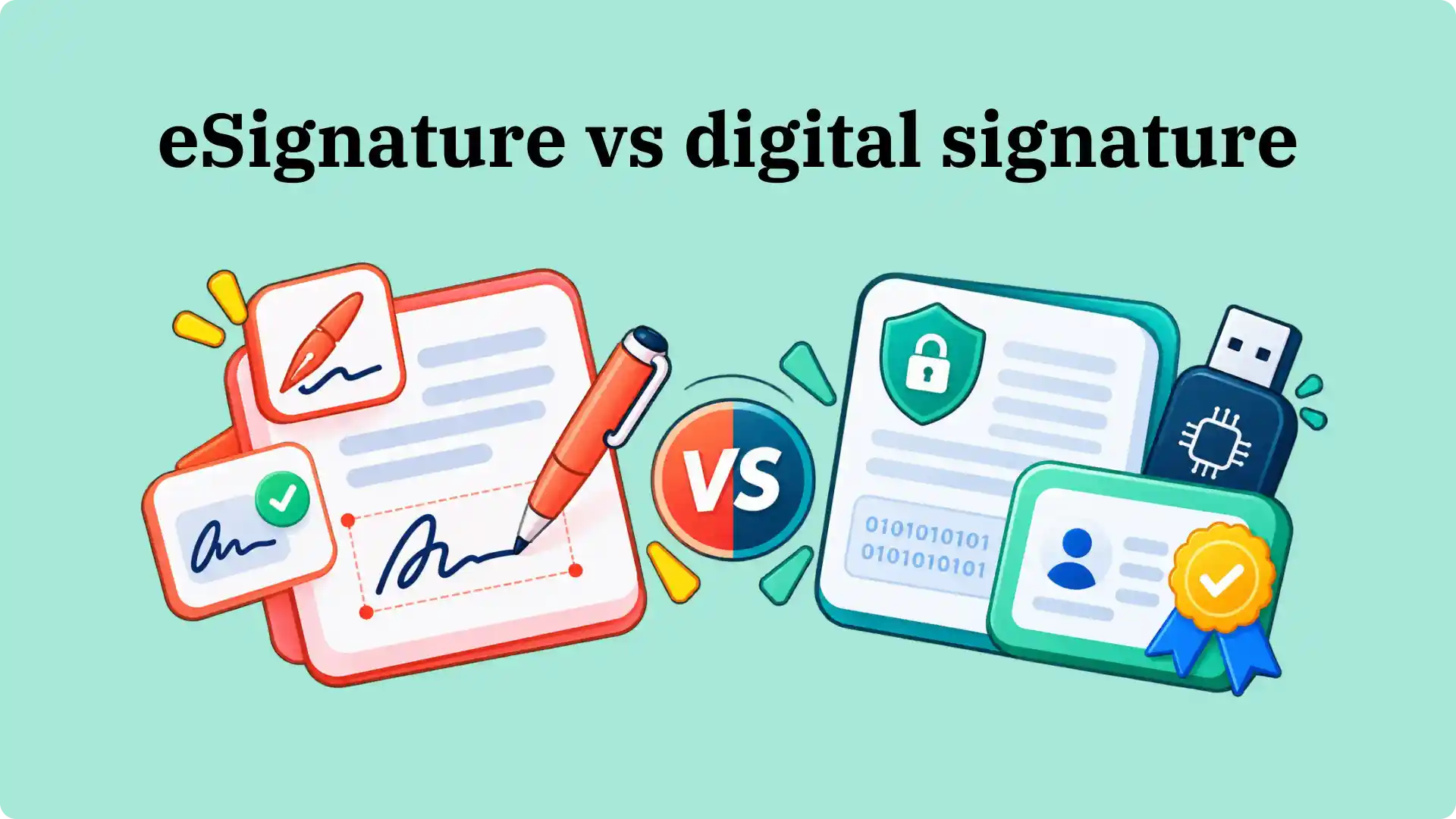


An electronic signature records a person's intent to sign an agreement. A digital signature adds certificate-based cryptographic verification, which helps recipients establish who signed and detect changes to the document. Both support electronic transactions, but the evidence they provide differs. This e signature vs digital signature comparison covers legal recognition, signer authentication, document integrity, and the signing requirements businesses need to consider.
What is an electronic signature?
An electronic signature, or eSignature, is an electronic process or action that a person adopts to show intent to sign a document or record. The U.S. ESIGN Act covers an electronic sound, symbol, or process associated with a record and adopted with the intent to sign it. It describes the action and the person's intent, not one required signature technology.
In practice, electronic signatures take several forms. The most common examples are:
- Typed name: A person types their name into a signature field to accept an agreement.
- Drawn or uploaded signature: A person writes with a finger or stylus, or inserts an image of their handwriting.
- Click-to-agree: A person deliberately clicks an acceptance control that is linked to the terms being accepted.
The action needs the surrounding context. A name typed into a document does not automatically prove that its owner agreed to the contents. A managed electronic signature workflow also records the request and signing activity.
If you want to see the appearance of a signature before signing a file, Signeasy's online signature generator lets you type or draw one. You can also learn how to make a handwritten signature online.

These methods capture the signer's intent, but they do not all offer the same way to verify the signature afterward. Digital signatures introduce certificate-based verification.
What is a digital signature?
A digital signature is a type of electronic signature that uses cryptographic technology for verification. Unlike a typed or drawn eSignature alone, it relies on a certificate-backed mechanism. In document workflows, it uses a digital certificate and a pair of related keys: a private key to create the signature and a public key to verify it.
Public Key Infrastructure (PKI) provides the framework for issuing, trusting, and checking those certificates.
When a certificate comes from a trusted Certificate Authority (CA) or Trust Service Provider (TSP), the verifier has a basis for checking the identity associated with the key. A self-signed certificate does not provide the same independent identity assurance.
A digital signature also helps establish document integrity: changes to the signed content cause cryptographic verification to fail. For a related example of certificate-based document protection, Signeasy's digital signature walkthrough demonstrates applying Trust Seal to a completed agreement.
Important distinction: A certificate-backed signature attached to an individual's identity and a company's digital seal on a completed document are not interchangeable. One can identify an individual signer; the other can establish the document's origin and whether its contents have changed.
e signature vs digital signature at a glance
The electronic signature vs digital signature distinction is about the signing method and available proof, not simply whether the signature looks handwritten.
The table compares a basic electronic signature with a certificate-backed digital signature. A managed eSignature service also provides controls such as recipient authentication, signing records, and tamper-evident documents without necessarily issuing a personal signing certificate to each recipient.
An e signature vs digital signature comparison becomes misleading when it treats every electronic signature as a pasted image. A managed signing service may already record signer actions and protect completed files. Certificates add a separate verification method, but do not remove requirements for signer intent, authorization, and the document itself.
The distinction affects more than the technology used to sign. It also changes how businesses handle legal requirements, signer verification, and completed documents.
Five e signature vs digital signature differences
The five differences below explain what changes for businesses using electronic signatures for routine agreements or documents requiring certificate-backed verification.
1. Legal recognition
The U.S. ESIGN Act generally prevents a transaction from being denied legal effect solely because an electronic record or signature was used. It does not remove other legal requirements for that transaction. A typed signature on an offer letter and a certificate-backed signature may both satisfy an electronic-signing requirement, but the surrounding evidence of consent and intent still counts.
In the EU, eIDAS recognizes simple electronic signatures (SES), advanced electronic signatures (AES), and qualified electronic signatures (QES). An electronic signature cannot be rejected as evidence solely because it is electronic or not qualified. A QES has the equivalent legal effect of a handwritten signature under the regulation.
This is different from saying that eIDAS requires a digital certificate for every business agreement. Our eIDAS overview explains the levels and their legal treatment.
Legal recognition establishes whether a signing method is accepted. The next consideration is how the recipient confirms who actually signed the document.
2. Signer identity and authentication
The e signature vs digital signature distinction also affects the evidence available about the signer’s identity. A pasted signature image doesn't establish who added it to a document. A managed eSignature workflow supports identity checks before signing, while certificate-backed signing links a cryptographic key to an identity established through the certificate-issuance process.
For example, Signeasy's recipient two-factor authentication sends a one-time password to the signer's phone. The Signeasy Business Pro plan lists recipient 2FA in its pricing features, and the audit trail records when this verification is used.
A certificate-backed digital signature uses a different mechanism: a certificate associates a public key with an identity. The recipient then checks the certificate and whether the signature verifies.
The assurance about who holds the key comes from the certificate issuer's identity-checking process and the protection of the private key, not from cryptography alone.
Once the signer has been identified, the next question is whether anyone changed the document after signing.
3. Tamper detection and audit records
If someone pastes a signature image into Word and later changes the document, that image offers no built-in proof of what changed.
With a digital signature, software checks the cryptographic signature against the signed data and detects document changes that invalidate the signature. It does not decrypt the entire document to perform this check.
Modern eSignature services also protect records. Signeasy provides an electronic signature verification process and an audit trail that records signing activity. Its separate PKI-based Trust Seal adds cryptographic tamper evidence to the completed PDF on eligible plans.
The two records answer different questions: the audit trail records what happened during signing, while the seal helps verify whether the final file has changed. Read more about the security controls behind eSignatures.
These controls provide evidence after signing. Businesses also need to consider the steps recipients must complete to produce that evidence.
4. Signing experience and effort
The difference between eSignature and digital signature workflows begins with what recipients need before signing. For a routine eSignature request, recipients open a link, review the document, and sign without separately obtaining a personal signing certificate. The sender tracks completion through the signing platform instead of collecting scanned copies by email.
Certificate-based signing adds the need for a trusted digital ID or a supported certificate service. That may involve identity proofing, certificate issuance, or authentication during signing.
Some services handle those steps remotely, so a digital signature is not always slower; the work comes from the verification requirement. An e signature vs digital signature comparison needs to account for the actual recipient experience, especially when customers or new hires are signing for the first time.
Apart from the signing steps, the document format also affects which methods are available.
5. File formats and compatibility
An e signature vs digital signature comparison must distinguish the uploaded file format from the verification method. Electronic signing platforms accept formats such as PDF and Word documents, while certificate-backed signing requires software that supports creating and validating cryptographic signatures for the selected format.
PDFs are a common digital-signature format, but cryptographic signatures are also used for other types of data and files. It is inaccurate to describe digital signatures as PDF-only.
For example, you can sign a PDF online with an eSignature without manually managing a certificate. If another organization specifically requests a verifiable digital signature, confirm the certificate requirements and accepted format before sending the file.
The certificate-based method involves a few technical steps that explain how it identifies changes to a signed document.
How a digital signature works
The technical side of the eSignature vs digital signature comparison is easier to understand by following what happens to one document.
A typical certificate-backed signing process follows four steps:
- Create a document hash. Signing software uses a mathematical algorithm to calculate a fixed-length digest from the file's contents.
- Sign the hash. The signer's private key creates a cryptographic signature over that digest.
- Attach verification details. The signed document includes the signature and certificate information needed for verification.
- Verify the result. The recipient's software checks the cryptographic signature using the corresponding public key and validates it against the signed document data. If someone changes the protected content, signature validation fails.
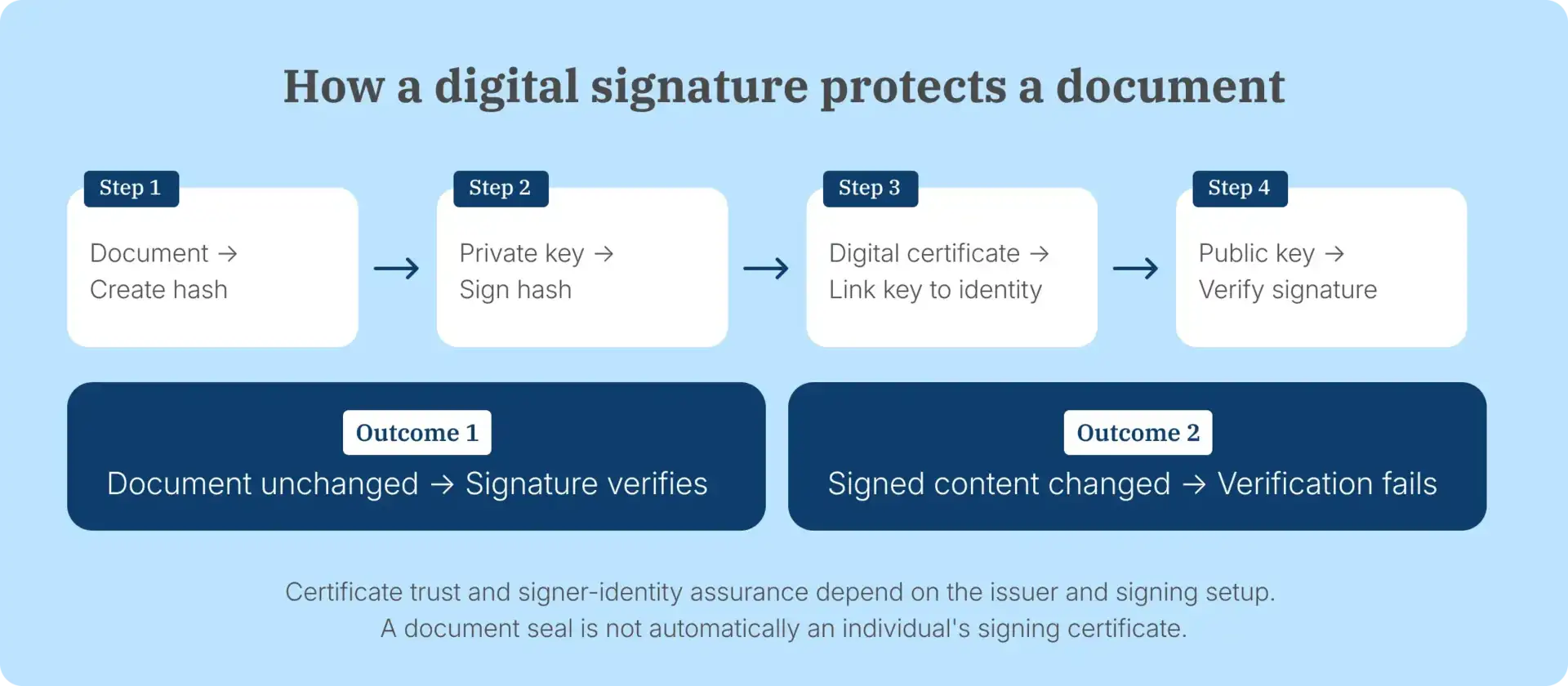
This verification supports document integrity, but it does not replace checking that the signer had authority to approve the agreement.
The amount of verification required varies by transaction. A routine employment offer and a government filing, for example, do not necessarily need the same signing method.
When to use eSignature vs digital signature methods
The e signature vs digital signature choice follows the agreement's specific needs, including consent evidence, signer verification, and certificate requirements.Routine business agreements generally need evidence of consent, signer activity, and completion. Other transactions require a trusted signing certificate, independent cryptographic verification, or a prescribed signature standard.
The following examples show where each method fits.
Use eSignatures for everyday business agreements
Electronic signatures work well when a sender needs to collect consent from people in different places and track the result.
Common business workflows include:
- HR: Send offer letters to candidates, collect signatures, and keep the completed copy with onboarding documents. See how HR teams use Signeasy for employee paperwork.
- Sales: Send proposals or order forms to a customer and see whether the agreement has been opened and signed.
- Operations: Route a vendor NDA or service agreement to the relevant signers without printing copies or coordinating scans.
These are examples of signing workflows, not a rule that electronic signatures are valid for every document in those categories. The electronic signing process still needs to meet the requirements of the particular agreement.
Some transactions require more than a signing history, particularly when the receiving organization specifies a certificate or digital-signature standard.
Use certificate-backed signing where verification is specified
A digital signature becomes particularly relevant when a recipient or regulator requires a trusted signing certificate, a prescribed signature standard, or cryptographic validation.
Examples of these requirements include:
- Government submissions that explicitly require a recognized digital ID or certificate-based signature.
- Regulated records for which the applicable agency or standard prescribes particular authentication and integrity controls.
- High-value agreements where the parties require independently verifiable signer credentials and evidence of file integrity.
A hospital's routine vendor agreement and a regulated clinical record may have different compliance requirements, including signing controls. The e signature vs digital signature decision follows the document's actual requirement, not simply the industry name. Check the specific rule before assuming that a QES or another high-assurance format is mandatory.
For a broader provider comparison, see our digital signature providers article.
These requirements also affect which features a business needs from its signing software. Some teams only need to collect signatures and maintain a signing history, while others also need cryptographic verification of the completed document.
How Signeasy handles electronic signing and digital document seals
The e signature vs digital signature distinction also applies to the evidence a business retains. Our eSignature software helps growing businesses prepare agreements, assign recipients, collect signatures, and monitor requests through the signing dashboard.
A signature request has a recorded signing history, so the sender can see when recipients were notified or signed. The audit trail download instructions show how to retrieve that record after signing.
For agreements requiring cryptographic verification of the completed PDF, Signeasy offers Trust Seal. This PKI-based document-sealing feature is available on the Signeasy Business Plus plan.
When enabled for a request, Signeasy applies its digital seal after all recipients have signed. The resulting PDF uses the PAdES-BLT digital-signature standard and shows seal validity in a PDF reader.
This is a document-level digital seal, not a claim that every signer has received their own certificate or completed a qualified electronic signature.

Once signing is complete, the recipient can open the final PDF and inspect the seal. The verification view reports whether the signed content has been modified after the seal was applied. This is the verification step that a pasted signature image in a Word file does not provide.
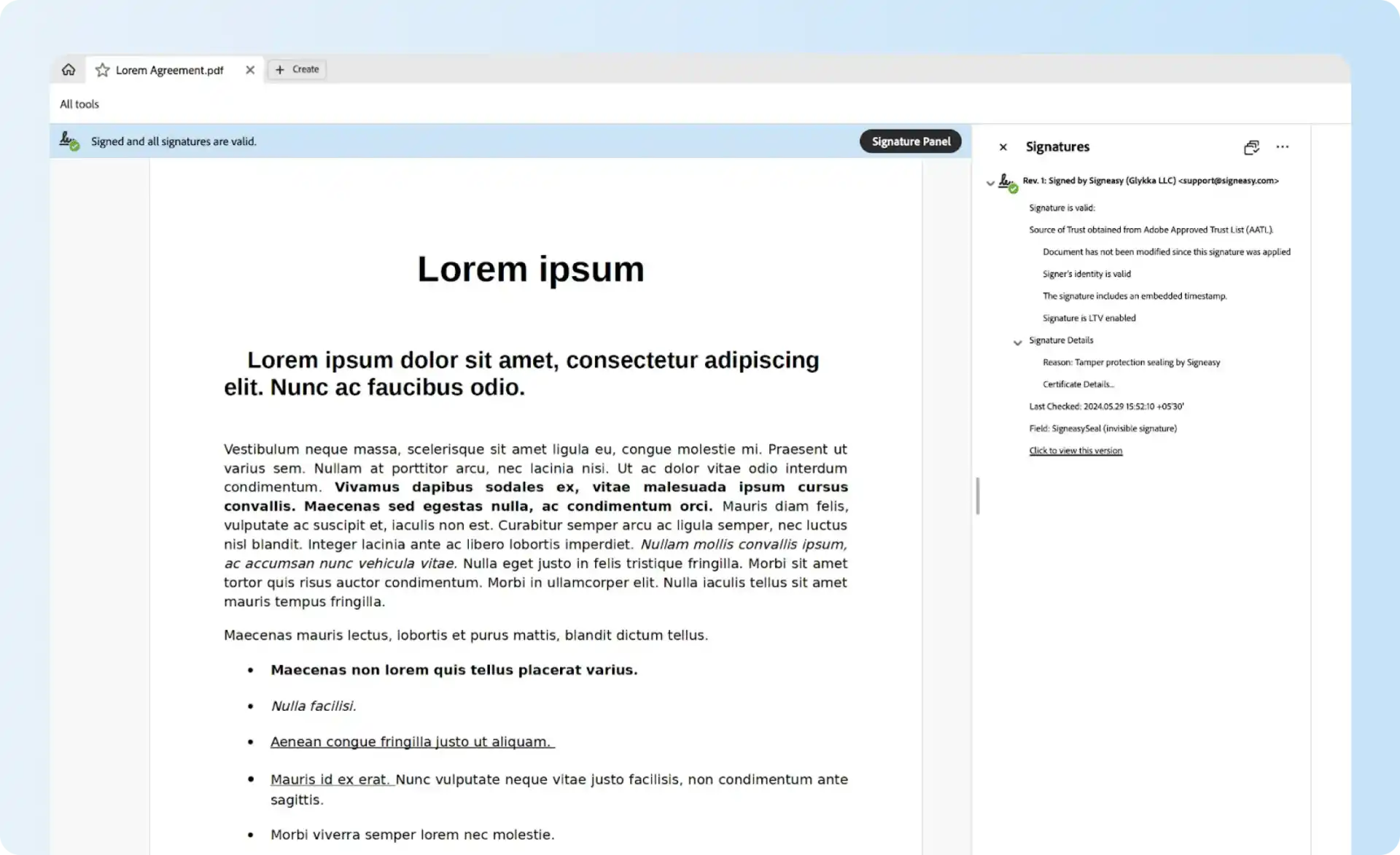
Explore Signeasy's interactive Trust Seal demo to see the document-sealing feature before discussing the required signing setup with our team.
Need an agreement history and a tamper-evident final PDF? We'll show the signing record and Business Plus Trust Seal using a sample agreement.
Electronic signature vs digital signature: how to choose
The e signature vs digital signature decision starts with the evidence the receiving party requires: a recorded signing action, verified recipient identity, a trusted signing certificate, or cryptographic verification of the final document.
The following questions help identify the signing and verification controls needed:
- Required evidence: Is the recipient asking for proof of consent, a detailed signing history, a trusted certificate, or all three?
- Signer identification: Is access through a signing email enough, or must the recipient complete a stronger identity check?
- Document integrity: Is an audit trail adequate, or must another party independently validate a cryptographic signature or seal?
- Jurisdiction and format: Does the transaction specify a national signature standard, qualified certificate, PDF profile, or approved trust provider?
- Recipient process: Will several customers sign remotely, or will signers use an existing certificate and compatible signing software?
For example, a growing sales team sending ordinary service agreements may prioritize quick signature collection and reliable completion records. A public-sector filing that explicitly requires a qualified certificate needs that certificate and an accepted signing method. The selected workflow has to meet the actual requirement in both cases.
Have a certificate or authentication requirement in your signing process? Share the document type with our team so we can review the supported controls.