





The W9 form is one of the most common tax documents you'll encounter as a freelancer, contractor, or business owner. It's how you provide your taxpayer information to clients who need to report payments to the IRS.
Despite its importance, many people find the form confusing or make avoidable errors:

Source
This guide covers everything you need to know to fill it out correctly the first time.
What you’ll get:
- A step-by-step walkthrough of each W-9 field with examples
- Common mistakes to avoid and how different business entities should fill out the form
- How to sign and submit W-9 forms digitally (using Signeasy) for faster processing
What is a W9 form?
A W9 form is an official IRS tax document that U.S. taxpayers use to provide their Taxpayer Identification Number (TIN) to businesses or individuals who need to report payments to the IRS. The full name is "Request for Taxpayer Identification Number and Certification."
When someone pays you for services or other reportable transactions, they're legally required to collect your tax information before making payments. The W9 form provides this information. You fill it out once, and the payer keeps it on file to prepare 1099 forms at the end of the year.
The IRS W-9 form collects basic information: your name, business name (if applicable), tax classification, address, and either your Social Security Number or Employer Identification Number. You'll also certify under penalty of perjury that the information is accurate and that you're not subject to backup withholding.
You can get a fillable W-9 form directly from the IRS website at no cost. The form is the same for everyone, whether you're an independent contractor, small business owner, freelancer, or corporation. Once completed and signed, you submit it to whoever requested it — never to the IRS directly.
The form has several key sections to understand.
W9 form fields explained
Each field on the W9 form serves a specific purpose for tax reporting.
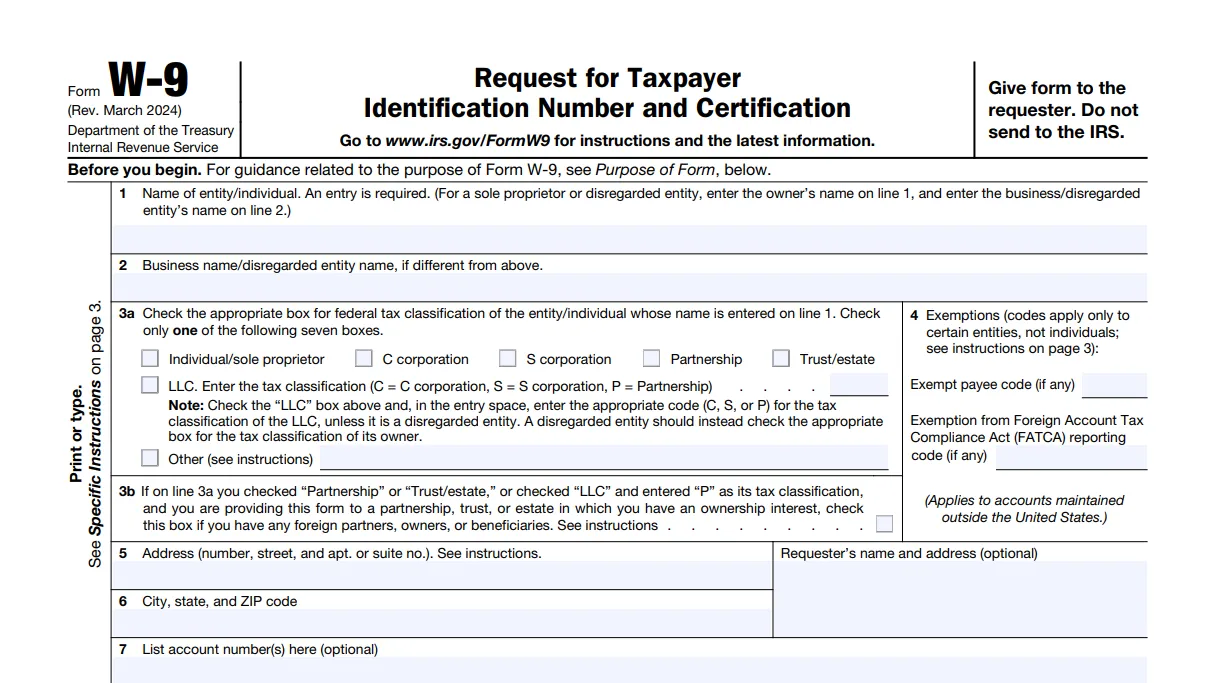
Here's a quick breakdown:
- Line 1 - Name: Your legal name as it appears on your tax return (owner's name for disregarded entities)
- Line 2 - Business name: Your DBA (doing business as), trade name, or disregarded entity name if different from Line 1
- Line 3a - Tax classification: Check one box: Individual/sole proprietor, C corporation, S corporation, Partnership, Trust/estate, LLC (with tax code C, S, or P), or Other
- Line 3b - Foreign partners: Check only if you're a partnership, trust, estate, or LLC-as-partnership providing this to another flow-through entity and you have foreign partners, owners, or beneficiaries
- Line 4 - Exemptions: Exempt payee code for backup withholding (applies to corporations, nonprofits, government entities — most individuals skip this); FATCA code for accounts at foreign financial institutions
- Line 5 - Street address: Your current mailing address (mark "NEW" if changed)
- Line 6 - City, state, ZIP: Complete mailing address
- Line 7 - Account numbers: Optional field for requester's internal tracking
- Part I - TIN: Your Social Security Number or Employer Identification Number (write "Applied For" if pending — you have 60 days)
- Part II - Certification: Your signature and date confirming accuracy under penalty of perjury
Let's complete a W9 form together using an example.
Step-by-step guide: How to fill out a W9 form
Filling out a W9 form takes just a few minutes when you know what information to provide. Let's walk through the process using Sarah Mitchell, a freelance graphic designer who operates as a sole proprietor under the business name "Mitchell Creative Studio."
Step 1: Get the form
Download the fillable W-9 form from the IRS website or request one from whoever needs it. You can complete it digitally using the PDF signing tool on Signeasy.
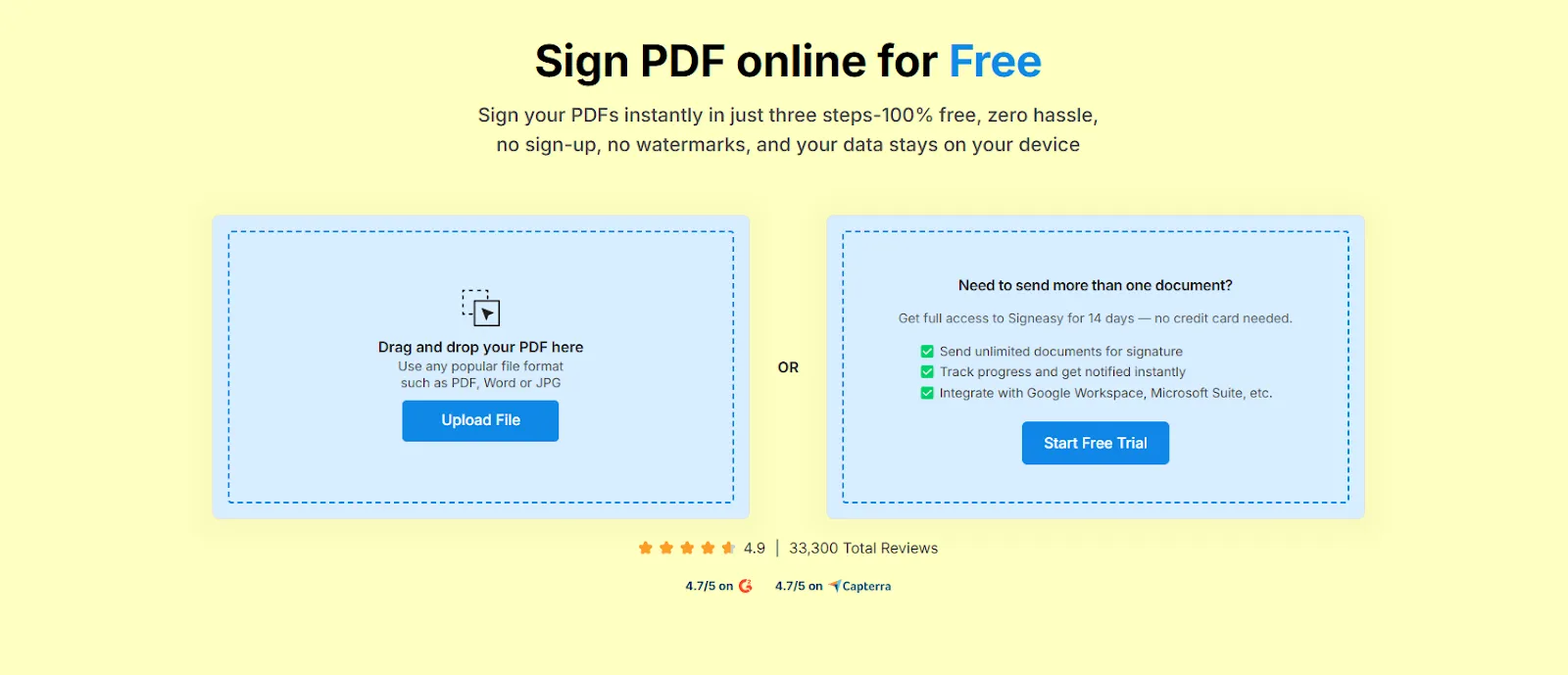
Simply upload the form, sign up, and fill in the fields — it takes under 2 minutes!
Step 2: Enter your legal name (Line 1)
Use the exact name that appears on your tax return. Sarah would enter 'Sarah Mitchell' — her legal name, not her business name.
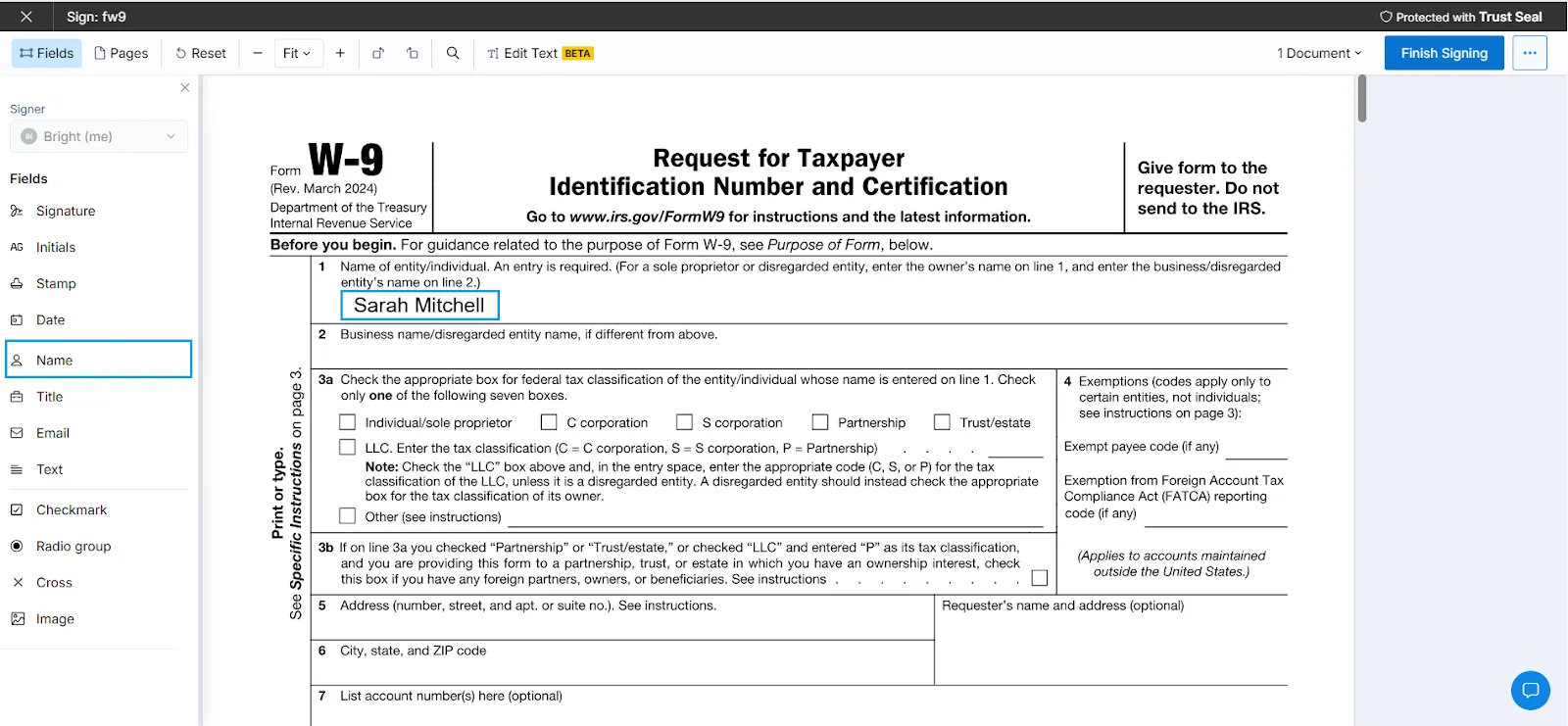
If you're a sole proprietor with a business name, put your personal legal name here. For disregarded entities like single-member LLCs, enter the owner's name on Line 1.
Step 3: Add your business name (Line 2)
If you operate under a business name, DBA, or have a disregarded entity, enter it here. Sarah would write 'Mitchell Creative Studio' on this line.
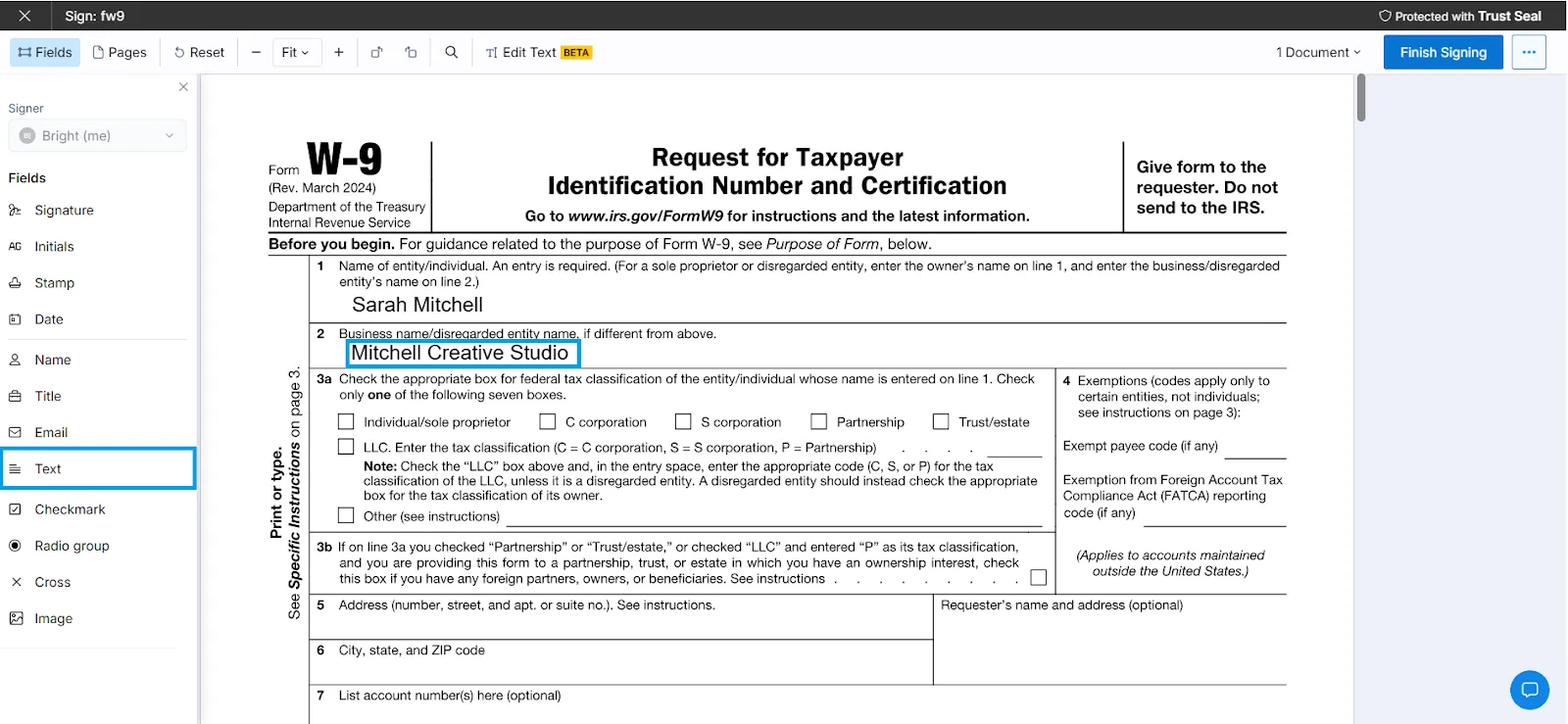
Sole proprietors without a separate business name can leave this blank.
Step 4: Select your tax classification (Line 3a)
Check only one box that matches how you file taxes. Sarah checks "Individual/sole proprietor" because she operates as a sole proprietor, even though she has a business name. Individual freelancers and sole proprietors check "Individual/sole proprietor."
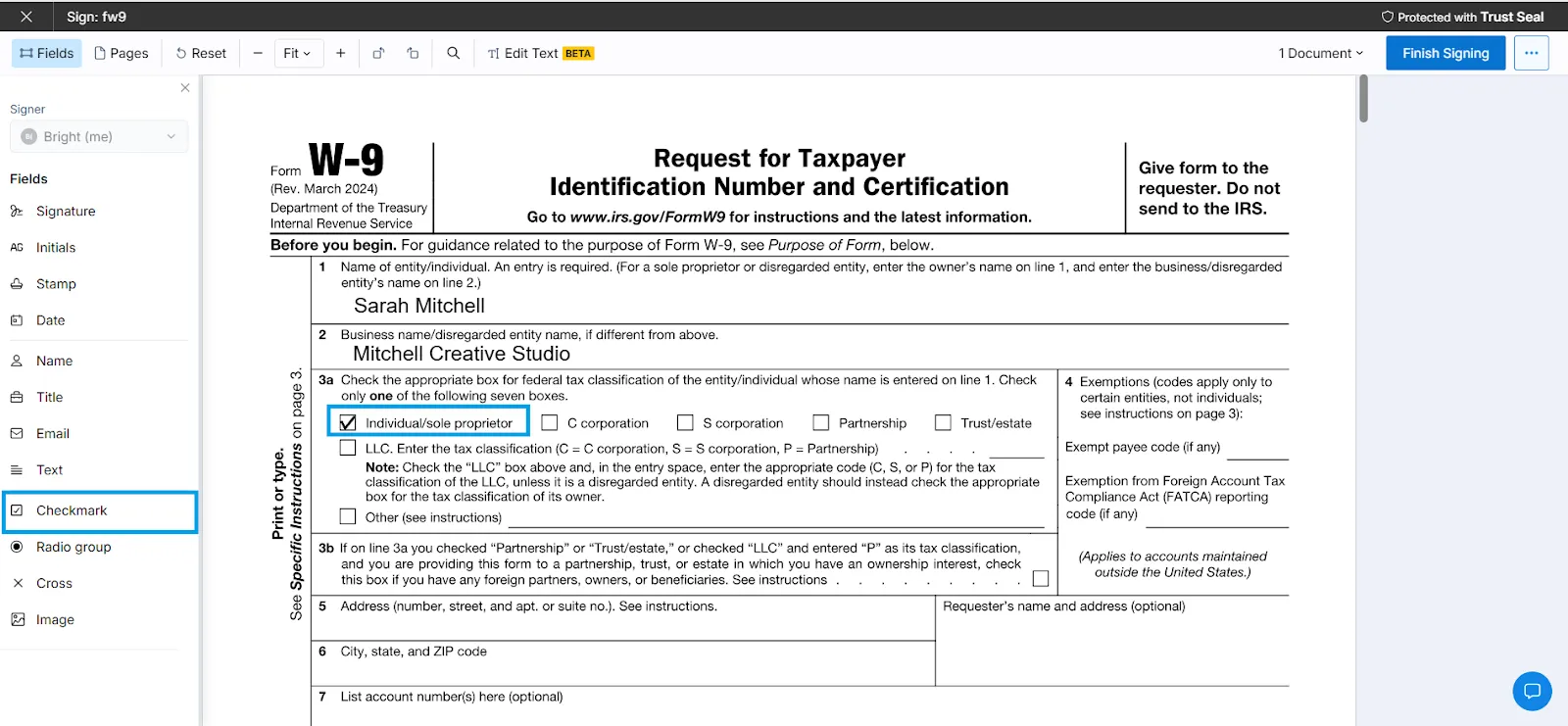
Single-member LLCs treated as disregarded entities should check the box matching the owner's status, not the LLC box. Multi-member LLCs check "LLC" and enter C, S, or P in the space provided based on your tax election.
Step 5: Complete Line 3b if applicable
Sarah leaves this box unchecked since it doesn't apply to her. Only check this box if you're a partnership, trust, or estate (or LLC taxed as partnership) with foreign partners and you're submitting this form to another partnership, trust, or estate where you have ownership.
Step 6: Skip exemption codes (Line 4)
Sarah leaves Line 4 blank, as most individuals and small businesses do. Corporations may enter an exempt payee code. Only fill in the FATCA code if you're dealing with foreign financial institutions.
Step 7: Provide your address (Lines 5-6)
Enter your current street address and complete city, state, and ZIP code. Sarah enters "1847 Maple Avenue" on Line 5 and "Portland, OR 97214" on Line 6.
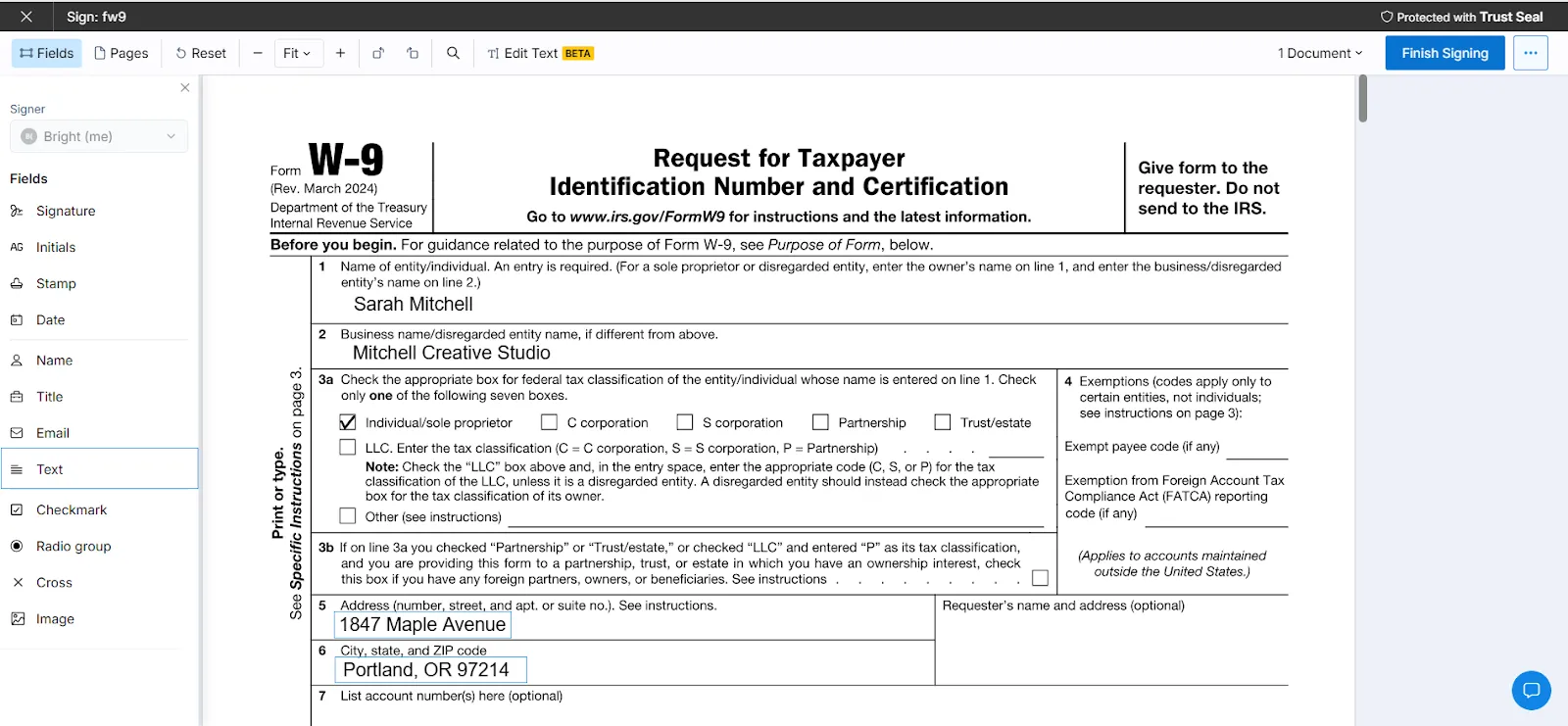
If your address is different from what the requester has on file, mark it as "NEW."
Step 8: Enter your TIN (Part I)
Provide either your Social Security Number or Employer Identification Number (never both). Sarah uses her Social Security Number (123-45-6789) since she operates as a sole proprietor and doesn't have an EIN.
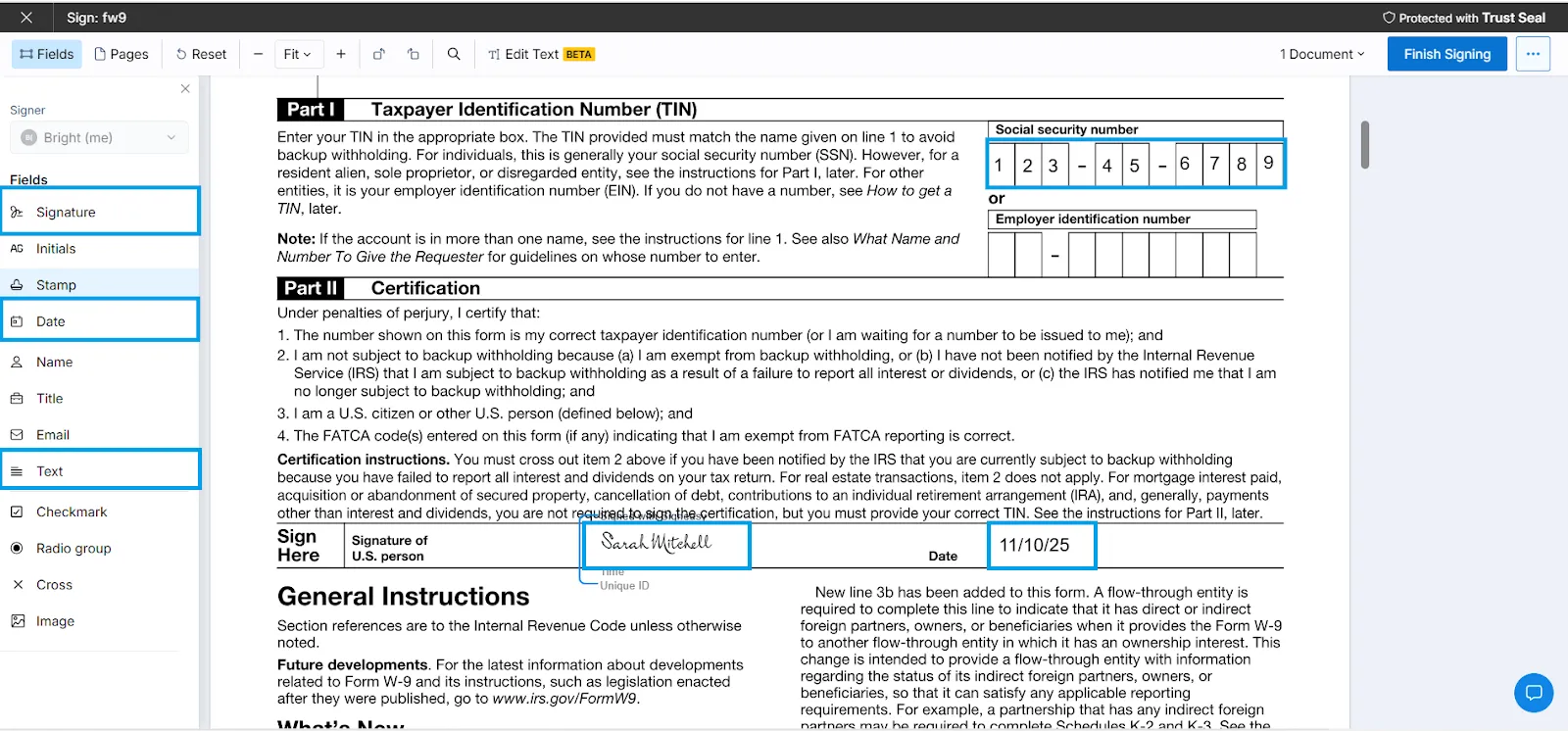
If you've applied for a TIN but haven't received it yet, write "Applied For" and submit within 60 days to avoid backup withholding.
Step 9: Sign and date (Part II)
Read the certifications carefully, then sign and date the form. Your signature confirms the information is correct under penalty of perjury. Digital signatures through Signeasy are legally valid and will save you time.
Suggested Read: How to sign a secured PDF document
You'll need to fill one out if you fall into any of these categories.
Who needs to fill out a W9 form?
You need to fill out a W9 form if you're a U.S. person receiving payments that must be reported to the IRS. This includes:
- Independent contractors and freelancers who provide services to clients and earn $600 or more per year from a single payer.
- Vendors and suppliers who sell products or services to businesses in amounts exceeding reporting thresholds.
- Small business owners operating as sole proprietors, partnerships, LLCs, or corporations when working with other businesses.
- Professionals like attorneys, consultants, and healthcare providers who receive payments for their services.
- Account holders at banks and financial institutions, including both U.S. and foreign financial institutions.
- Real estate transactions participants, including sellers and those involved in mortgage interest payments.
The key requirement: you must be a "U.S. person" as defined by the IRS. This includes U.S. citizens, resident aliens, partnerships, corporations, estates (except foreign estates), and domestic trusts.
Non-resident aliens and foreign persons use different forms (W-8 series) instead of the W9 form.
The following situations trigger a W9 request.
When do you need a W9 form?
Businesses request a W9 form from you when they expect to pay you $600 or more during the calendar year for services or certain other payments. This is the standard IRS reporting threshold that triggers 1099 filing requirements.

You'll typically receive a W9 request at the start of a new business relationship, before your first payment is processed. Some companies ask for it immediately after signing a contract, while others request it once payments approach the $600 threshold.
Beyond the $600 rule, you'll need to provide a W9 form for:
- Interest and dividend payments of $10 or more from banks and investment accounts.
- Real estate transactions regardless of amount, including property sales and mortgage interest payments.
- Debt cancellation of $600 or more that must be reported on Form 1099-C.
- Substitute payments in lieu of dividends or tax-exempt interest totaling $10 or more.
You should submit your completed form before receiving payment to avoid backup withholding. Without a valid W9 on file, the payer must deduct 24% from your payments for taxes.
Avoid these frequent mistakes that trigger payment delays.
Common W9 form mistakes and how to avoid them
Small errors on your W9 form can trigger backup withholding or payment delays. Here are the most frequent mistakes and how to fix them:
Correction procedure:
If you discover an error after submission, complete a new W9 form with correct information and submit it immediately to the requester. Contact them to confirm they've received and processed the updated form before your next payment.
Should you print or go digital?
Digital vs paper W9 forms
Both paper and digital W-9 forms are perfectly legal, but going digital is faster, more accurate, and way less hassle.
Both requesters and payees have legal obligations.
Legal requirements and compliance
Understanding W9 compliance requirements protects both requesters and payees from IRS penalties.
1. Record retention:
Requesters must keep W9 forms for at least three years from the date they file the related 1099 form, though the IRS recommends keeping them indefinitely or until you receive an updated form. Store them securely to protect taxpayer information.
2. When to request updated forms:
You'll need an updated form when:
- Change in payee's legal name
- Change in TIN
- Change in tax classification or business structure
- Change in exempt status
- At least once every three years as a best practice
3. Penalties for non-compliance:
Violating W-9 requirements can result in these penalties:
4. Backup withholding:
If you don't provide a valid W9 form or your TIN doesn't match IRS records, the payer must withhold 24% of your payments and send it directly to the IRS. This continues until you correct the issue.
People often confuse these three forms. Here's the difference.
W9 vs W4 vs 1099 forms
These three forms serve different purposes in the tax system. Here's how they compare:
Note: You fill out a W-9 form when you're self-employed or running a business. You fill out a W-4 form when you're an employee. You receive a 1099 form based on information from the W-9 you submitted.
Let's wrap up with the easiest way to get this done.
Sign and submit W9 forms online with Signeasy
Completing your W9 form doesn't require printing, scanning, or mailing. Digital solutions make the process faster and more secure.
Signeasy offers a 14-day free trial that lets you complete and sign W9 forms in minutes without watermarks or fees. Simply upload your IRS W-9 form download, fill in the required fields, add your electronic signature, and send it directly to the requester.
Why it works: The IRS permits electronic W9 forms as long as they contain the same information as paper forms and include a valid electronic signature under penalty of perjury. Electronic signatures are legally binding under the ESIGN Act and UETA.
Best practices for digital submission:
- Download the fillable W-9 form directly from IRS.gov for the current version
- Complete all required fields before signing
- Save a copy for your records
- Confirm receipt with the requester to avoid payment delays
Most businesses now prefer receiving W9 forms electronically because it reduces processing time, minimizes data entry errors, and creates automatic digital records. Going digital saves you time and keeps you compliant with IRS requirements.




