


Adobe Sign is a widely recognized eSign platform trusted by businesses worldwide. Contract management teams, however, still search for Adobe Sign reviews, primarily due to four recurring concerns.
- Is the premium cost justified compared to alternatives?
- Will the "new experience" disrupt our workflows?
- Can we get help when issues arise?
- Does it truly simplify our existing tech stack?
We'll answer each of these questions by examining real user experiences, feature limitations, pricing structures, and detailed comparisons with a prominent competitor, Signeasy. You’ll get Adobe Sign’s:
- Purpose and day-to-day operation
- Core eSignature capabilities and supporting features
- Set-up effort and ease of use
- Customer support reliability and self-service resources
- Best-fit business sizes, industries, and use cases
What is Adobe Acrobat Sign?
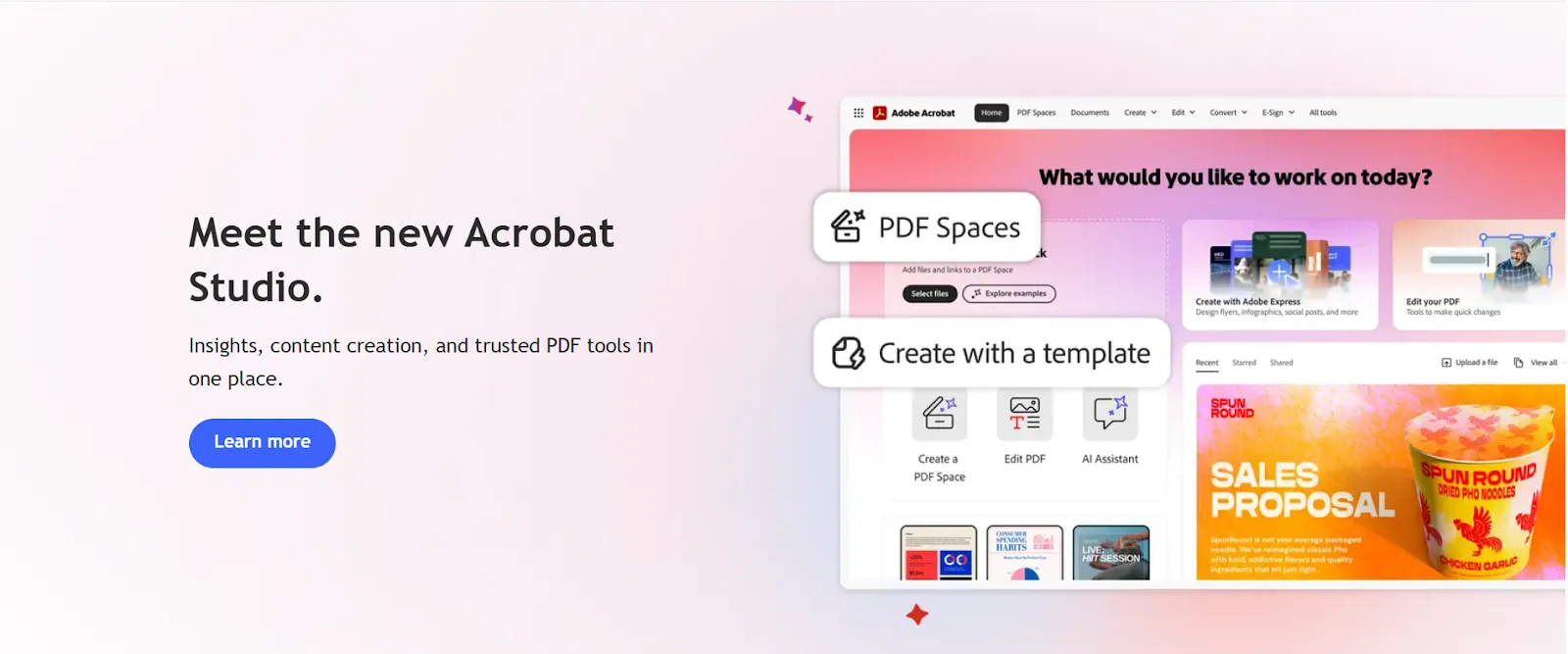
Adobe Acrobat Sign is an eSignature platform for sending, signing, and tracking documents digitally. It supports simple contracts to multi-party approval workflows with built-in ESIGN, eIDAS, HIPAA, and FDA 21 CFR Part 11 compliance.
Best for large enterprises needing extensive PDF editing and workflow automation in healthcare, finance, legal, and government sectors.
However, it requires significant setup time and premium pricing. Signeasy offers similar eSign capabilities with better deployment and AI contract intelligence at lower costs for mid-sized teams.
Let's first explore Adobe Sign's set of features.
How we sourced our data
To provide accurate recommendations, we reviewed Adobe Acrobat Sign's official website, pricing pages, feature documentation, and user help resources. We also analyzed verified user reviews from G2, Capterra, Trustpilot, and Reddit, examining feedback patterns across different company sizes and industries.
Our evaluation focused on ease of use, pricing transparency, mobile functionality, and enterprise features. This approach saves you hours of research and helps you determine whether Adobe Acrobat Sign fits your workflow needs.
Adobe Acrobat Sign features: A closer look
Adobe Acrobat Sign packs several features designed to handle everything from simple signature requests to complex approval workflows. Here's what users say about the platform's capabilities.
1. Core eSignature features
Users find documents easy to send for signature, with visibility into who has opened them and notifications when the signing process is complete. Reviews highlight that multiple signers can be routed in a specific order, which helps when approvals need to happen sequentially.
Form creation starts with a PDF upload, and users note that Adobe automatically detects likely signature fields. Fillable forms can be built from scratch, or existing Word documents can be converted into signable PDFs. Reviewers appreciate the auto-fill feature that pulls data from previous forms, saving time on repetitive documents.
Pros: Users praise the automatic PDF conversion and real-time document tracking as reliable and time-saving features.
Cons: Some reviewers report delayed notifications, which can slow down time-sensitive approval workflows.
2. Accessibility and authentication
Adobe Sign meets compliance standards, including HIPAA and 21 CFR Part 11, which reviewers in regulated industries confirm. Each signature generates a detailed audit trail showing who signed, when the signature was applied, and the IP address used. For a broader comparison of platforms with healthcare compliance, see our guide to HIPAA-compliant eSignature solutions.
Authentication options include password requirements, phone-based verification, or government-issued ID checks. Certificate-based signatures on Pro plans support industries with stricter security requirements, as noted by several reviewers.
Pros: Strong enterprise compliance and reliable eSignature validity receive consistent praise from users in healthcare, legal, and financial sectors.
Cons: Certificate-based signatures are only available on Pro plans and above, requiring upgrades for teams with stricter security needs.
3. Branding and integrations
Pro and Studio plans allow you to add your company logo to signature requests and customize the signing experience using branded URLs. You can create reusable templates for contracts you send frequently, with pre-filled fields and automated reminders.
Adobe connects with Microsoft, SharePoint, Salesforce, and dozens of other business tools through APIs and cloud storage integrations.
Pros: Comprehensive Microsoft 365 integration works seamlessly for teams already using Adobe products.
Cons: Confusing pricing tiers make it difficult to determine which plan includes the needed features. Poor customer support for free trial users is a recurring complaint in reviews.
Adobe Acrobat Sign pricing and plans
Adobe Acrobat Sign structures its pricing for Individuals, Students & Teachers, and Businesses. For contract management teams, the relevant options are the business tiers.
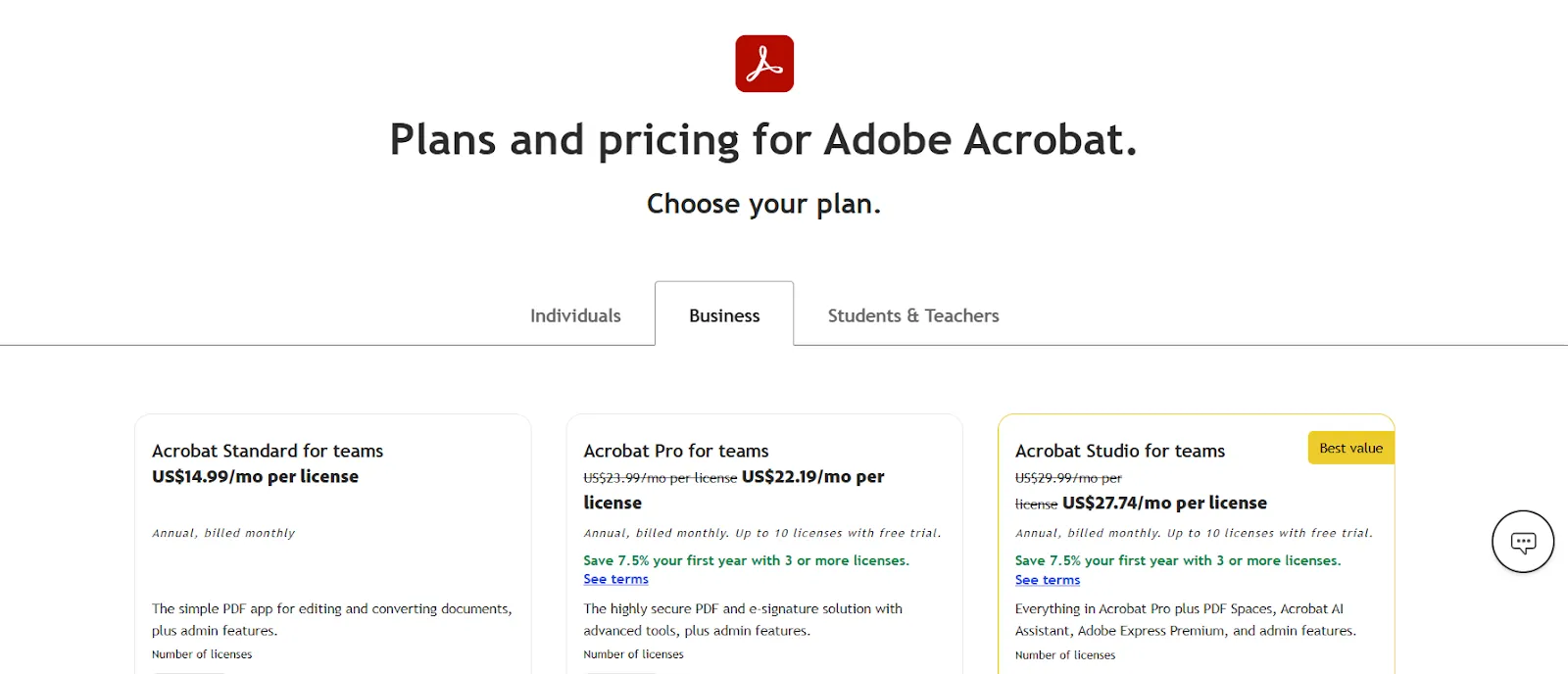
- Acrobat Standard for teams: $14.99/month per license. Basic PDF editing, eSignatures, and Microsoft 365 integration. No web forms, bulk sending, or AI Assistant (costs extra).
- Acrobat Pro for teams: $22.19/month per license. Adds redaction, web forms, bulk sending, OCR, and branding. 7.5% discount for 3+ licenses.
- Acrobat Studio for teams: $27.74/month per license. Includes AI Assistant, PDF Spaces, and Adobe Express Premium.
You should also keep in mind that API access requires custom quotes. AI Assistant is an add-on for Standard and Pro plans.
For a detailed pricing breakdown, see our complete Adobe Sign pricing guide.
Ease of use: Is Adobe Acrobat Sign user-friendly?
Adobe Sign reviews suggest usability depends heavily on the use case. Some use cases find it intuitive, while others struggle with the interface structure and setup requirements.
1. Interface design and onboarding experience
The interface presents users with numerous tools grouped together. One reviewer on G2 noted:

Source
The abundance of features can make simple tasks harder to locate.
Adobe doesn't provide guided walkthroughs for new users. A Capterra reviewer mentioned:
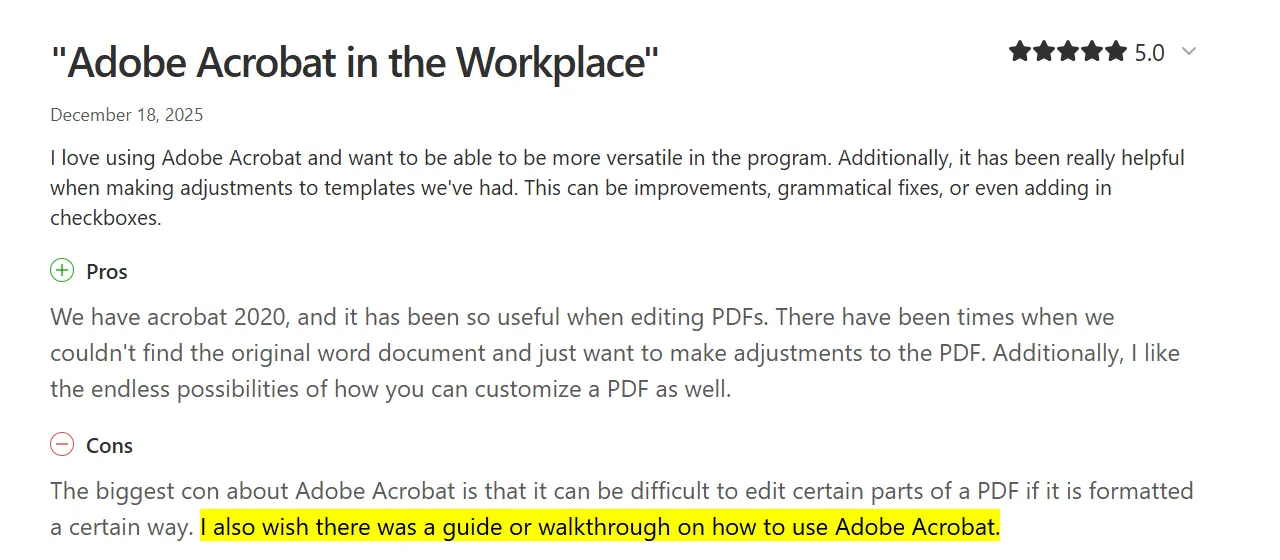
Source
Users rely on customer support documentation or trial-and-error to learn the platform. The rollout takes around 10 minutes according to reviews, though configuring advanced workflows requires additional time.
2. Learning curve for new users
Adobe Acrobat Sign requires significant time investment before users feel comfortable. A G2 review from a staffing firm noted:

Source
Reddit discussions reveal admins struggling to create simple step-by-step guides: "I haven't been able to locate a guide for enterprise users who refuse to figure out how Adobe Sign works and need a step-by-step guide with screenshots."
3. Speed of setup and sending documents
Once familiar with the platform, sending documents is a breeze. Users report completing signature requests in under five minutes. One reviewer stated: "I rely on this more than ten times each week to handle all my document approvals," and praised quick turnaround times.
However, creating new templates or forms from scratch proves time-consuming. A consultant on G2 mentioned:

Source
4. Mobile usability
Adobe's mobile experience receives consistent criticism across Adobe Sign reviews. Users mention slow loading times and limited functionality. A reviewer noted: "Editing PDF documents on a mobile phone can be difficult due to the small screen size, which means you often have to zoom in and out to see the document clearly."
An administrator also shared:

Source
The mobile app works for basic signing but is not optimized for document preparation. A G2 review stated: "The mobile experience isn't as fluid as the desktop version." These mobile limitations repeatedly affect Adobe Sign's rating among users who work remotely.
With Adobe Sign's learning curve and usability covered, let's see how Signeasy handles the same factors.
Adobe Acrobat Sign vs Signeasy feature comparison
Below is a side-by-side comparison of Adobe Acrobat Sign and Signeasy across key features like AI contract insights, mobile functionality, integrations, and authentication options, informed by documented capabilities and recurring user feedback.
Adobe Acrobat Sign comes loaded with reliable features, and many of these capabilities sit behind Pro or Studio paywalls. Need AI tools, web forms, or bulk sending? Prepare to upgrade and pay more.
Signeasy works differently. Essential features like in-person signing, signer attachments, offline access, and AI contract insights come standard across all plans. Contract teams don't waste time comparing tiers or justifying upgrades. Budgets simply stay predictable.
If you need full functionality without constant plan comparisons, Signeasy removes those friction points.
Adobe Acrobat Sign vs Signeasy: Pricing comparison
The table below compares pricing and feature availability across tiers, including differences in AI capabilities, CRM integrations, custom branding, and enterprise security features:
1. What does this mean for you?
- Adobe gates AI contract intelligence behind Studio ($27.74) or requires add-on purchases on lower tiers. Signeasy includes AI in all paid plans starting at $20.
- In-person and offline signing are unavailable on Adobe at any tier. Signeasy provides both features standard on Business plans.
- Adobe Pro costs $22.19 but lacks mobile-focused capabilities like signer attachments. Signeasy Business Pro ($30) adds these features plus HubSpot integration.
- For API access, Adobe requires you to contact sales for custom quotes. Signeasy publishes API pricing: $125/month (1,000 requests) or $250/month (2,000 requests).
- Adobe offers a 7-day free trial. Signeasy provides a 14-day trial plus a 100-day money-back guarantee for extended evaluation.
2. Cost comparison calculation:
- 3-user team: Adobe Pro costs $799.68/year (with first-year discount). Signeasy Business costs $720/year and includes AI features that Adobe charges extra for.
- 10-user team: Adobe Pro costs $2,663/year (first year). Signeasy Business costs $2,400/year with the same AI capabilities built in.
- Enterprise (25+ users): Both require custom quotes, but Signeasy publishes what triggers custom pricing while Adobe's structure remains opaque.
Also Read: Signeasy reviews, ratings, and features 2026
But how easy is Adobe Sign to actually use? Let's look at what reviewers say about the learning experience.
What do users say about Signeasy?
1. Ease of use
Signeasy prioritizes simplicity. Multiple reviews emphasize this strength. One user wrote: "What I like best about Signeasy is its simplicity and user-friendly interface."
Another stated: "Signeasy is really easy to use, and I like how simple it is to upload documents, add signatures, and get them sent out for signing."
The platform requires minimal training. A G2 reviewer noted:

Source
2. Mobile experience
Signeasy provides even performance across devices, with users regularly noting smooth mobile functionality. One reviewer shared:

Source
The mobile app supports full document preparation and signing, and reviews confirm: "Uploading documents, adding signatures, and collecting them works seamlessly on phone or tablet."
3. Setup speed
Implementation goes smoothly, with one user reporting: "Setting up an account takes just a few minutes." Another mentioned: "It's easy to set up, easy to use and gets the job done at a reasonable price."
Integration with business tools proceeds smoothly. A reviewer described:

Source
4. Customization
A G2 user noted: "I especially like their template feature — it can take a little time to set up initially, but once it's ready, it becomes a real time-saver."
The platform allows branding customization and reusable workflows without technical expertise. Users can create signing sequences and automated reminders independently.
Contract management teams evaluating Adobe Sign reviews often compare multiple platforms before committing. For a detailed side-by-side comparison of Adobe Sign with leading alternatives like Signeasy, PandaDoc, Docusign, and others, see our comprehensive Adobe Sign alternatives guide.
Thinking Adobe or Signeasy? Here's how to decide without regret.
Adobe Acrobat Sign vs Signeasy: Which platform fits your business?
Choosing between these platforms depends on team size, industry requirements, workflow demands, and integration needs.
1. Team size and structure
Adobe Acrobat Sign serves large enterprises with complex approval chains and established Adobe ecosystems. Organizations already using Creative Cloud or Adobe Experience Manager benefit from seamless integration. The platform handles enterprise-scale document volumes with centralized admin controls.
However, one G2 reviewer noted the challenge:

Source
Signeasy, however, targets mid-sized to large businesses (50+ employees to enterprise-scale) needing full contract management with seamless deployment. Teams comparing smaller alternatives can also check our Dropbox Sign pricing guide. For a full breakdown, explore our AdobeSign alternative comparison. While being more affordable than Adobe, Signeasy handles complex workflows including multi-step approvals, conditional routing, and department-wide automation.
Teams can deploy quickly without IT involvement, and the pricing structure scales predictably as teams grow, which helps avoid surprise costs when adding users or capabilities. SSO, HIPAA compliance, and advanced security are included as standard in enterprise tiers rather than sold as expensive add-ons.
2. Industry-specific targets
Enterprise healthcare organizations often rely on Adobe Acrobat Sign for regulated workflows such as research documentation. A Sr. Research Regulatory Coordinator confirmed: "Meets strict regulatory standards (HIPAA, FDA 21 CFR Part 11, etc.), which is essential for research and healthcare environments."
Legal teams value features like advanced redaction and certificate-based signatures that support formal review and audit requirements. However, one reviewer noted:
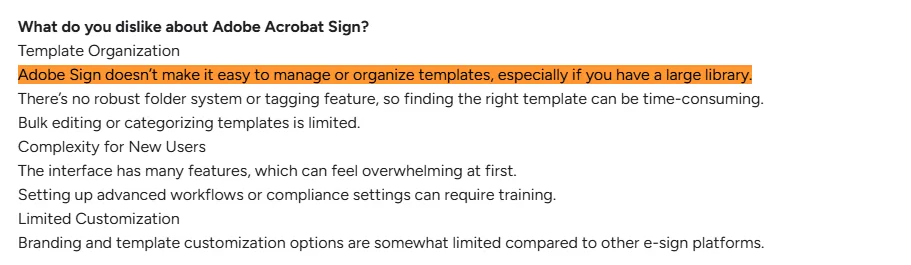
Source
Signeasy is commonly used in real estate, education, insurance, staffing, healthcare, financial services, and professional services. As a dedicated contract management platform built for end-to-end contract workflows, Signeasy handles everything from creation to signing to storage with AI-powered insights.
Agents sign contracts in person while on site, HR teams collect ID proofs and licenses during remote onboarding, and sales teams connect contracts to HubSpot to keep deal progress visible alongside pipelines.
3. When each platform is the best fit
Adobe Acrobat Sign handles scenarios like:
- Extensive PDF editing and document manipulation
- Print production preflight and quality control
- Integration with Adobe's Creative Cloud (Photoshop, Illustrator, InDesign)
- Multi-step approval workflows across departments
The Adobe Sign rating gets its biggest boost from healthcare, legal, and financial services teams that face regular compliance audits. However, these capabilities come at a cost in both pricing and setup effort.
Signeasy serves teams needing purpose-built contract management:
- Real estate agents closing deals on-site with in-person signing on tablets
- Sales reps sending contracts from HubSpot with CRM-native workflows
- Insurance professionals gathering client documents with offline signing capabilities
- Enterprise legal teams managing contracts with AI extraction and Smart Q&A
Features like in-person signing, signer attachments, offline access, and CRM-native workflows come standard across Signeasy's plans. Adobe limits these capabilities to enterprise tiers or does not provide them at all.
For teams focused on contract management, not general PDF tools, Signeasy provides enterprise-grade functionality with simple deployment and transparent pricing.
The verdict is in. Who should buy Adobe Sign, and who should look elsewhere?
Adobe Acrobat Sign review verdict
Adobe Acrobat Sign comes with reliable eSignatures backed by audit-ready security and Microsoft 365 integration. However, Adobe Sign reviews reveal recurring complaints around unclear pricing and steep learning curves that delay team adoption.
Signeasy works best for contract management teams seeking minimal setup time, predictable costs, and features like sequential signing workflows, custom branding options, template libraries, and reusable forms. The platform includes AI contract insights at every tier without forcing upgrades to access baseline features.
Experience how mid-sized contract management teams close deals more efficiently with features that work out of the box. Request Demo.