



.webp)


Average employees lose 3.2 hours weekly to document searches, totaling over 166 hours yearly. That's more than a full work month spent locating files instead of acting on them.
For contract-heavy teams in legal, procurement, HR, and finance, this search burden compounds. A single vendor agreement might require input from three departments, each storing its version in a different location. When the signed copy finally surfaces, it's outdated, or worse, no one can confirm which version was executed.
Contract search and retrieval determine how quickly your organization can act on its own agreements. When locating a document takes longer than reviewing it, every downstream workflow suffers.
In this guide, you'll learn:
- Why traditional search methods fail (and the real cost of inefficiency)
- The four capabilities every contract search system needs
- A step-by-step approach to finding contracts quickly
- Features to look for when evaluating contract search tools
Why traditional contract search methods fail
Most organizations default to storage systems that were never designed for contract search or retrieval:
- Email storage lacks version control. Contracts get buried in threads, and critical agreements disappear when employees leave the company.
- Shared drives suffer from inconsistent folder structures. Without a full-text contract search, finding a specific clause means opening dozens of files manually.
- Spreadsheets for tracking require manual updates that fall behind within weeks. The tracker says a contract exists, but the link points to a moved or deleted file.
- Desktop storage offers zero visibility for team members. If the person who saved the file is unavailable, the contract is effectively lost.
The true cost of inefficient contract search
Considering the same vendor contract, mentioned above, includes a 60-day notice window to renegotiate pricing. Teams are busy looking for the correct version of the contract as different copies are floating around. Approvals stall while everyone waits for confirmation.
By the time it’s finally located, the window has already closed. The agreement auto-renews at a higher rate, locking the company into costs it could have avoided for another year.
Higher costs are just the start. If a renewed contract doesn't meet new regulations, you're exposed legally. Furthermore, if teams can't quickly find the latest terms, they walk into vendor negotiations without leverage, make calls based on outdated clauses, and end up guessing instead of knowing.
That uncertainty chips away at trust, both inside the organization and with partners. What started as a search problem quietly becomes a business risk.
What makes contract search effective?
Effective contract search relies on four core capabilities, such as AI-powered search and a centralized repository. Here’s a closer look at each.
1. Centralized contract repository
A centralized repository creates a single source of truth for all agreements.
Beyond consolidation, a good repository structures access so the right people find the right contracts without unnecessary back-and-forth.
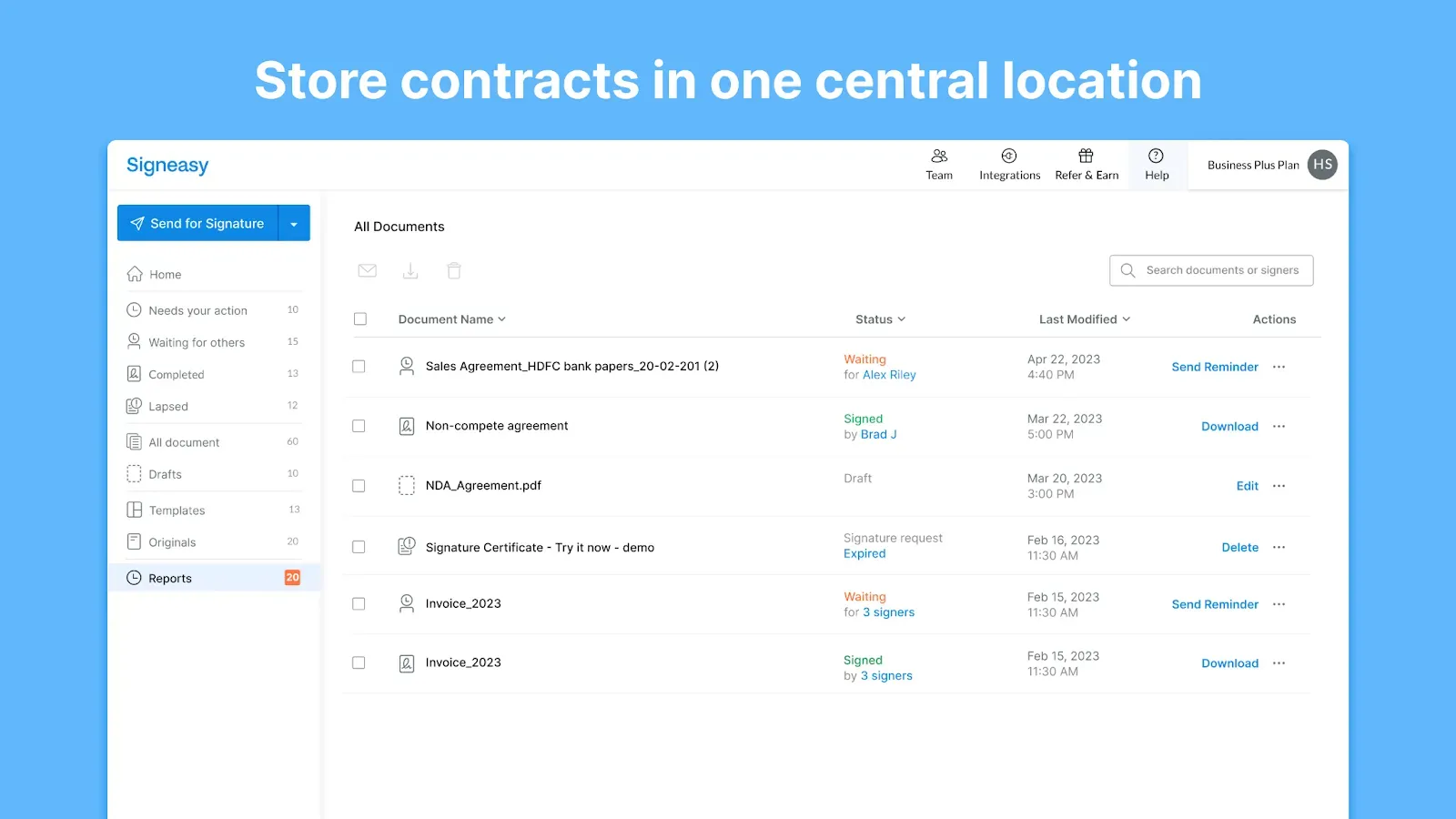
Signeasy's Intelligent Contract Management platform includes an intelligent repository that stores every agreement in a secure, searchable location with proper access to each team. Because contracts sync automatically after signing, teams never lose track of executed documents or wonder whether the latest version made it into the system.
2. Full-text search and OCR technology
A contract saved as "Agreement_ClientName_2024" by one person might be saved as "ClientName_NDA_Final" by another, which makes folder browsing ineffective even when you know roughly where to look.
Full-text contract search addresses this gap by letting you find content inside documents rather than relying on titles. Combined with OCR (Optical Character Recognition) for scanned documents, this capability transforms how teams locate agreements:
- Search for specific clause language like "indemnification" and surface every contract containing it, regardless of file name
- Find party names, dollar amounts, or date ranges across thousands of agreements
3. Metadata tagging and filtering
While full-text contract search helps you find specific language, metadata tagging helps you narrow results before you even start searching.
A well-tagged repository lets you:
- Filter by contract type, status (active, expired, pending), department, or owner
- Sort by contract value, renewal date, or execution date
- Combine multiple filters to answer complex questions instantly
4. AI-powered search capabilities
If you search for "termination" but the contract uses "cancellation," you miss the result entirely. AI-powered contract search moves beyond exact matching to understand intent.
Natural language queries let you search the way you think about contracts. You simply ask questions and get answers:
- "Show me all NDAs expiring in Q1" surfaces relevant contracts based on meaning, not string matching
- "What is the termination clause?" pulls the specific language directly from a document
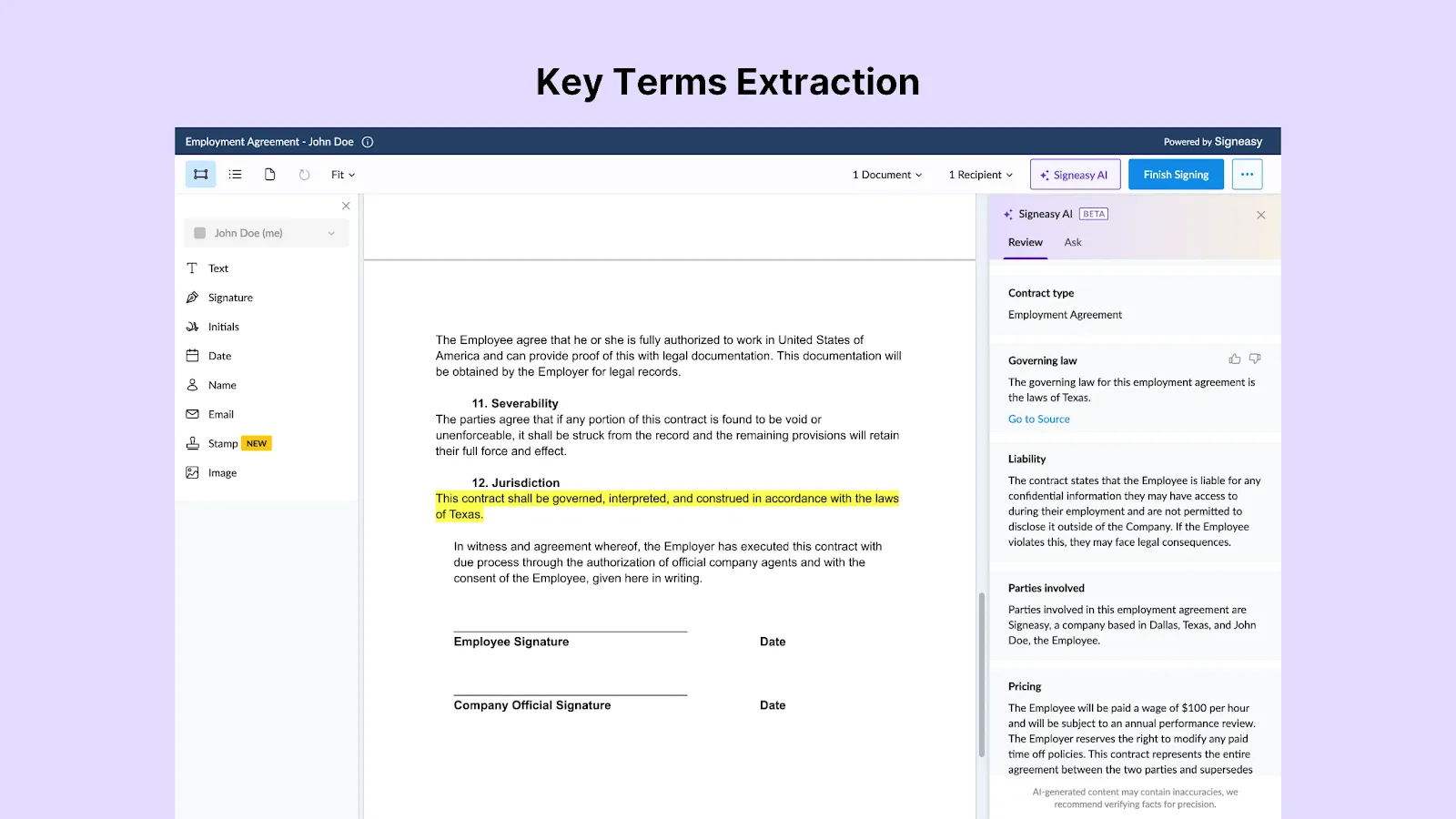
Signeasy's AI features include Smart Q&A for direct question-answering, contract summaries for quick reviews, and key terms extraction that highlights critical obligations. These capabilities shift the retrieval process from hunting through pages toward getting immediate answers.
Suggested read: Signeasy Reviews: Ratings, Pricing, and Key Features
How do you search contracts quickly?
The five steps below create a retrieval process that scales with your contract volume.
Step 1: Consolidate contracts into a single repository
Migration is the first step toward efficient contract retrieval. Pull agreements out of email attachments, shared drives, desktop folders, and legacy systems into one centralized platform.
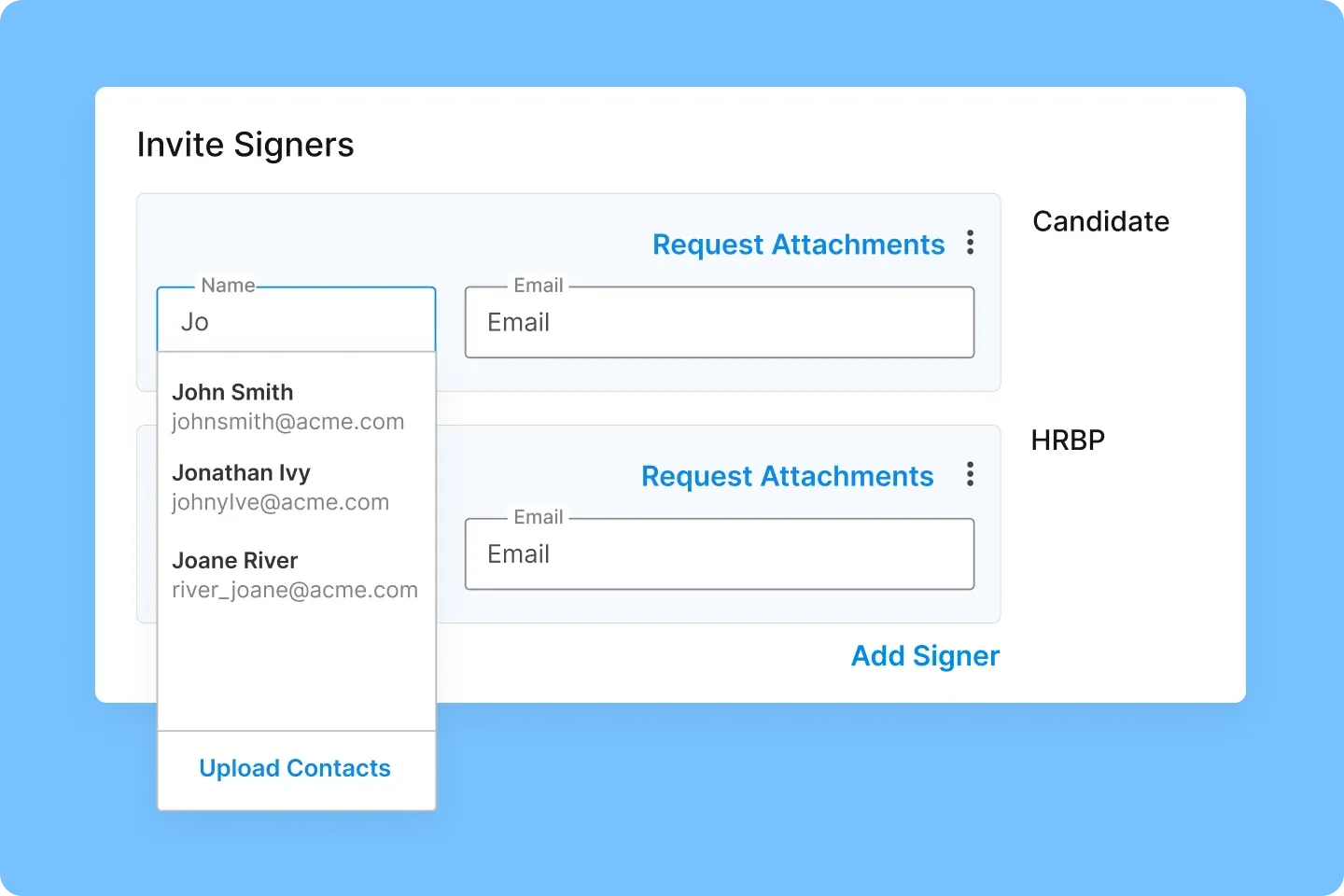
Signeasy makes this migration efficient with Import Contacts. Instead of manually re-entering signer names and email addresses as you move contracts over, you can pull them directly from Gmail or Outlook.
Need to migrate in bulk? Upload a CSV with all your recipient details at once. When you're consolidating hundreds of agreements, that can save hours.
Active and high-value contracts should be prioritized first. These are the agreements your team searches for most often, so centralizing them delivers immediate time savings. Legacy contracts can follow in phases, with OCR ensuring scanned documents become searchable alongside native digital files.
Step 2: Establish consistent naming conventions
File names should tell you what a contract contains before you open it. Strong naming conventions share a few characteristics:
- They include contract type, counterparty name, and date
- They follow a consistent format across all team members
- They avoid vague terms like "Final," "Updated," or "New"
- They make browsing viable even before you use search
Step 3: Apply metadata tags during upload
Tagging contracts at the moment of upload takes effort upfront, but saves hours later. Assigning tags for status, department, contract value, owner, and renewal date as part of your standard upload process ensures every agreement is filterable from day one.
Front-loading this work pays dividends every time someone searches for a contract.
A procurement manager looking for all vendor agreements over $100,000 expiring in Q2 can pull results in seconds when metadata is complete. Without tags, that same query requires manually reviewing dozens of files.
Signeasy supports filtering by contract type, date, department, folder, and sender. Teams can add custom filters and save views for queries they run frequently, which eliminates repetitive search work.
Step 4: Use full-text search for specific queries
When you need to find specific language within contracts, full-text search becomes essential.
The real power emerges when you combine full-text search with metadata filters:
- "Indemnification" + "active contracts" + "over $50K" narrows thousands of agreements to a handful of results
- "Auto-renewal" + "vendor agreements" + "expiring Q2" surfaces contracts that need immediate attention
- Counterparty name + "2025" locates every agreement with a specific partner from the past year
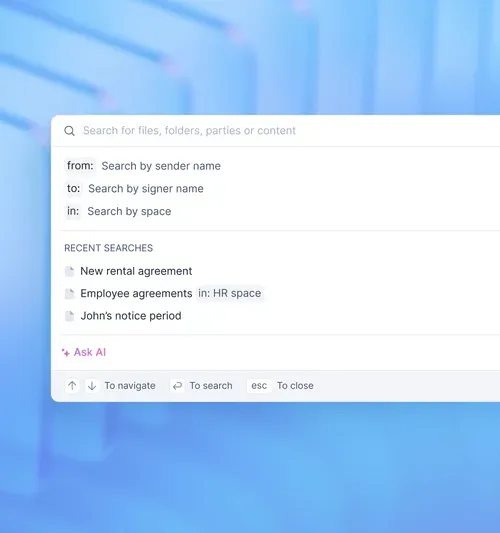
With Signeasy, you can search for files, folders, parties, or content directly. It’s also convenient to filter by sender name, signer name, or workspace. Recent searches are saved for quick access, and the Ask AI option lets you query contracts in natural language.
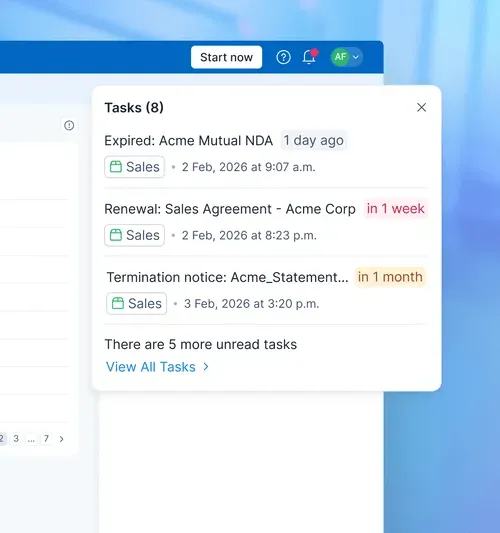
Step 5: Set up alerts for critical dates
Contracts contain deadlines that matter: renewal dates, termination windows, rate escalation triggers, and compliance milestones.
Automated reminders ensure you never miss a deadline because you could not find the contract in time.
Signeasy includes smart alerts that surface upcoming renewals and milestones automatically. You can create calendar events in Google, Apple, or Outlook directly from detected dates, so critical deadlines integrate into your existing workflow.
Essential features for contract search tools
Choosing a contract search tool requires evaluating capabilities that directly impact retrieval speed and accuracy. The table below outlines the core features to assess when comparing platforms.
Suggested read: 8 Must-Have Features for Your Contract Management System
Common contract search mistakes to avoid
Even with the right tools in place, certain habits undermine contract retrieval. Avoiding these mistakes ensures your search system delivers the speed and accuracy you need.
1. Relying on memory instead of systems
Institutional knowledge works until it doesn't. When the person who "knows where everything is" goes on vacation or leaves the company, that knowledge disappears with them.
A searchable system with a consistent structure removes dependence on any single person.
2. Inconsistent or missing metadata
Metadata powers filtering and sorting, but only when applied consistently. A contract tagged "vendor" by one person and "supplier" by another creates gaps during critical searches.
Every untagged contract is a contract that won't appear in filtered results. Garbage in, garbage out.
Suggested read: Top 7 Contract Management Best Practices
3. Ignoring scanned and legacy documents
Many organizations digitize new contracts while leaving years of scanned PDFs untouched. These legacy documents often contain critical terms and renewal dates that remain invisible to search. OCR technology makes them searchable, but only if you process them.
4. Using tools without permission controls
Not every contract should be visible to every employee. Compensation agreements, acquisition terms, and confidential vendor arrangements require restricted access. Tools without role-based permissions expose sensitive information and force employees to sift through irrelevant contracts.
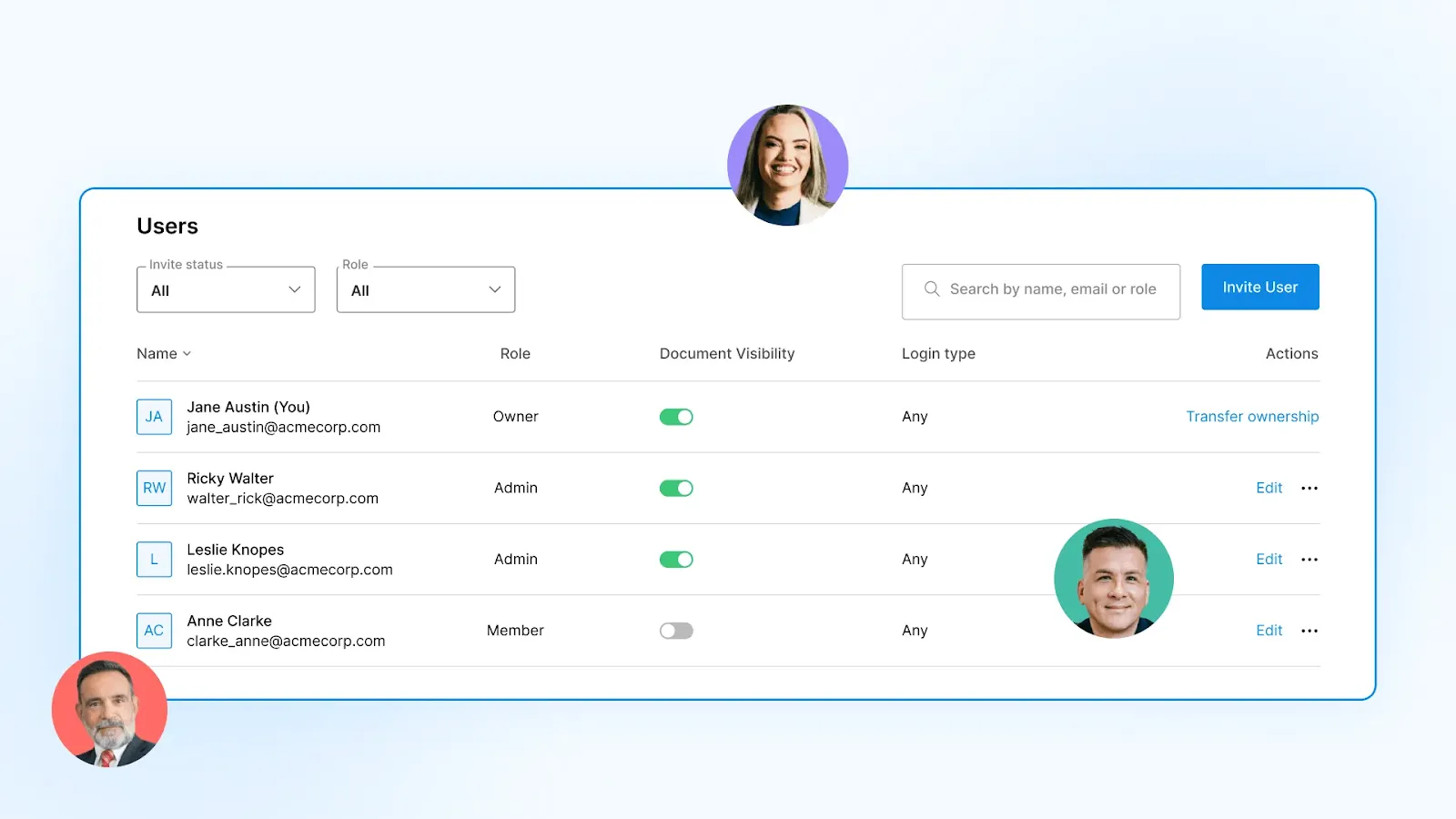
Signeasy's user management with Teamspace features lets admins control access by role, department, or individual, so sensitive contracts stay protected while team members retain visibility into agreements relevant to their work.
Find any contract in seconds
Every hour spent searching for contracts is an hour not spent reviewing terms, closing deals, or catching unfavorable renewals before they auto-execute.
The path to contract retrieval starts with consolidation, continues with structured tagging and naming conventions, and accelerates with tools that search within documents. Organizations that follow this approach transform contract search from a recurring frustration into a non-issue.
Signeasy was built for exactly this. Contracts flow into one searchable location after signing, while Smart Search finds clauses, parties, and terms across your entire library. AI answers questions pulled straight from the document. Smart alerts also flag renewals and expirations before they become expensive surprises.
Start free trial and stop losing hours to contract searches.




