


Nitro Sign reviews point to a tool that handles basic signing well. Clean interface, quick setup, and pricing that sits below tools like Docusign. Where it gets complicated is when volume picks up or integrations become increasingly necessary.
The ones walking away are usually those who needed bulk sending, SSO, or API access and found those features either locked behind higher tiers that require contacting sales for pricing, or those who surmised contract management platforms to be a better investment.

Source
Knowing where those limits sit is what this review aims to answer. We’ll cover:
- What Nitro Sign is and who it is built for
- How its features hold up against real user feedback
- What the pricing looks like across all three plans
- How it compares to Signeasy on features and cost
How we sourced our data
This review draws on Nitro's official website, pricing pages, and product documentation for Nitro Sign specifically. User feedback was sourced from G2, Capterra, Software Advice, and Gartner Peer Insights, covering a range of company sizes and industries.
The evaluation focused on feature depth across all three tiers, pricing transparency, ease of use, and real-world performance in day-to-day signing workflows. The goal is to give you an accurate picture of what Nitro Sign delivers, its limitations included, before you commit to the tool.
What is Nitro Sign?
Nitro Sign is a cloud-based eSignature tool built for individuals, small teams, and midsized businesses. It sits under the broader Nitro product suite alongside Nitro PDF, though the two can be accessed separately. Many users run both, and Nitro often sells them together as part of a bundled workflow.
The platform covers the core eSign use case: sending documents for signature, tracking status, collecting audit trails, and staying compliant under eIDAS, UETA, the ESIGN Act, SOC 2, and HIPAA. It positions itself as a cost-effective alternative to Docusign and Adobe Acrobat Sign for teams that don't need a premium eSign or contract management system.For a detailed breakdown check out our adobesign alternatives.
On paper, the case is easy to make. In use, the picture fills in differently.
Nitro Sign features: A closer look
Hundreds of Nitro Sign reviews across G2, Capterra, and Gartner Peer Insights show where the tool earns its place and where buyers tend to hit unexpected walls, particularly around signing workflows, compliance coverage, and integrations.
1. Signing and document workflows
On the Standard plan, Nitro Sign covers envelope sending, multi-document packages, form fields, audit trail, manual reminders, and sequential signing, with five individual workflow templates included. For individuals and small teams with low-volume, repeatable workflows, this covers most of what they need day to day.
Reviewers generally describe the signing process as quick and easy to navigate at this level. Where the feature list thins out is when teams start pushing beyond basic signing. Bulk send and shared team workflow templates require Plus, while identity verification and advanced signing methods are Enterprise-only.
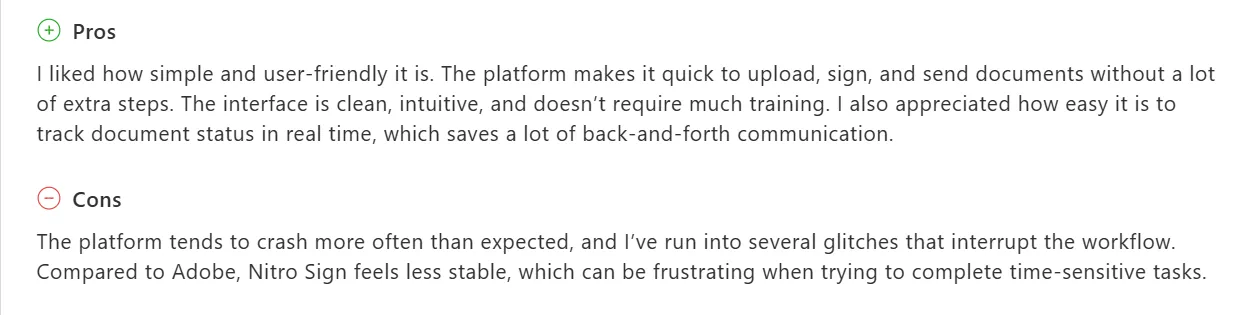
A logistics specialist in government relations noted that uploading, signing, and sending required minimal steps, and being able to check document status in real time meant fewer back-and-forth emails chasing signers.
The same reviewer also flagged recurring crashes and instability as the bigger concern, particularly when working against deadlines.
Source
Another frequent note across Nitro Sign reviews is the field placement experience when preparing documents. One reviewer found adding fields cumbersome. They also flagged that signers sometimes assumed they needed a Nitro account to complete signing, something that tends to surface before the document ever reaches the signer.
Sending a document through is simple. Building one out with the right fields takes more patience than most reviewers expected.
2. Security and compliance
SOC 2, HIPAA, eIDAS, UETA, and the ESIGN Act apply across all Nitro Sign plans. Although ZertES, AES, and QES, advanced signing standards used in regulated industries across Europe, are Enterprise-only. It means teams operating under EU compliance frameworks or industries where identity verification is a legal requirement will need to be on the top tier before those options become available.
Users in regulated industries tend to trust the compliance foundation. A senior accountant in healthcare noted on Gartner Peer Insights that the legally recognized status gave their team confidence to move contract approvals through digital channels without second-guessing the process.

Source
Where some reviewers push back is on access controls below Enterprise.
A reviewer noted the platform lacks granular user permission settings, which becomes a sticking point for compliance-heavy teams needing tighter access management without moving to an Enterprise contract.
Compliance coverage checks most boxes. What it struggles with, based on reviews, is restricting team members internally.
3. Integrations and API
Nitro Sign connects to Google Drive, Dropbox, Box, OneDrive, SharePoint, Microsoft Word, Outlook, and Power Automate. For teams that rely on Salesforce for managing customer relationships or Zapier for automating repetitive workflows between apps, both are available on Plus and above.
For teams already running Nitro PDF, the combined workflow is a practical convenience. Several reviewers mention choosing Nitro Sign specifically because it paired with the PDF tool they were already using, avoiding a separate purchase.
The API restriction is where Nitro Sign reviews show consistent pushback. Teams needing to embed signing into internal apps or systems will find the public API is only available at Enterprise.
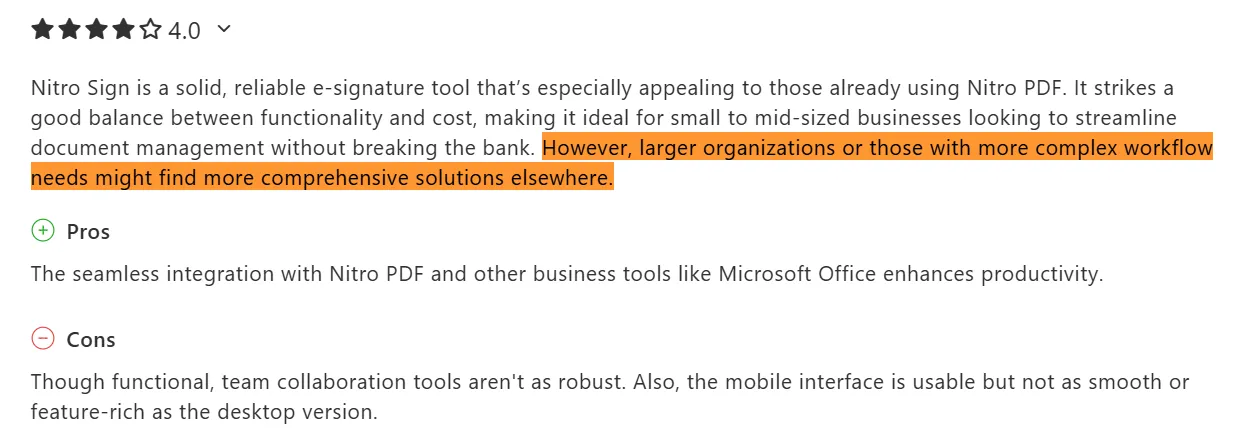
One education reviewer noted the tool handles standard use cases reliably, but organizations with more complex workflow needs may find more comprehensive solutions elsewhere.
Source
Teams that need signing built into their own systems, or deeper connectivity through Salesforce and Zapier, are looking at Plus or Enterprise pricing before they can explore those options.
Nitro Sign pricing and plans
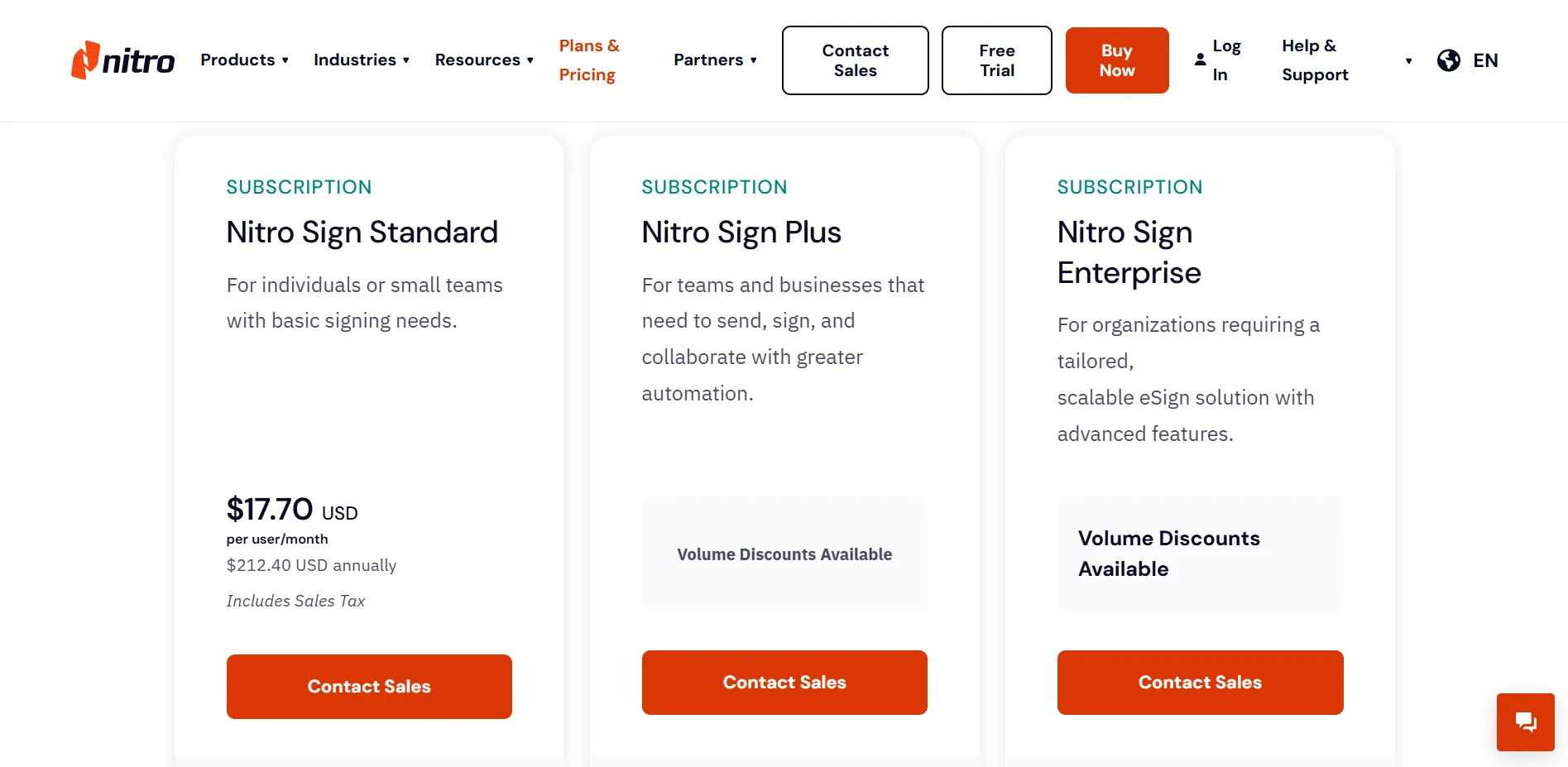
Nitro Sign has three plans: Standard, Plus, and Enterprise. Only Standard has pricing listed publicly — Plus and Enterprise both require contacting sales. Before getting into what each plan includes, there is one pricing model change worth knowing about that has shaped how longer-term users talk about the product.
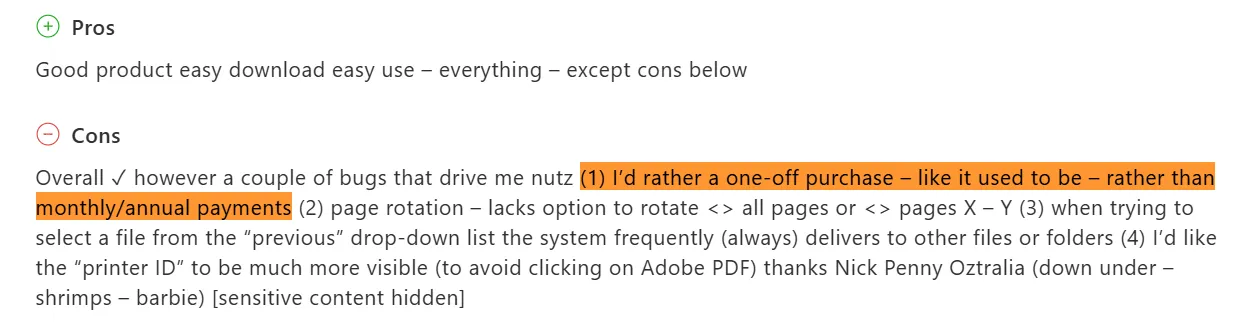
Nitro previously offered perpetual licensing, and the shift to subscription-based pricing is a grievance that runs consistently through longer-term user reviews.
A reviewer on G2 put it plainly, noting that a one-off purchase used to be the appeal, and the move to annual billing changed the value calculation.
Source
With that context in mind, here is how the current pricing structure is structured.
1. Nitro Sign Standard
Standard is billed annually at $212.40 per user, which works out to $17.70 per user per month. The plan includes envelope sending, form fields, audit trails, manual reminders, and sequential signing, with individual workflow templates capped at five.
For individuals and small teams with predictable, low-volume workflows, this works. Teams sending at a higher frequency will feel it.
2. Nitro Sign Plus
Plus requires you to contact sales. Volume discounts are available, but no published figure is listed publicly. Bulk send, custom branding, shared team workflow templates, and SSO are features available from the Plus plan and above. Moving up from Standard is the only way to access them, which is worth knowing before settling on a tier.
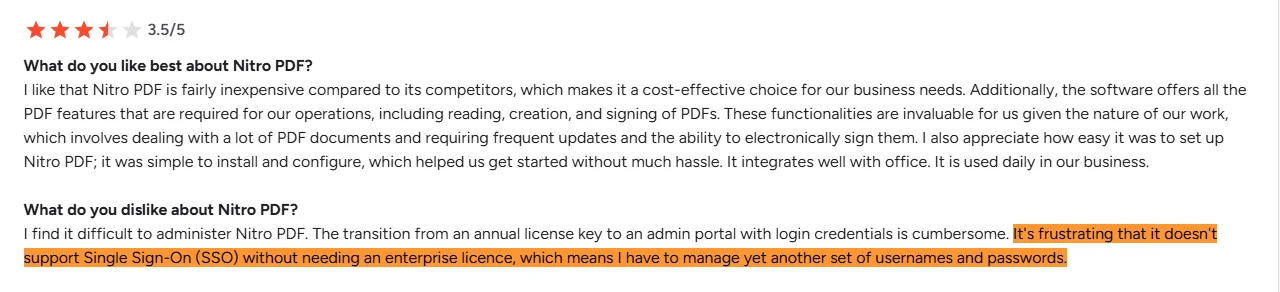
A G2 reviewer flagged SSO specifically, noting having to manage a separate set of credentials because single sign-on sits behind a higher tier.
Source
The bigger issue here isn't the features themselves. It's that the decision to upgrade comes with no dollar figures attached — just a call with sales.
3. Nitro Sign Enterprise
Enterprise comes with fully custom pricing based on the organization's size and needs. API access, identity verification, and advanced compliance standards, including eIDAS AES, QES, and ZertES, are all available at this tier, along with dedicated onboarding and premium support.
Teams needing to embed signing into internal systems or operate under EU regulatory requirements will land here by necessity. Whether Plus justifies the step up from Standard is a separate question entirely.
Is Nitro Sign easy to use?
Reviewers have a lot to say about getting started with Nitro Sign and what day-to-day use looks like.
1. Onboarding and setup
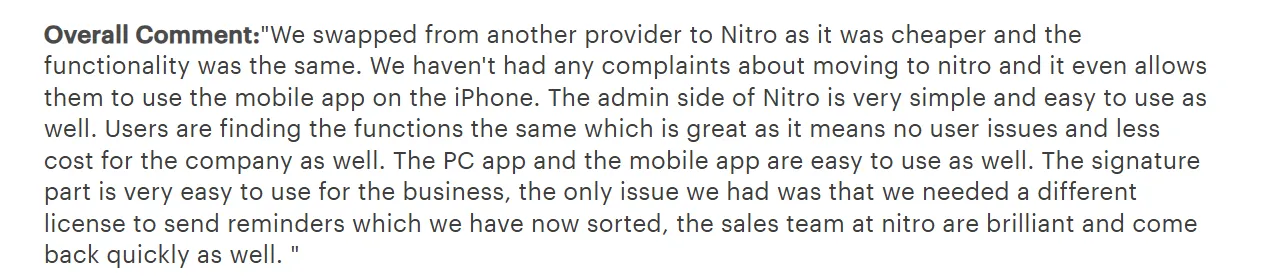
Nitro Sign offers a 14-day free trial with no credit card required. Users describe the initial setup as simple, and the admin side draws particular praise for being smooth to navigate without much technical overhead.
One IT manager noted that users transitioned from a previous tool without complaints, finding the functions familiar enough to get going without hand-holding.
Source
Low onboarding friction is a real advantage for teams switching from Adobe or Docusign who can't afford a long adjustment period. The setup doesn't demand much, and most users are sending documents within the first session.
Getting the most out of it past the basics is where users start investing more time.
2. Interface and day-to-day use
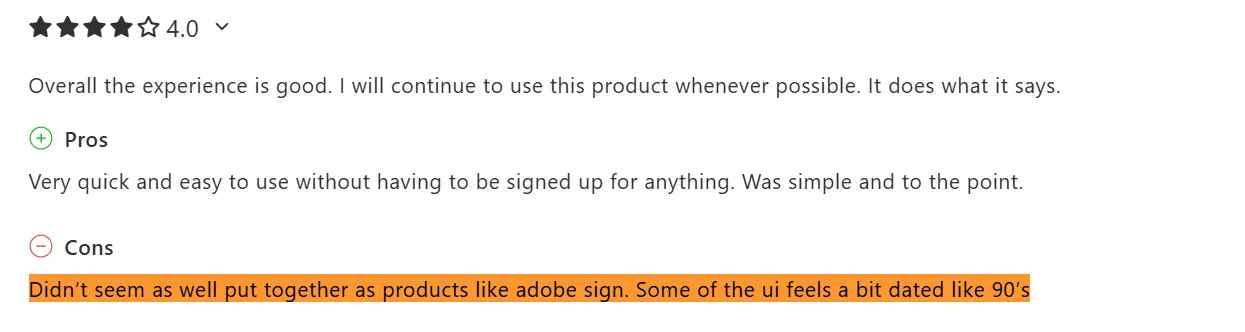
The interface works well enough for routine tasks, though reviewers notice that moving between features is less smooth. One user described the UI as feeling dated, comparing it unfavorably to Adobe Sign and noting it had a look reminiscent of older software.
Source
Performance with large files is another common complaint. Users processing heavier documents report slowdowns that interrupt time-sensitive workflows.
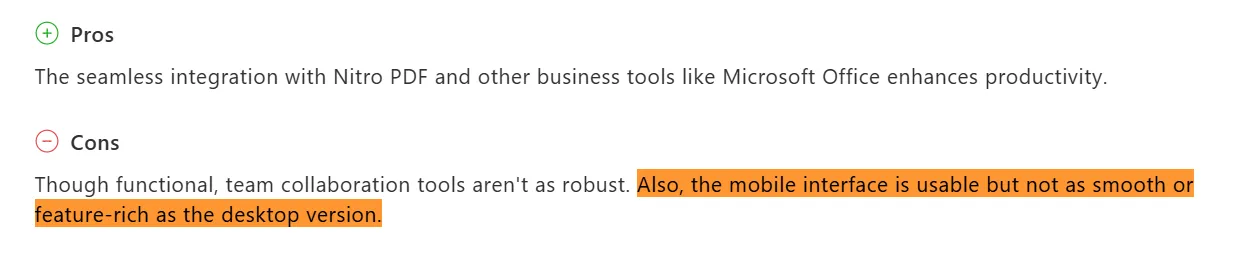
Mac users get a lighter experience than Windows users. The mobile app suggests similar feedback; functional, but noticeably less fluid than the desktop version.
Source
Across devices and file types, the experience holds up best when the task is simple and the document is light.
Nitro Sign vs. Signeasy: Feature comparison
Nitro Sign is built around signing. Signeasy is built around contract management. The table below shows what that difference amounts to at the feature level.
Nitro Sign is a signing tool, not a contract management platform. Signeasy extends into what happens before and after it: contract preparation, AI-assisted review, approval workflows, and repository management. Teams evaluating both as contract management platforms will find that distinction showing up clearly across the mid tiers before either product reaches enterprise pricing.
The table above covers the capability. This next one covers the cost.
Nitro Sign vs. Signeasy: Pricing comparison
Nitro Sign publishes pricing for its entry plan only. Signeasy lists pricing across all three tiers. What each plan actually includes for that price is where the comparison gets specific.
Nitro Sign Standard costs less than Signeasy Business per seat, but Standard is built for basic, low-volume signing. Signeasy Business comes in with unlimited sending, AI contract insights, and team collaboration included.
A team running Signeasy Business pays more monthly than Nitro Sign Standard, though accessing comparable features on Nitro Sign means moving to Plus, where pricing is no longer published.
What do users say about Signeasy?
Signeasy reviews across G2 and Capterra cover a lot of ground. Three things come up the most: ease of use, mobile experience, and customer support. These would be our focus in this section:
1. Ease of use
Signeasy’s ease of use dominates nearly every review. The interface is clean, onboarding takes no time, and most users describe getting their first document out without any IT involvement or training required.
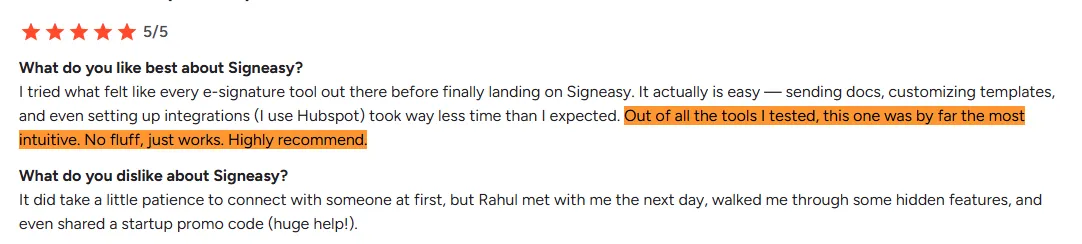
A CEO who tested multiple eSignature tools before settling on Signeasy noted on G2 that sending documents, customizing templates, and setting up integrations took far less time than expected. Out of every tool tested, it was the most intuitive.
Source
That feedback is consistent across industries and team sizes. The interface doesn't ask much of the person on the other end, either; a real advantage when sending contracts to clients or signers who aren't regular software users.
2. Mobile experience
Cross-device performance is another recurring differentiator in Signeasy reviews. Users flag the mobile app specifically as reliable for document preparation and signing on the go, not just viewing.
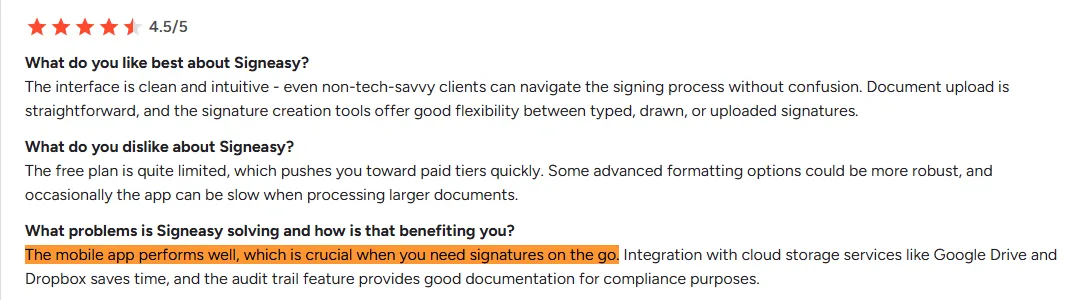
A G2 reviewer noted that the mobile app performed well for client signatures in the field, with cloud storage integrations saving time on document handling.
Source
For teams where signing happens outside the office, this distinction is worth noting.
3. Customer support
Support responsiveness is one of the most frequently praised aspects of Signeasy reviews. Users mention quick responses, proactive reps, and follow-through on product questions.
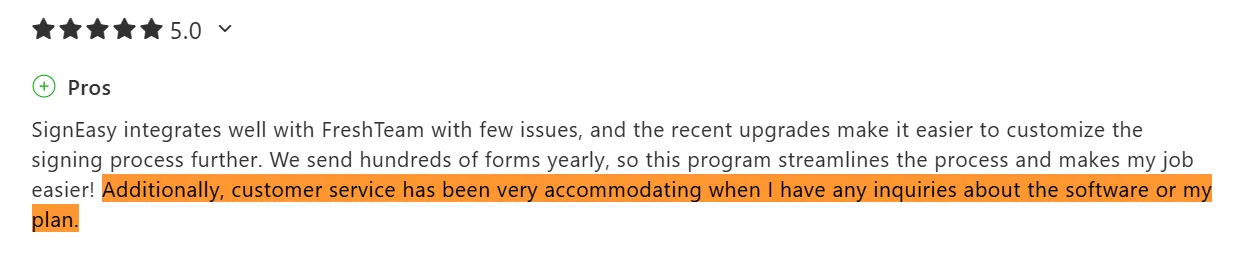
An operations manager at a non-profit noted on Capterra that customer service was accommodating whenever there were questions about the software or their plan, and that the team handled integration issues without friction.
Source
Business Pro users get 24/7 priority support. Users on lower tiers report similar experiences, with multiple reviewers noting quick response times and reps who follow through.
Every section so far has been about what each tool does. This one is about who each tool is for.
Nitro Sign vs. Signeasy: Which platform fits your business?
The right choice between the two comes down to team size, industry, and what you need the tool to handle outside of signatures.
1. Team size and structure
Nitro Sign makes the most sense for teams already running Nitro PDF who want a bundled workflow without a separate purchase. It also earns its place for enterprises in regulated industries where ZertES or QES signing methods are a compliance requirement, not a nice-to-have.
Signeasy fits midsized to larger teams that need self-serve pricing, smoother rollout across departments, and a platform that connects to the tools already in their stack. The tiered eSignature pricing is transparent enough for ops or finance to make a decision without a sales conversation first.
2. Industry-specific fit
Nitro Sign's compliance depth at Enterprise makes it a credible option for EU-regulated industries where identity verification and high-trust signing methods are non-negotiable.
Signeasy tends to fit better across real estate, HR, legal, sales, and healthcare teams that need more than a signing tool. Contract preparation, AI-assisted review, CRM connectivity, and approval workflows make it a practical fit for teams managing contracts end to end rather than just closing them.
3. When to choose each
Nitro Sign is the stronger choice when the Nitro PDF workflow is already in place or when the primary need is basic signing without a significant jump in cost.
Signeasy is the stronger choice for teams that need more than a signing tool, particularly when contract management is the goal. Broader integrations, AI contract insights, in-person signing, and published pricing across tiers give it more flexibility for teams that expect their document workflows to grow.
Most Nitro Sign reviews reflect a tool that handles signing cleanly. Signeasy is built for everything that surrounds the signature — preparation, approval, tracking, and management.
Decide if Nitro Sign is worth your investment
Nitro Sign entry pricing is budget-friendly, and for teams in regulated industries, the Enterprise plan’s compliance coverage is hard to argue with.
The honest Nitro Sign review verdict is that the tool works best when the use case stays narrow. Push past basic signing, and the upgrade path gets expensive quickly, with key features sitting behind tiers that require a sales conversation to even price.
Teams that have outgrown a simple signing tool will find Signeasy covers the broader contract workflow at a price point that stays competitive with what Nitro Sign charges for far fewer features.
If the contract does more than get signed, Signeasy is worth a closer look. Request Demo.