

HR runs on paperwork. Offer letters, NDAs, I-9s, benefits forms — by the time a new hire's first day arrives, a small forest has already been processed. DocuSign for HR helps teams move all of that off paper and into digital workflows, which is no longer optional but essential to how modern teams operate.
Docusign is one of the most widely used electronic signature platforms in this space. Its brand recognition runs deep. Across independent software review platforms, the default recommendation in HR communities is still Docusign. Recipients rarely hesitate when they see the familiar signing process, and that trust has real operational value.
But recognition is not the same as the right fit. As Docusign has evolved toward an enterprise-grade Intelligent Agreement Management (IAM) platform, its pricing model, send limits, and feature set have created real friction for HR departments — particularly growing teams who need to onboard dozens of new hires every month without hitting a ceiling.
In this guide:
- What Docusign for HR does well
- Where it falls short in 2026
- Why many HR teams are making the switch to Signeasy
What is Docusign for HR?
Docusign for HR is a dedicated solution within the Docusign ecosystem designed to manage the full employee lifecycle. Docusign positions this as supporting the hire-to-retire process across four core stages:
- Easier hiring: HR professionals use Docusign to send offer letters, complete background check authorizations, and handle other pre-boarding paperwork through remote, mobile-friendly signing.
- More efficient onboarding: New hires complete their entire new hire document stack digitally — tax forms, direct deposit authorizations, benefits enrollment, and policy acknowledgments — before their first day. Automated routing and reminders eliminate manual follow-up.
- Stronger employee management: Throughout an employee's tenure, Docusign manages recurring HR agreements: salary revision letters, NDA renewals, promotion approvals, and policy updates. Cross-departmental routing reduces bottlenecks when agreements require sign-off from multiple managers.
- More secure offboarding: Departure agreements, IP assignment confirmations, and benefits continuation forms are handled securely, with full audit trails showing who signed what and when. If you encounter issues while using DocuSign for HR workflows, try these 10 fixes for common DocuSign problems in 2026 to resolve common signing and document errors.
Key Docusign features for HR departments
Docusign packages several capabilities specifically for HR use. Here is what the platform offers across the employee lifecycle.
1. Templates
Docusign allows HR teams to build reusable templates for agreements sent repeatedly — offer letters for different roles, standard NDAs, benefits enrollment forms. A template stores the document structure, field placements, and recipient roles so that each new send takes seconds rather than minutes. Template libraries can be shared across the team to enforce consistency.
2. Automated workflows
Docusign's workflow automation lets HR configure multi-step signing sequences. An offer letter might route first to the hiring manager, then to HR leadership, and finally to the candidate — only moving forward after the previous signer completes their action. For approvals that span multiple departments, this eliminates the manual coordination that typically slows down hiring.
3. Audit trail and compliance
Every signed document in Docusign generates a certificate of completion — a tamper-evident record that logs each signer's name, email address, IP address, timestamp, and geolocation.
Docusign meets ESIGN, UETA, and eIDAS legal standards, making signed documents legally binding in the US, EU, and most global markets.
4. Mobile-friendly signing
Candidates and employees can sign from any device — mobile, tablet, or desktop — without installing any software. This matters most for hourly workers and field employees who complete onboarding on personal phones rather than company laptops.
5. HRIS integrations
Docusign integrates with more than 1,000 pre-built connectors, including Workday, ServiceNow, iCIMS, Oracle, and Greenhouse. HR professionals can trigger signing workflows directly from their existing HRIS, so signed documents flow back into the system of record automatically.
HR use cases for Docusign
Docusign is used across every stage of the employee lifecycle. These are the most common workflows HR teams run on the platform.
1. Pre-employment and hiring
Recruiters use Docusign to send offer letters within minutes of a verbal acceptance. Background check authorization forms, drug screening consents, and reference check releases can be bundled into a single envelope so candidates complete everything in one session. The mobile-friendly experience means a candidate can accept an offer on their phone during their commute home from the interview.
2. Employee onboarding
New hire paperwork is one of the highest-volume use cases in HR. A typical new hire packet includes federal tax forms (W-4), state withholding forms, and I-9 employment eligibility verification. Add direct deposit authorization, emergency contact forms, benefits enrollment, and standard policy acknowledgments, and the volume adds up fast.
Docusign automates the sequencing and tracking of all of these, sending automated reminders to incomplete signers and giving your team live visibility into outstanding items.
3. Ongoing employee management
Throughout the employment relationship, people operations teams generate a steady flow of agreements: salary revision letters, promotion letters, performance improvement plans, amended benefit elections, and policy update acknowledgments. Docusign stores these in a searchable repository and ensures that every update has a signed record.
4. Compliance documentation
HR departments in regulated industries — healthcare, finance, education — use Docusign to manage compliance records such as HIPAA acknowledgments, code of conduct certifications, and conflict of interest disclosures. The audit trail provides evidence that each employee received and signed the required agreements.
5. Offboarding
Exit interviews, separation agreements, non-disparagement clauses, IP assignment confirmations, and COBRA continuation notices all require acknowledgment at the end of an employment relationship. Docusign manages these sensitive agreements with the same security and audit trail as any other document type.
Docusign for remote and hybrid workforces
Remote work made the case for electronic signatures undeniable. When employees are distributed across cities, countries, and time zones, paper-based signing processes break down entirely.
Docusign addresses this by enabling fully asynchronous signing. An HR manager in Austin can send an offer letter to a candidate in London at 9 AM. The candidate signs on their phone by noon, and the completed document is in the HR system before the end of the business day — no printing, scanning, or follow-up calls required.
Hybrid teams benefit from Docusign's SMS and WhatsApp delivery options, which help reach employees who check their phones more reliably than their work email. This removes the traditional friction of forms sitting unread in inboxes for days.
Signeasy supports the same fully remote signing experience across all devices, with no software installation required. Cross-device support is built in for iOS and Android, making it practical for both desk-based staff and field employees. However, if you experience issues with signing or accessing documents, knowing how to troubleshoot DocuSign not working can help minimize workflow disruptions.
Docusign HR pricing
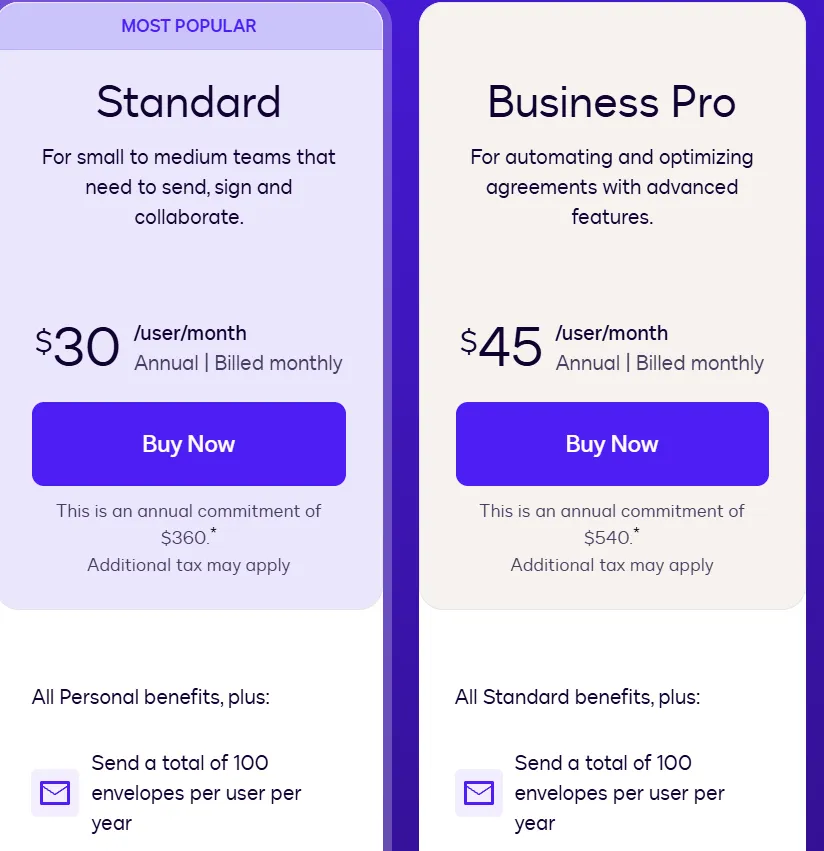
Docusign pricing tiers are structured as follows.
If you're wondering, is Docusign free, it offers a free account with limited signature requests, while paid plans provide access to more features and higher usage limits. For HR professionals, the send limits in mid-tier plans deserve close attention.
The Standard plan's 100-envelope annual ceiling is an immediate constraint for any growing team. An HR generalist at a company hiring 20 people per month — each with a five-document new hire packet — will exceed that limit in the first week.
When limits are reached, Docusign charges overage fees per envelope depending on the plan. These fees are not always surfaced up front; users typically discover them at renewal or when reviewing monthly statements.
In 2025, Docusign launched its Intelligent Agreement Management (IAM) platform — a higher-tier layer that bundles AI-powered agreement analysis, workflow automation via Docusign Maestro, and a smart document repository called Docusign Navigator.
IAM plans sit above the standard eSignature tiers and are built primarily for large enterprise teams managing complex, high-volume agreement operations.
Docusign for HR: Limitations to consider
Docusign works well for many teams, but several characteristics create real friction for mid-sized HR departments in 2026. These are the patterns that come up most consistently in user reviews.
1. Send limits constrain high-volume HR operations
The Standard plan's 100-envelope annual cap is the most consistently cited operational problem among mid-sized HR teams. HR is a high-volume function by nature — a company scaling from 50 to 150 employees in a year processes hundreds of signed agreements.HR teams can better understand their sending limits by learning how a DocuSign envelope works. Teams that stay on standard plans either absorb significant overage fees or limit document volume, which undermines the efficiency gains automation was meant to deliver.
2. Pricing increases at renewal
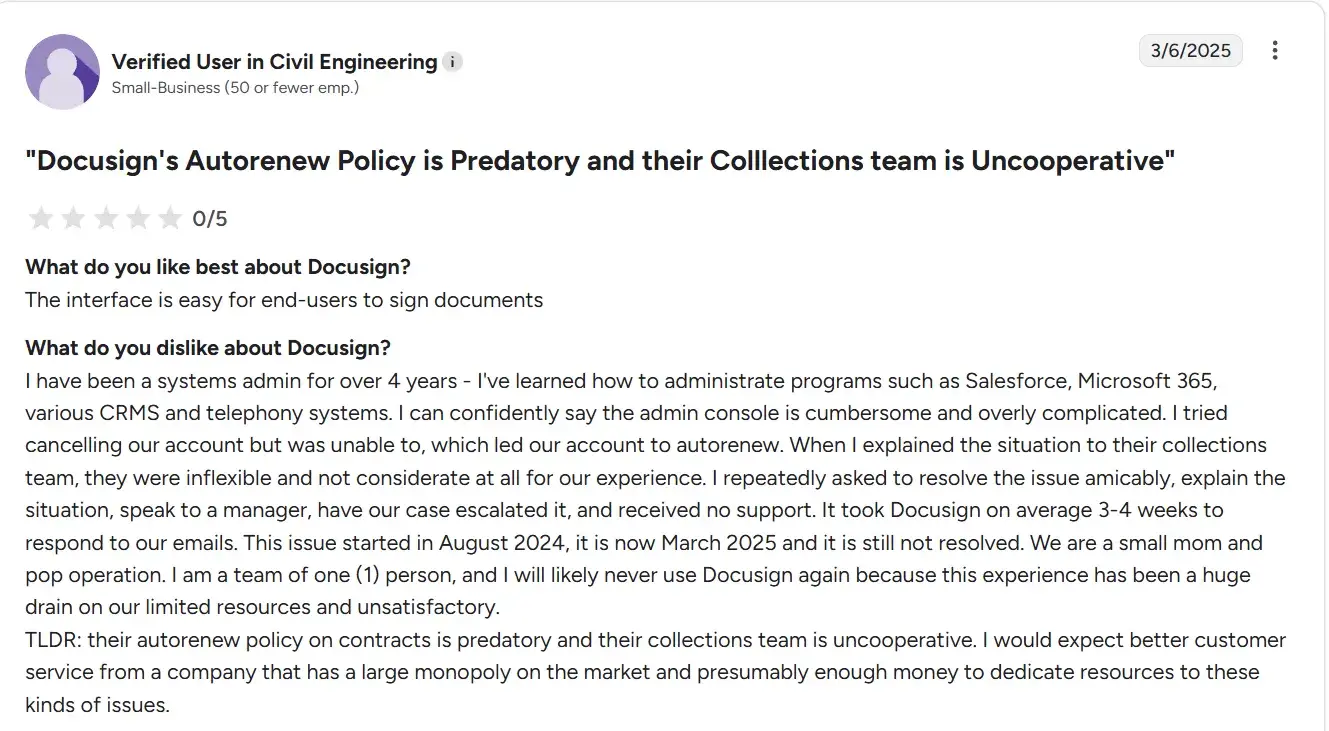
Users of Docusign review on G2 and Capterra consistently report that Docusign's renewal pricing increases without advance notice, creating budget surprises for HR departments operating under fixed headcount costs.
3. Feature set can slow adoption
Docusign has evolved significantly toward enterprise agreement management, adding Maestro workflow automation, the Navigator document repository, and IAM platform capabilities. These serve large legal and procurement teams well. For an HR team that primarily needs to send, sign, and store employment agreements, new coordinators typically require dedicated training before using the platform independently. Teams frequently report using a small subset of available capabilities.
4. Advanced features sit behind higher tiers
API access for integration with platforms like Workday, advanced workflow automation, and Single Sign-On (SSO) all require Business Pro or Enterprise plans. For HR teams considering custom integrations, Docusign API pricing is another factor to consider, as API access and usage can involve costs beyond the standard eSignature plans. Smaller HR teams that want integration with existing systems without purchasing a full enterprise contract can end up paying for capabilities well beyond their actual use case.
5. Additional costs add up
Beyond send limit overages, users report that advanced reporting, custom branding, identity verification add-ons, and dedicated integrations each carry additional fees. The true total cost for a mid-sized HR team is frequently higher than the stated plan price.
A simpler alternative: Why HR teams choose Signeasy
Built for growing businesses, Signeasy is an AI-powered contract management and eSignature platform that helps HR, legal, and operations teams manage the full document lifecycle without the overhead or cost of heavyweight CLM systems. For HR teams considering a docusign migration, Signeasy provides a simpler way to manage document workflows while keeping signing and contract management in one place.
It is optimized for getting agreements signed quickly and reliably, with minimal onboarding — designed specifically for teams that need results without a steep learning curve.
1. Unlimited document sends on all Business plans
Signeasy's Business plans include unlimited document sends with no annual caps and no overage fees. HR professionals processing high volumes of new hire paperwork will find this a fundamental operational difference. There is no need to limit document volume, no unexpected charges, and no sales conversation required when hiring activity increases.
2. Purpose-built HR workflows
Signeasy's workflow automation allows HR teams to build multi-step signing sequences — routing an offer letter through the hiring manager, department head, and candidate in sequence — with automated reminders at each stage. Teams across HR, legal, and finance can access and manage agreements within their own context, with role-based permissions controlling visibility.
HR teams also get a centralized contract repository with real-time tracking and renewal alerts, so nothing slips through at offer, onboarding, or offboarding stage.
3. AI-powered contract review
Signeasy AI helps HR teams extract key terms, generate contract summaries, and ask questions about document content, reducing manual review time before sending offer letters, NDAs, or policy acknowledgments. Available on Business plans and above.
4. Reusable templates for the full employee lifecycle
Signeasy's template library lets HR teams build reusable document formats for every recurring agreement: offer letters, NDAs, benefit enrollment forms, performance review acknowledgments, and exit agreements. Templates store field placements and recipient roles, so sending a standard document takes seconds. Teams can share templates across the department to ensure consistency.
5. Legally compliant and secure
Signeasy is certified under ESIGN, eIDAS, GDPR, HIPAA, SOC 2 Type 2, and 21 CFR Part 11. Making it an docusign for legal that need to meet compliance requirements. Every signed document generates a tamper-evident audit trail with detailed signer and activity records. Security controls include multi-factor authentication, built-in encryption, and role-based access.
For HR teams in healthcare, finance, or education, this means signed agreements hold up in audits and meet legal requirements without additional compliance overhead.
6. Straightforward onboarding for HR teams
HR coordinators can send their first document within minutes of account setup. In organizations where staff turns over frequently, or where the platform needs to be used by non-technical managers across departments, this simplicity reduces onboarding friction and drives faster adoption across the team.
7. Integrations with tools HR teams already use
Signeasy integrates with Google Workspace, Microsoft 365, HubSpot, and cloud storage platforms including Google Drive, OneDrive, Dropbox, and Box. No app switching needed — prepare, send, and manage agreements from within the tools your team already uses.
8. Transparent, predictable pricing
Signeasy's pricing plans start at $10/user/month. Business plans and above include unlimited document sends with no hidden caps to track. HR departments managing fixed budgets will find cost planning significantly more straightforward than Docusign's tiered send model
Docusign for HR vs. Signeasy: The bottom line
Docusign for HR is a well-built platform with genuine strengths. Its audit trail, mobile-friendly signing, template system, and 1,000+ HRIS integrations cover the full hire-to-retire lifecycle, and its brand recognition means candidates and employees engage with the signing process without hesitation. For large enterprise teams that need deep agreement management across legal, procurement, and HR, it delivers.
Where Docusign creates friction is for growing HR teams. Send limits that cap mid-tier users at 100 envelopes per year, overage fees that surface without warning, and renewal price increases that catch HR budgets off guard are not edge-case complaints. They are consistent patterns across independent review platforms. As Docusign continues to build toward enterprise IAM, mid-sized teams are increasingly paying for capabilities they do not need.
Signeasy is built for exactly that gap. It offers AI-powered contract management, unlimited document sends on all Business plans, purpose-built HR workflows, and certification under ESIGN, eIDAS, GDPR, HIPAA, and SOC 2, without the overhead. Templates, sequential signing, automated reminders, and integrations with Google Workspace, Microsoft 365, and HubSpot are available out of the box, at a price that does not change at renewal without notice. If you are looking for more options explore our adobesign alternatives page .
If your HR team is hitting Docusign's ceiling, or simply wants a platform that scales with your hiring without scaling your costs. Start free trial or request demo to see Signeasy in action.