





Nine times out of ten, a delayed contract traces back to one thing: someone wasn't in the loop. That's the core problem a collaborative contract management tool is designed to fix. If different departments are stuck in email threads with no shared view of what's pending, a one-week contract easily turns into three.
It's more common than most teams admit.
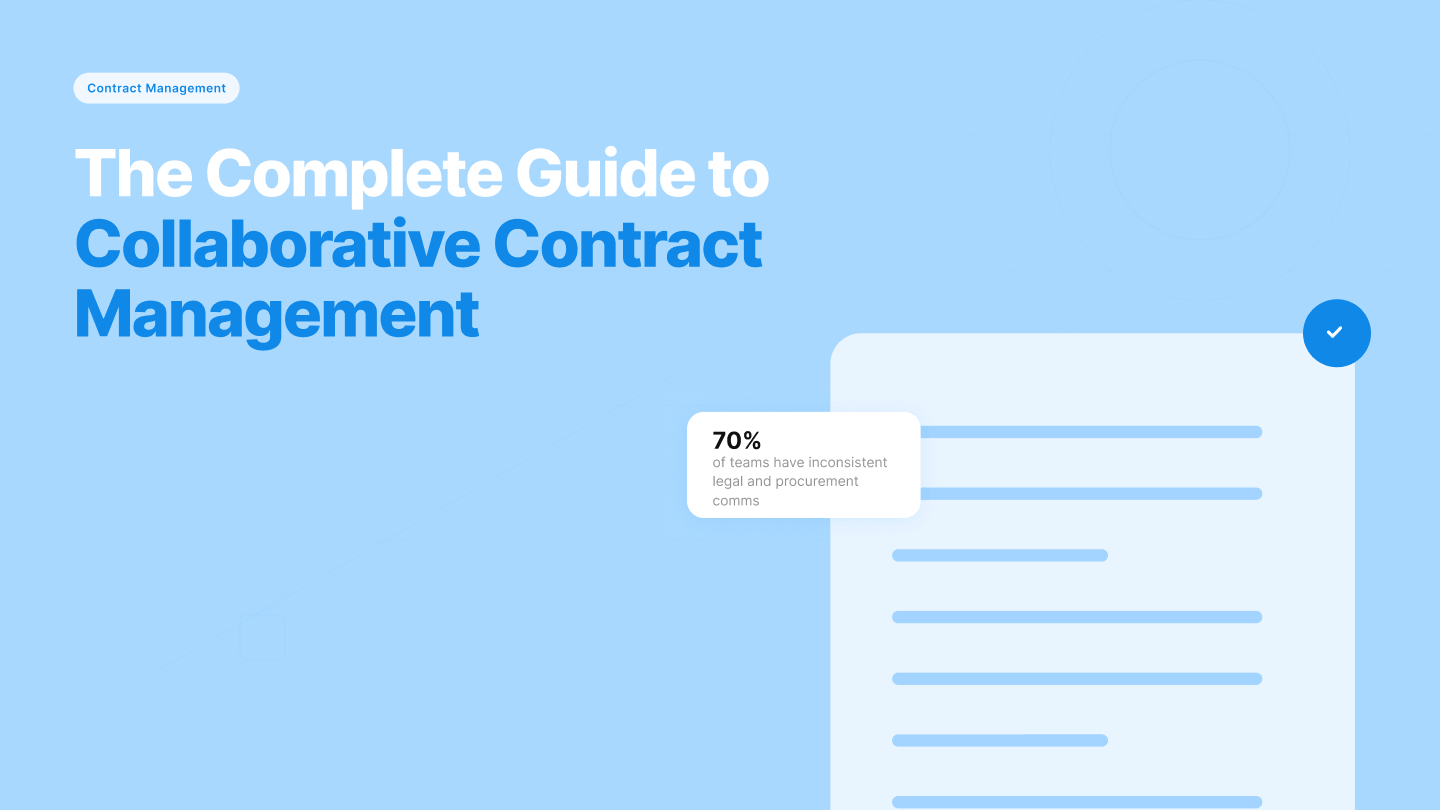
A January 2026 WorldCC report found that roughly 70% of organizations have inconsistent communication between legal and procurement, with only 15% sharing contracting technology between those teams. At that level of disconnection, every pending approval turns into a waiting game, and the right contract collaboration software changes that.
What this guide covers:
- What a collaborative contract management tool is and how it works
- Key features that separate capable platforms from lightweight ones
- Who needs to be involved and where collaboration breaks down
- How to evaluate tools and what Signeasy brings to the table
How we sourced our data
We drew on independent industry research, including WorldCC's 2025 contract management whitepaper, WorldCC's 2026 procurement-legal research, and Deloitte's 2025 Global CPO Survey. The goal was a grounded view of what's actually working in cross-functional contract collaboration today.
What is a collaborative contract management tool?
A collaborative contract management tool is a platform that lets every team involved in a contract work from one shared workspace.
It's not a standalone eSignature tool, which only handles the final step. It's also not a full enterprise CLM, built for complex, high-volume operations with a steep implementation cost. It sits between both.
On a practical level, that includes:
- Shared templates and approval sequences visible to all stakeholders
- Real-time status tracking across every stage of the contract
- Integrations with tools different functions already use
- A central repository where every contract version lives
Those four capabilities are what puts a contract collaboration platform in a different category from both.
Plenty of teams ask whether they really need a tool for this. Here's our answer.
Why do teams need collaborative contract management?
Because contracts already cross every team in your organization, and the infrastructure just hasn't caught up.
For example, a vendor agreement starts in procurement, gets reviewed by legal, needs a finance sign-off, and lands on an operations desk before anyone signs. Each of those handoffs is a chance for a version conflict, a missed comment, or an approval sitting unread in someone's inbox.
WorldCC's August 2025 contract management whitepaper puts it plainly: the average organization manages contract data across 24 different systems. That's a visibility problem, and it compounds with every agreement your team sends.
Teams that address this gap perform measurably better. Deloitte's 2025 Global CPO Survey found that organizations investing in the right technology and processes met or exceeded their cost savings goals at a rate of 96%, compared to 80% for those that hadn't.
Contract collaboration tools don't change how contracts work. They change how teams work around them, giving every stakeholder a shared line of sight so nothing moves without the right people knowing.
Every platform in this category claims to deliver this. The feature set tells you which ones can.
Key features of collaborative contract management tools
Five capabilities separate a collaborative contract management tool from a basic signing tool: shared templates, sequential signing, signer attachments, intelligent contract management, and integrations with existing business tools. Let’s break them down.
1. Shared templates and in-flight editing
A good platform lets different functions work on the same contract without emailing versions back and forth. Shared templates give teams a consistent starting point, pre-approved language included.
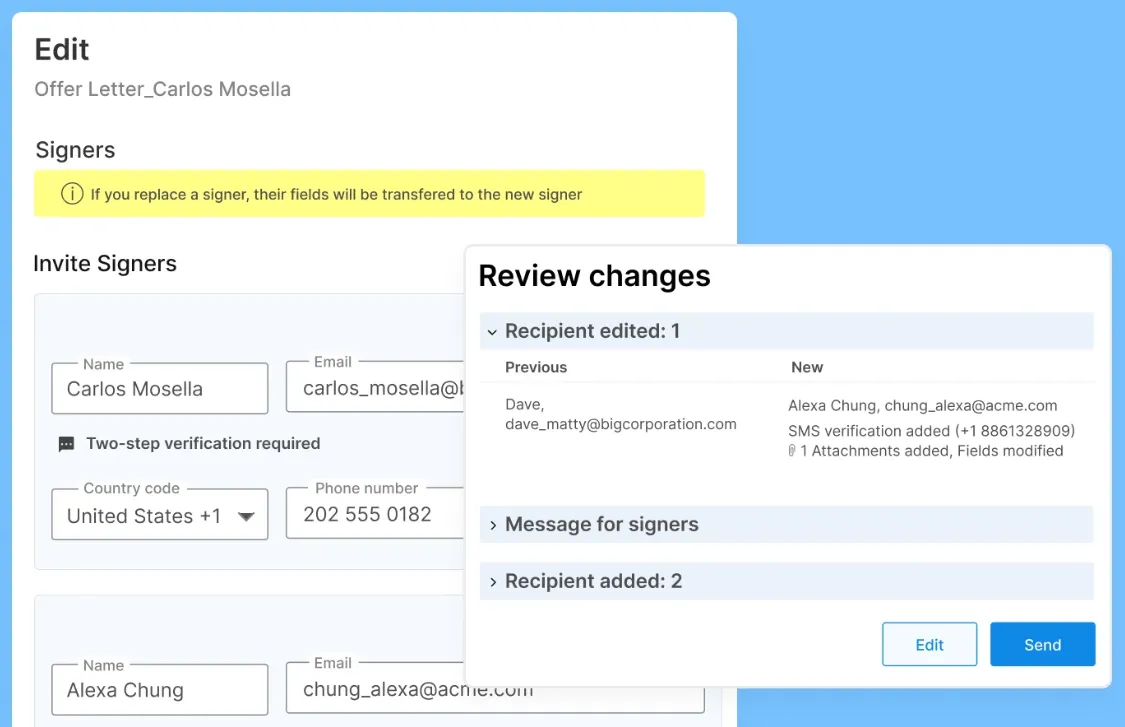
In-flight editing means teams can modify signer details, add or remove signers, and update contracts mid-process without restarting the workflow from scratch. Every change gets logged in the audit trail automatically, so the right people stay informed and nothing happens without a record.
2. Sequential signing and role assignment
Collaboration breaks down when nobody knows who acts next. Sequential signing solves that by routing a contract to each stakeholder in a defined order — legal first, then finance, then the signatory — so nothing moves forward until the right person has taken action.
Role assignment on the other hand goes a step further, giving each participant a specific function in the workflow. Approver, reviewer, signer. No ambiguity or overlap.
3. Signer attachments
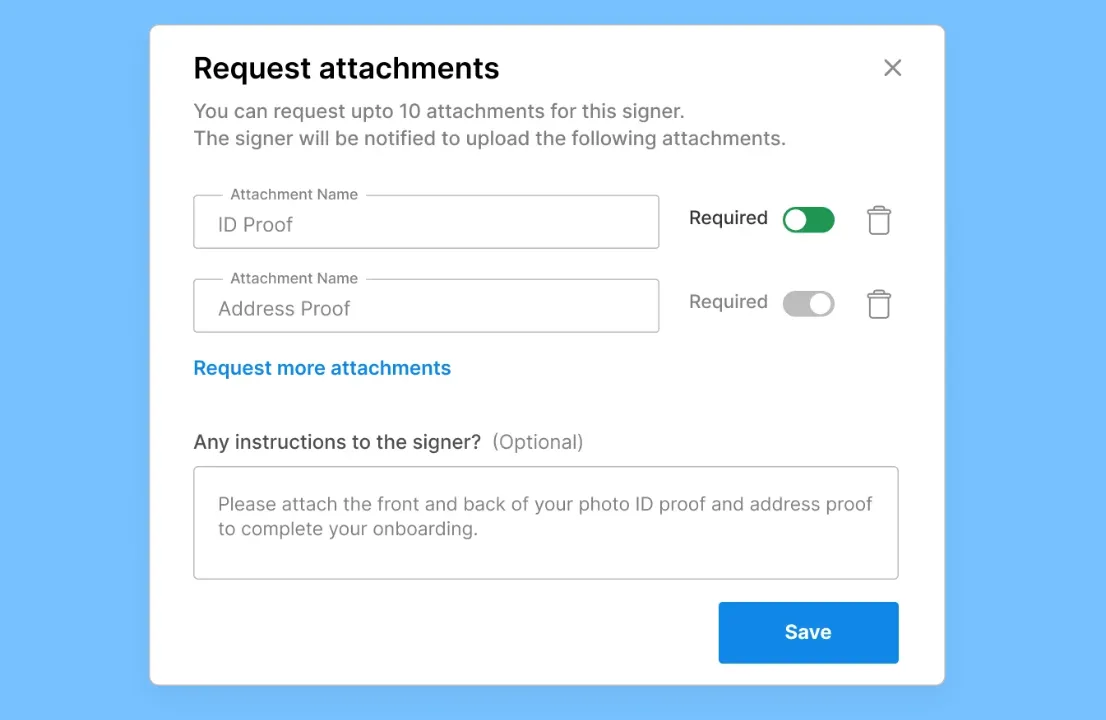
Getting a contract signed is rarely the whole picture. HR needs a new hire's ID, legal needs a compliance certificate, even procurement needs proof of insurance. Without a structured way to collect these, teams fall back on email threads and follow-up messages that drag the process out.
A collaborative contract management tool handles this inside the signing workflow. Signeasy lets teams request up to ten supporting documents alongside a signature, mandatory or optional. Everything arrives together, reviewed and stored in one place.
4. AI-powered contract management
This is where collaborative contract management tools have moved furthest in the last two years. Signeasy's AI, for example, generates contract summaries to surface key dates, terms, and obligations instantly. It extracts critical clauses automatically and lets team members ask questions like "what's the termination clause?" and get answers pulled directly from the document.
Shared views flag contracts that need team attention, and AI-extracted key dates feed directly into renewal reminders so nothing expires without notice. The practical effect is that reviewing a contract no longer requires reading every line of it.
5. Integrations with existing tools
A collaborative contract management tool only works if teams actually use it. That means it has to fit where work already happens. Native integrations with Google Workspace, Microsoft 365, and HubSpot let different functions initiate, review, and sign contracts without switching platforms. Sales teams close from their CRM. Operations teams track from SharePoint. HR teams manage from within their existing workflow.
Before moving on, let’s cover who really needs access to a contract collaboration tool.
Who should be involved in contract collaboration?
Six teams have a direct stake in how contracts move, and leaving any one of them out is usually where things go wrong. Contract collaboration isn't a legal function. It's more of a cross-functional one.
- Legal reviews language, flags risky clauses, and approves terms before anything gets signed. Give them a shared workspace and they stop being the last person everyone is waiting on.
- HR sends more contracts than most teams expect, offer letters, NDAs, employment agreements, contractor terms. When a new hire's paperwork is stuck in someone's inbox, onboarding pays the price.
- Procurement manages vendor agreements, tracks supplier obligations, and owns renewal timelines. A missed renewal date on a key vendor contract is rarely a mistake. It's a visibility gap.
- Finance watches payment terms, auto-renewal clauses, and cost obligations across every active agreement. A contract that quietly auto-renews at last year's rate is a finance problem that started upstream.
- Sales lives and dies by contract turnaround. Every day a signed order form is pending is a day a deal isn't closed.
- Operations needs to know what's been agreed before they can deliver on it. Timelines, vendor terms, service levels, all of it.
Knowing who should be at the table is step one. The harder part is making the collaboration work once they're there.
What gets in the way of contract collaboration, and how to clear it?
The honest answer to why contract collaboration breaks down isn't what teams do wrong. It's what contracts were designed to be. For most of their existence, contracts have been treated as endpoints, legal artifacts that exist to be finalized, signed, and filed.
The workflow that produces them has always been a means to an end. That assumption quietly shapes (almost) every tool, process, and team habit around contracts, and it's the root cause of three patterns that keep showing up across organizations of every size.
1. Late involvement
Teams get pulled in at the wrong stage:
- Legal sees a vendor contract two days before the counterparty expects a response
- Finance discovers an auto-renewal clause after the invoice hits
- HR finds out a contractor's terms are non-standard only when payroll flags them
The fix isn't a new approval layer. It's building a workflow where every team that will eventually touch a contract gets a seat in the process from the beginning. Collaborative contract management tools make that possible by giving each function a defined entry point, not an email forward.
2. Ownership diffusion
When a contract moves through five functions, it technically has five owners and practically has none. The gaps between owners are where renewals disappear, obligations slip, or version control collapses. Clearing this requires explicit role assignment at every stage of the contract lifecycle.
- Who drafts?
- Who reviews?
- Who approves?
- Who tracks?
A shared platform makes those roles visible and enforceable.
3. Tool borrowing
Contracts get pulled into email, spreadsheets, and shared drives because that's where teams already work. The problem is that those tools were built for communication and storage, not for managing an instrument that needs controlled versions, auditable changes, and cross-functional visibility.
The fix is choosing a contract platform that integrates directly into them, so collaboration happens where work already happens.
The thread running through all three is the same. Contract collaboration fails when the process is treated as an afterthought. It works when the infrastructure is built to match how contracts actually move.
Now for the evaluation part of this exercise.
How to choose the right collaborative contract management tool
Feature lists look similar across most vendors. What truly separates the right tool from the good one is how well it matches your team's reality. These six criteria are the most important:
1. Fit for your contract volume and complexity.
When comparing contract management software options a basic eSignature tool buckles under high-volume contract workflows. A full enterprise CLM on the other hand is overkill for most mid-market teams and comes with an implementation timeline to match. Look for a platform built for your actual volume, not a ceiling you might hit in five years.
2. Time to value.
Enterprise CLM implementations usually run past two months, with some taking six or more. That's before your team has signed a single contract through the new system. Ask vendors how long onboarding takes in real life, and whether existing contracts can be migrated without manual rework.
Related read: Migrate Docusign templates into Signeasy
3. Adoption across non-legal teams.
The best contract platform is the one your (non-legal) team will actually use. If HR, sales, or operations finds it too complex, they'll revert to email within weeks. Evaluate UX from the perspective of your least technical user, not your most.
4. Pricing transparency.
Quote-based pricing is common at the enterprise tier and often signals hidden implementation costs, per-envelope fees, or aggressive upsells. A vendor that publishes pricing publicly is usually a vendor confident in what it's selling.
5. Security and compliance depth.
Verify if the vendor offers SOC 2 Type 2, HIPAA, GDPR, role-based access, SSO, and audit trail granularity. If you operate in a regulated industry, treat this as a filter, not a nice-to-have.
6. AI posture and data privacy.
AI features are now standard across vendors. What varies is what happens to your contract data once the AI touches it. Confirm whether your contracts are used to train AI models, where processing happens, and what data residency controls exist.
Those are the six boxes worth checking. Signeasy checks them.
How Signeasy enables seamless contract collaboration
Signeasy enables collaboration by bringing every team that touches a contract into one shared workspace. Operations, finance, legal, HR, and procurement prepare, sign, track, and manage contracts end to end from a single platform, without switching tools or chasing email threads.
That shared workspace includes contracts created from shared templates, routed through defined approval sequences, and tracked in real time across every stage. AI summaries and key term extraction also surface what matters in each document, cutting down review time for legal and business teams.
Teams collaborate inside the tools they already use, including Microsoft Outlook, SharePoint, and Teams, so contract work happens where work already happens.
Here’s what collaborative contract management looks like for teams managing contracts at scale:
1. Eversendai cuts contract completion to two days across four departments
Eversendai, a global construction and engineering leader based in the UAE with offices across India, Malaysia, Singapore, and Qatar, struggled to coordinate contracts across time zones. IT, HR, Finance, and Procurement worked from different locations with no shared system.
After adopting Signeasy with Microsoft SharePoint integration and sequential signing, 69% of contracts were completed within the first two days.
"Signeasy's intuitive Microsoft integration saved us time and resources. Global teams now collaborate effortlessly, leading to faster approvals and smoother project execution." — Manoj Periyasami, Group ICT Administrator at Eversendai.
2. Sohar Port and Freezone cuts contract processing time by 80%
Further south, Sohar Port and Freezone, a major logistics hub in Oman, managed contracts manually across investors, tenants, and employees. Documents moved between Sohar City and Muscat, three hours apart, by physical signing and courier.
After integrating Signeasy with Microsoft Teams and SharePoint, 62% of documents now complete within 24 hours, representing an 80% cut in processing time.
"The integration of Signeasy with Microsoft has streamlined our document management process by allowing direct access to and signing of documents stored on SharePoint and easy sharing on Teams and Outlook. This has enhanced collaboration among teams." — Said Al Mamari, IT Application Officer Lead at Sohar Port and Freezone.
That's what seamless contract collaboration looks like when teams stop working in parallel and start working together.
See what collaborative contract management looks like with Signeasy
Contracts break down for the same reason almost every time. Teams work in parallel instead of together, and it costs them missed deadlines and delayed deals. A collaborative contract management tool closes that gap by bringing every stakeholder into one shared system.
Signeasy does that without the baggage that usually comes with enterprise CLM. Teams are up and running in under 24 hours.Pricing is published openly, with business plans starting at $20 per month and AI contract management built in. Every yearly plan comes with a 100-day money-back guarantee. On the privacy side, the AI never trains on your contract data.
Start Free Trial today and see what changes when your team starts working together.




