


Electronic signatures are only one part of many business workflows. HR teams need identity documents, procurement teams need W-9s, and contractors often need to upload supporting specifications before a contract is complete.
Without built-in document collection, these files are usually exchanged later over email, creating delays and manual follow-up.
Signer Attachments lets you request those documents during signing, so signatures and supporting files stay together in the same transaction. Now, this feature is live on the Signeasy eSign API.
Whether you're onboarding employees, collecting vendor paperwork, or managing project documentation, you can now capture everything you need in a single signing experience using the Signeasy eSignature API.
Why collect supporting documents during signing?
Asking someone to sign a document and then email supporting files afterward creates unnecessary friction.
Someone has to remember to follow up. The signer has to find the documents later. Files arrive in separate email threads, often days after the contract has been signed. Someone on your team then has to match those files back to the correct transaction.
Signer Attachments eliminates those extra steps by making document upload part of the signing flow. Signers upload the requested files before completing the agreement, so everything is collected together and stored with the completed envelope.
Common use cases of requesting documents along with signature requests
Signer Attachments can be used anywhere signatures and supporting documents need to be collected together.
- Employee onboarding: Request a driver's license, passport, or work authorization documents alongside an offer letter.
- Vendor onboarding: Collect W-9s, insurance certificates, or compliance documents with supplier agreements.
- Construction and engineering: Ask contractors to upload blueprints, drawings, or specification sheets before signing a statement of work.
- Financial services: Collect identity documents or supporting paperwork required for compliance.
How Signer Attachments work in Signeasy's eSign API
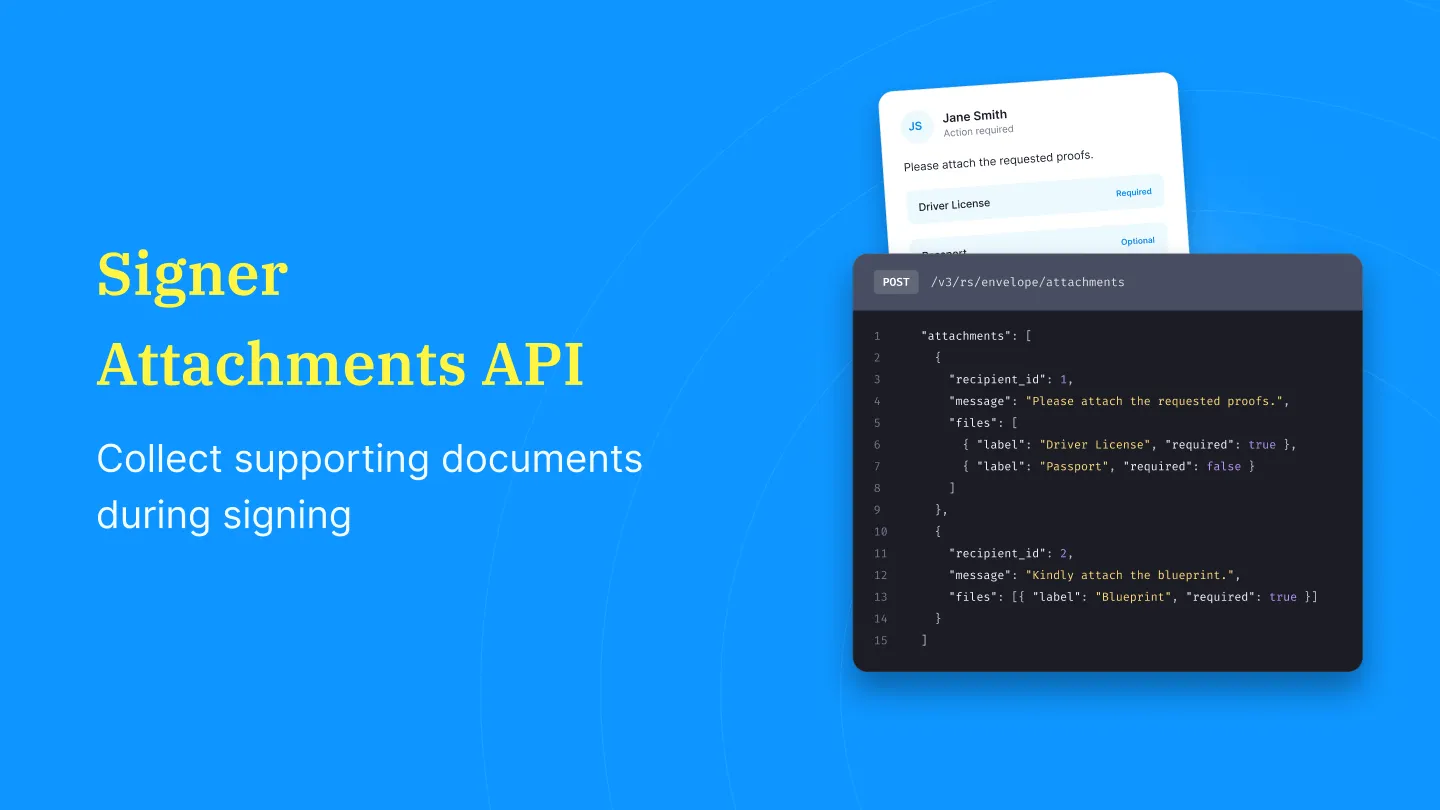
When you create or send an envelope, include an attachments array in your request.
Each attachment request is associated with a specific recipient and lets you:
- request one or more files
- provide instructions for the signer
- assign a label to each requested document
- mark each file as required or optional
Different recipients can be asked to upload different documents within the same envelope. In the below example, the first recipient is asked to upload a driver's license and may optionally upload a passport, while the second recipient is required to upload a blueprint before completing the signing process.
It’s just an extra step on the same create or send an envelope endpoint, as an additional attachments array alongside your recipients:
Require attachments before signing is complete
If a file is marked as required (required: true), the signer must upload it before they can complete the signing session.
Optional attachments allow signers to provide additional documents without blocking completion.
This gives you the flexibility to collect only the documents that are essential for your workflow while making supplemental files optional.
Automate workflows with webhooks
If you're already using Signeasy webhooks, Signer Attachments fits into your existing integrations.
Webhook events indicate whether the requested attachments have been uploaded, allowing your application to trigger downstream workflows automatically.
For example, you can:
- start an employee verification process after identity documents are received
- route agreements for internal approval only after all required files are uploaded
- synchronize supporting documents with your document management system
- notify internal teams when a transaction is complete
Download signer-uploaded documents
Once uploaded, you can pull the files back through the API instead of asking the recipient to email them to you separately.
Use the existing download a signed envelope endpoint and include the include_attachments=true query parameter to download:
- the signed document
- the signature certificate
- all documents uploaded by signers
Because everything is tied to the same envelope, there's no need to reconcile files received through separate email conversations.
Available on the Signeasy API Advanced Plan
Signer Attachments is available on the Signeasy API Advanced Plan.
If you're already on a different plan, contact your account manager or email api-support@signeasy.com to enable the feature.
If you're evaluating the Signeasy eSignature API and would like to see how Signer Attachments fits into your workflow, we'd be happy to help.