Route contracts to teams instead of individuals with Signer Groups

Sign, track, and store contracts — without the complexity of CLM.
Send one envelope to a role, not a named person, with the Signeasy API.
Karthikeyan KC
Karthikeyan KC
Updated on
This is some text inside of a div block.
5
 min read
Published on
July 31, 2026
This is some text inside of a div block.
5
 min read
Karthikeyan KC
Karthikeyan KC
July 31, 2026
July 31, 2026
 • 
5
 min read
Route contracts to teams instead of individuals with Signer Groups
Summarize and analyze this article with
chatgptgrokclaude-aigemini-ai

Key Takeaways

  • Route contracts to teams instead of individual recipients using Signer Groups.
  • Let the first available group member complete the signing step with the
  • any
  • signing rule.
  • Eliminate manual recipient assignment for role-based approval workflows.
  • Retrieve signing links for recipients and signer groups in a single API request for embedded signing.
  • Track signer group activity using existing Signeasy webhooks.
  • Build flexible approval workflows without maintaining custom routing logic.

Electronic signatures are often routed to a specific role rather than a specific person. A contract might need approval from someone in Legal, Procurement, or Finance, but you don't always know who that person is when the contract is created.

Without role-based routing, developers have to maintain lookup tables, rely on shared inboxes, or ask someone to manually forward the contract to the right signer. These extra steps slow down approvals and add unnecessary complexity.

At Signeasy, we are solving this gap with Signer Groups, now live on the Signeasy API.

Signer Groups lets you send an agreement to a group of authorized signers instead of an individual. The first available member can review and sign the document, helping teams move agreements forward without manual reassignment.

Whether you're building procurement workflows, internal approval processes, or customer-facing applications, Signer Groups makes it easier to route contracts to the right people without needing to know exactly who will be available.

Why use Signer Groups?

Many business processes are role-based rather than person-based.

For example:

  • A legal agreement can be reviewed by any member of the legal team.
  • A purchase order can be approved by any procurement manager.
  • A customer contract can be signed by any authorized branch manager.
  • An internal request can be approved by whichever finance approver is available.

Without Signer Groups, these workflows often rely on shared inboxes, manual reassignment, or custom logic to determine who should receive the contract.

Signer Groups removes that complexity by allowing you to send agreements directly to a group of authorized signers.

Common use cases

Signer Groups works well for workflows where multiple people are authorized to sign the same document.

  • Legal approvals: Route contracts to any authorized legal signer.
  • Procurement: Allow any procurement manager to review and approve vendor contracts.
  • Finance: Send purchase approvals to the next available finance approver.
  • Regional operations: Route agreements to the appropriate branch or regional manager.
  • Customer onboarding: Let any designated account administrator complete the signing process.

How Signer Groups work

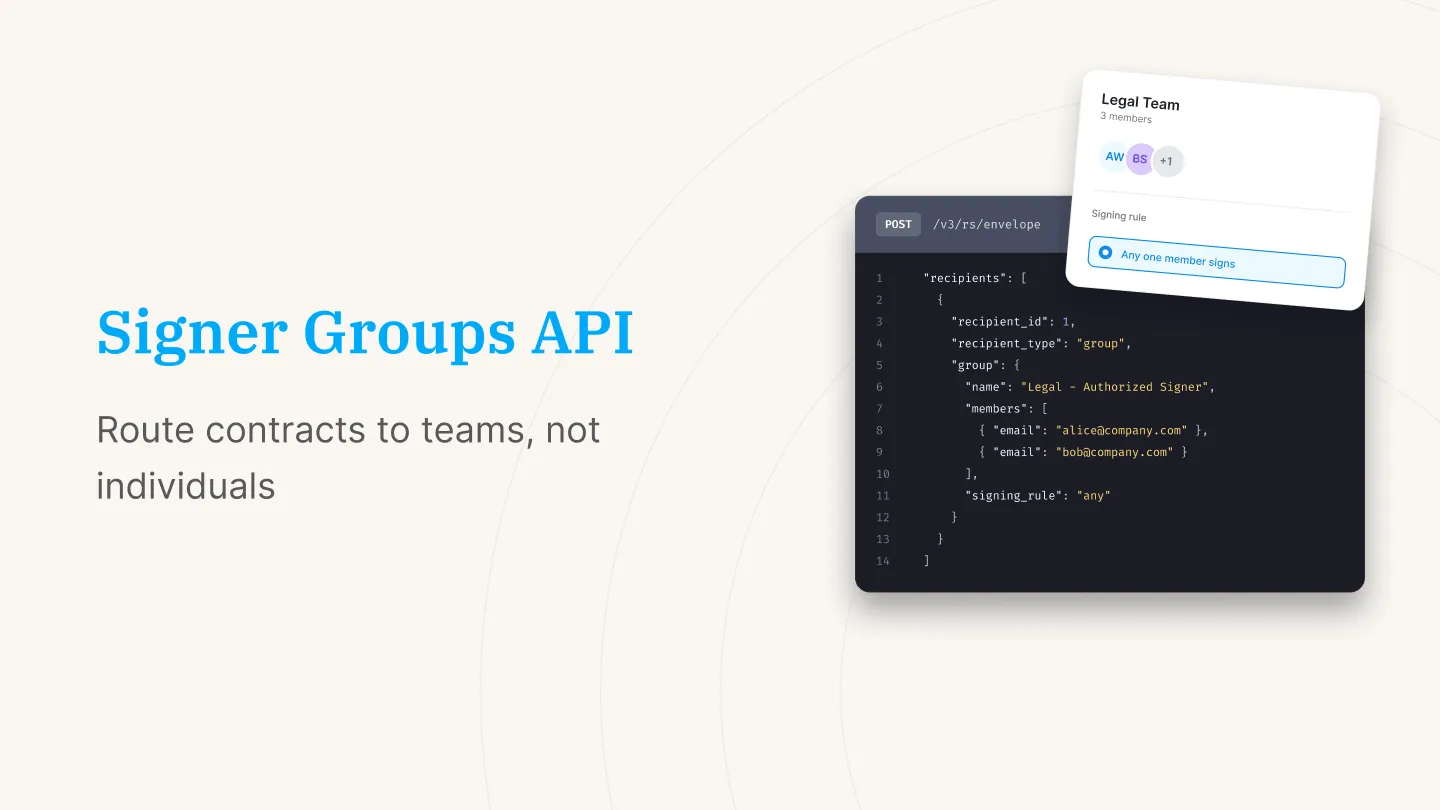
Instead of assigning a contrat to a single recipient, you can assign it to a signer group.

A signer group represents multiple authorized recipients, but only one signature is required. Once the first group member opens the envelope and signs, that signing step is completed for the group.

This makes Signer Groups ideal for approval workflows where any authorized signer can act on behalf of the team.

Create a signer group by setting the recipient type to group and providing the list of group members.

{
  "recipients": [
    {
      "recipient_id": 1,
      "recipient_type": "group",
      "group": {
        "name": "Legal - Authorized Signer",
        "members": [
          {
            "email": "alice@company.com",
            "first_name": "Alice",
            "last_name": "Wong"
          },
          {
            "email": "bob@company.com",
            "first_name": "Bob",
            "last_name": "Singh"
          }
        ],
        "signing_rule": "any"
      }
    }
  ]
}

At present, Signer Groups supports the any signing rule, which means the first member of the group to complete the signing request satisfies that recipient step.

Signer Groups vs. multiple recipients

Although they may seem similar, Signer Groups and traditional multi-recipient signing solve different problems.

With multiple recipients, every designated signer is expected to complete the document.

With Signer Groups, only one signature is required from the group. Once one authorized member signs, the signing request is automatically completed for the rest of the group.

This makes Signer Groups a better fit for approvals, on-call teams, and role-based authorization workflows.

Updated API response

The Create or Send Envelope endpoint now returns recipient and recipient group information alongside the envelope ID.

This additional information makes it easier to identify group members and use them in subsequent API requests.

{
  "id": 103449717,
  "recipients": [
    {
      "recipient_id": 45037881,
      "email": "mario@example.com",
      "first_name": "Mario",
      "last_name": "A"
    },
    {
      "recipient_id": 45037882,
      "email": "luigi@example.com",
      "first_name": "Luigi",
      "last_name": "B"
    },
    {
      "recipient_id": 39443885,
      "group_id": 3849392,
      "email": "mark.jones@example.com",
      "first_name": "Mark",
      "last_name": "Jones"
    },
    {
      "recipient_id": 39443886,
      "group_id": 3849392,
      "email": "alex.jones@example.com",
      "first_name": "Alex",
      "last_name": "Jones"
    }
  ],
  "recipient_groups": [
    {
      "group_id": 3849392,
      "name": "Legal"
    }
  ]
}

Fetch signing links for embedded signing

If you're building an embedded signing experience, you'll often need signing links for every recipient in an envelope.

To simplify this workflow, we've introduced the Fetch Action Links endpoint, which returns signing URLs for both individual recipients and signer groups in a single request.

Instead of making separate requests for each recipient, you can retrieve all signing links with one API call.

Sample request

{
  "recipients": [
    {
      "recipient_id": 39443879,
      "allow_decline": true,
      "redirect_url": "https://portal.com/complete?recipient=39443879"
    },
    {
      "recipient_id": 39443880
    }
  ],
  "recipient_groups": [
    {
      "group_id": 3849392,
      "redirect_url": "https://google.com"
    }
  ],
  "redirect_url": "https://portal.com/complete",
  "allow_decline": false
}

Sample request

{
  "recipients": [
    {
      "recipient_id": 39443879,
      "intent": "signer",
      "email": "jane.smith@example.com",
      "first_name": "Jane",
      "last_name": "Doe",
      "url": "https://dl.signeasy.com/signaturerequest?hash=abc123..."
    },
    {
      "recipient_id": 39443880,
      "intent": "signer",
      "email": "mark.jones@example.com",
      "first_name": "Mark",
      "last_name": "Jones",
      "url": "https://dl.signeasy.com/signaturerequest?hash=def456..."
    }
  ],
  "recipient_groups": [
    {
      "group_id": 39443878,
      "group_name": "Legal - Authorized Signer",
      "signing_rule": "any",
      "recipients": [
        {
          "recipient_id": 39443879,
          "intent": "signer",
          "email": "jane.smith@example.com",
          "first_name": "Jane",
          "last_name": "Doe",
          "url": "https://dl.signeasy.com/signaturerequest?hash=abc123..."
        },
        {
          "recipient_id": 394438453,
          "intent": "signer",
          "email": "anderson.smith@example.com",
          "first_name": "Anderson",
          "last_name": "Smith",
          "url": "https://dl.signeasy.com/signaturerequest?hash=abc123..."
        }
      ]
    }
  ]
}

Track signer groups with webhooks

Signer Groups works with Signeasy's existing webhook events, allowing you to monitor recipient activity and envelope progress throughout the signing process.

This makes it easy to trigger downstream workflows, notify internal systems, or update application state as signer groups complete their assigned signing step.

Get started with Signer Groups

Signer Groups is available on the Signeasy API Advanced Plan.

To enable the feature, reach out to your account manager or email api-support@signeasy.com. Our team can help you get started and answer any implementation questions.

Frequently asked questions

What are Signer Groups?
Signer Groups is a feature that lets you send agreements to a group of authorized recipients instead of a single individual. The first group member to sign completes the signing step for the group.
When should I use Signer Groups?
Use Signer Groups when multiple people are authorized to sign the same document, such as legal teams, procurement managers, finance approvers, or regional managers. This way you don't have to send the document to a specific individual.
What happens if two group members try to sign at the same time?
The first person to complete the signing step is accepted, and that step is marked done for the whole group. If someone else was mid-signing at that moment, they'll see the document has already been completed by a teammate.
Can I mix individual recipients and signer groups in the same envelope?
Yes. The recipients array can include a mix of individual recipient objects and group recipient objects, in any order.
Is there a limit to how many members I can add to a group?
There's no hard limit today. We'd recommend keeping a group to the people actually authorized to complete that signing step.
Does Signer Groups work with the webhooks I already use?
Yes. Group and recipient status changes come through your existing webhook subscriptions, alongside a group_id so you can tell which events are tied to a group.
Does signing_rule support anything besides "any"?
Not yet. "any" is the only supported rule today, meaning the first member to sign closes out the step for the group. We're evaluating additional rules based on customer feedback.
Karthikeyan KC
Karthikeyan KC
He is a Product Manager at Signeasy, passionate about discovering and solving problems related to eSignature API, developer experience, digital trust, and security. His work focuses on aiding businesses of all sizes in adopting digital transformation and efficiently implementing paperless transaction workflows.
LinkedIn share iconTwitter share icon
Arrow Up