



Docusign API pricing starts at $50/month with annual billing on Starter, including 40 envelopes/month. Intermediate costs $300 and Advanced $480, both starting at 100 envelopes/month. Docusign generally counts envelopes once they're sent, even when signing remains incomplete, while Signeasy API counts completed requests. This guide compares plan limits, feature requirements, production expenses, and the billing differences that affect your integration costs.
How we evaluated Docusign API pricing
We checked Docusign's developer pricing, plan comparison, and API documentation to verify subscription costs, envelope allowances, feature availability, and production requirements. We also reviewed customer experiences involving API implementation and maintenance. For alternatives, we compared each API's pricing structure, included usage, billing units, and the features available on each plan.
Docusign API pricing plans at a glance
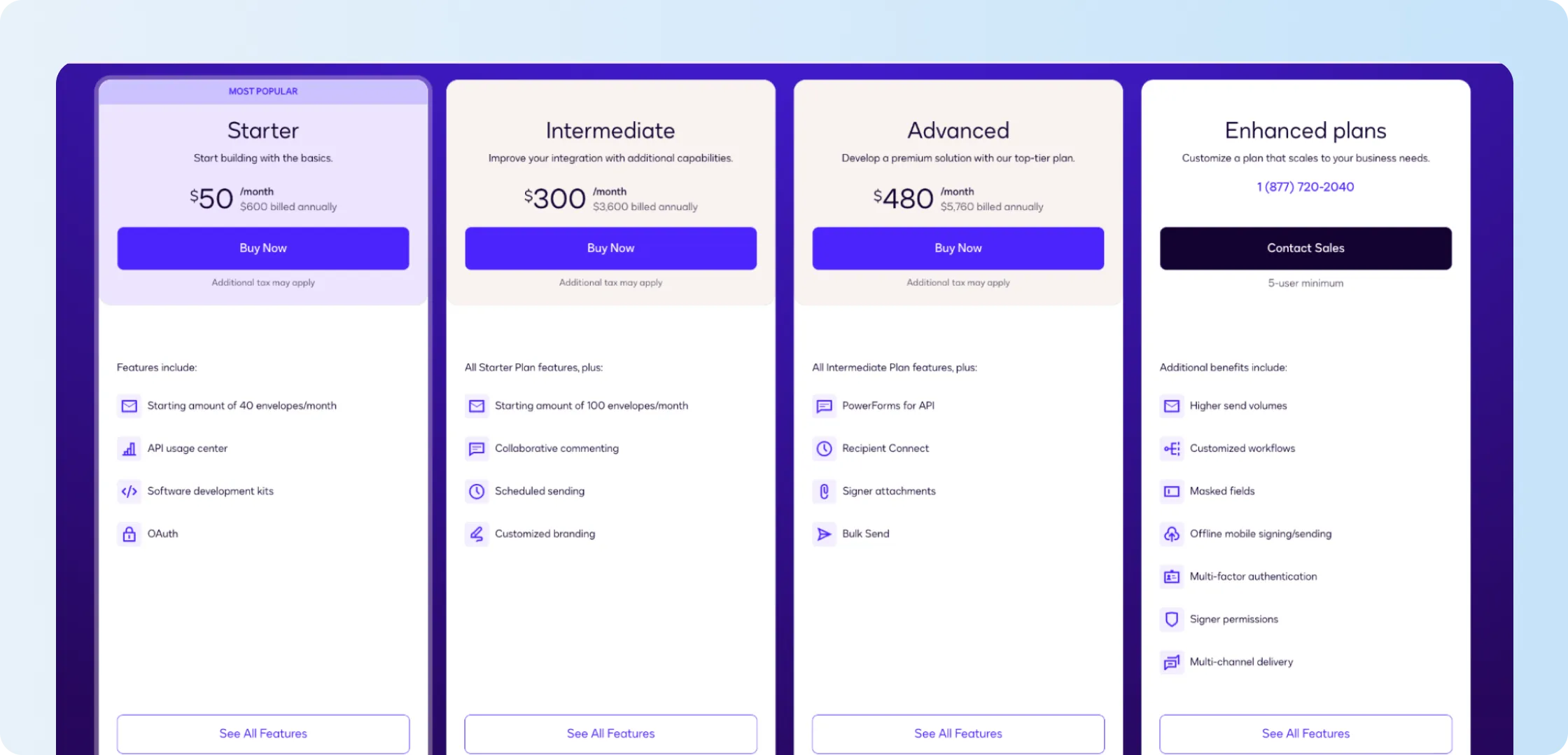
Docusign API pricing currently has three published production tiers plus custom Enhanced plans. The biggest distinction is easy to miss: Intermediate and Advanced both begin at 100 envelopes/month, so the USD 180 monthly difference on annual billing is paying primarily for additional functionality, not a higher starting allowance.
Pricing below reflects US pricing checked in October 2026. One envelope can contain several documents and recipients, so document volume alone doesn't determine envelope usage. Docusign follows the common sent-envelope pricing model: an envelope counts against the allowance when it is sent, even if none of the recipients completes signing. The exact billing terms depend on the customer's contract.
Free Developer Account
Docusign's free Developer Account includes a developer sandbox for building and testing API requests. Most enterprise features are available to test in this non-production environment, and the account doesn't expire.
Production API access requires an API-enabled paid plan and successful completion of Docusign's go-live process. Requests sent through the free developer account remain in the non-production environment.
The distinction is useful for budgeting because development can begin before production spend does. The paid commitment arrives once the integration is ready to send live envelopes.
Ready to move from sandbox testing to live signing? We'll show how a Signeasy API integration moves through testing, authentication, and production setup.
Starter
Starter puts Docusign API pricing at USD 50/month with annual billing, or USD 600 for the year, with a starting allowance of 40 envelopes/month. Core developer tools include the API Usage Center, SDKs, OAuth, embedded sending, reusable templates, reminders, and audit-trail functionality.
Forty envelopes work out to roughly two sends per business day. That covers a small integration with predictable usage. Once several teams or customers start sending through the same application, the monthly allowance gets used up faster.
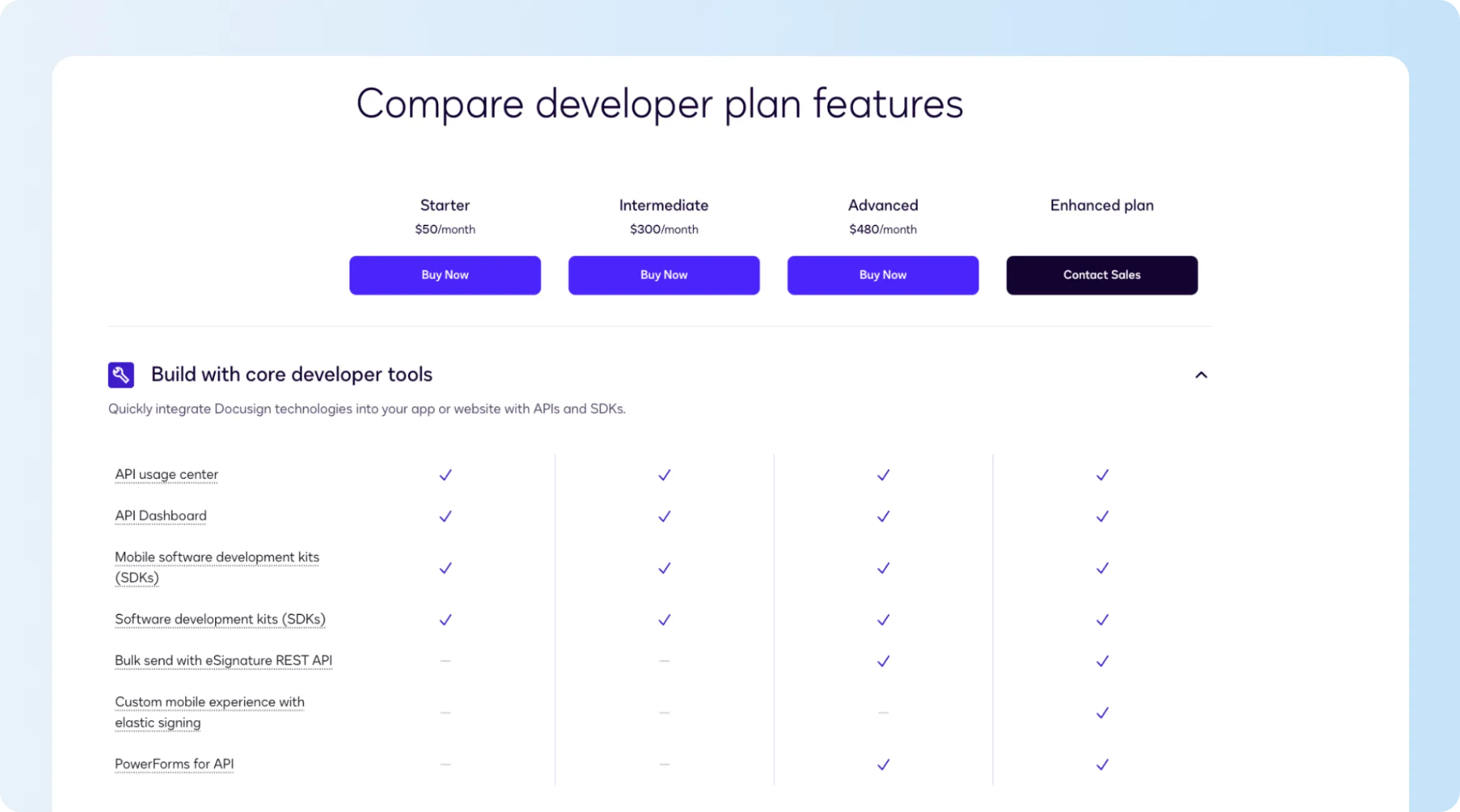
Starter also illustrates why feature requirements need to be checked before price alone. Embedded sending is available, so a user can prepare and send from inside your application. Embedded signing is not included, which means the signer cannot complete the signature experience inside the app on this plan.
If embedded signing is part of the product experience you are building, the USD 50 entry price is therefore not the relevant cost.
Intermediate
Intermediate raises Docusign API pricing to USD 300/month with annual billing, or USD 3,600/year. The starting allowance moves from 40 to 100 envelopes/month.
The price rises sixfold while the initial envelope allowance rises 2.5×, so most of the jump cannot be explained by sending volume. Intermediate adds capabilities such as collaborative commenting, scheduled sending, pre-filled fields, and customized branding.
That becomes easier to justify when those capabilities sit directly inside the customer experience. A marketplace automatically filling customer data into a contract or a SaaS product scheduling agreements for a later date can use them every day.
A team expecting more than 40 envelopes per month but not needing Intermediate-only features should request Docusign’s terms for additional volume. The public Developer API price page does not show a standard overage rate or confirm that every Starter account can buy more envelopes without changing plans.
Need to compare a higher envelope allowance with a different API plan? We'll review your expected monthly requests and the features your application uses.
Advanced
Advanced costs USD 480/month on annual billing, or USD 5,760/year, while its published starting allowance remains 100 envelopes/month—the same as Intermediate.
That $2,160 annual difference pays for specific API features. Advanced includes Bulk Send through the eSignature REST API, PowerForms for API, Recipient Connect, and signer attachments.
Docusign integration sending the same onboarding form to hundreds of recipients through API Bulk Send needs Advanced, even when its monthly envelope volume is relatively low. The upgrade adds that capability, but the published starting allowance remains 100 envelopes per month.
If none of those Advanced-only capabilities appears in the integration, Intermediate starts with the same published 100-envelope allowance at a lower subscription cost.
Enhanced plans
Enhanced plans move Docusign API pricing from public rates to a sales quote. Docusign lists a five-user minimum and positions Enhanced around higher send volumes, custom workflows, masked fields, offline mobile signing and sending, multi-factor authentication, signer permissions, and multi-channel delivery.
Docusign lists embedded signing on Enhanced. Even an application sending 30 envelopes per month needs an Enhanced quote if recipients must complete signatures inside the app. The feature requirement drives the move to custom pricing despite the low sending volume.
This is the point where the public price table stops giving enough information. Ask for the envelope commitment, user minimum, required add-ons, authentication costs, and renewal terms in the same quote.
What does Docusign API cost at different sending volumes?
Docusign API pricing gets more expensive per envelope when a team uses only part of its allowance. At full annual-billed usage, Starter works out to USD 1.25 per envelope, Intermediate USD 3, and Advanced USD 4.80. These figures divide the subscription price by envelopes sent; they are our calculations, not rates published by Docusign.
Up to 40 envelopes per month
Starter costs USD 50/month on annual billing whether the integration sends 40 envelopes or 10.
The lower envelope count does not make Starter expensive in absolute terms—USD 600/year is still Docusign's lowest public production commitment. It does show why utilization changes the comparison with an API that uses an annual pool or usage-based billing.
At 40 envelopes every month, Starter uses the published allowance efficiently. At 10, three-quarters of that starting capacity is unused each month.
Around 100 envelopes per month
Intermediate and Advanced both begin at 100 envelopes/month, so volume does not separate the plans. Features and subscription price do.
At 100 envelopes, Advanced costs USD 1.80 more per envelope in our calculation. Its business case therefore comes from Bulk Send, PowerForms for API, Recipient Connect, signer attachments, or another Advanced capability.
There is also a gap between Starter's 40 and Intermediate's 100. A team expecting 60 monthly envelopes should get Docusign's additional-envelope terms before assuming a sixfold subscription increase is the only route.
More than 100 envelopes per month
Above the published 100-envelope starting allowance, Docusign API pricing becomes less predictable from the public page.
Docusign describes the published plan limits as starting amounts, while Enhanced provides higher send volumes under custom terms. It does not publish one universal overage price for Developer API plans.
Before budgeting for higher sending volumes, request the overage costs for additional envelopes on your current Developer API plan and a separate quote for moving to Enhanced.
A product expecting 300 envelopes during a busy month needs that answer before launch. The USD 300 or USD 480 subscription only describes the published starting point.
Does your application have seasonal traffic or incomplete signing requests? We'll map your sending forecast to Signeasy's completed-request allowance.
What can increase the total cost of Docusign API?
Sending volume, features restricted to higher plans, and specialized APIs affect the Docusign subscription cost. Your development team also needs to build and maintain the integration, adding infrastructure, monitoring, and engineering expenses outside the Docusign bill.
Additional envelope volume
A published subscription price does not tell you what the 101st envelope will cost on Intermediate or Advanced.
Docusign lets Developer API customers monitor envelopes sent through account settings, but the public developer pricing page does not publish a universal overage rate for those plans. Enhanced limits also vary by the terms of the custom contract.
That makes three questions worth putting in writing before production traffic begins:
- What is the cost of each additional envelope on this specific Developer API plan?
- Can additional volume be purchased ahead of time?
- At what usage point does Enhanced become the required or less expensive arrangement?
Docusign does document pay-as-you-go additional envelopes for its ordinary Standard and Business Pro eSignature subscriptions, but that FAQ should not be treated as the confirmed Developer API rate.
Features that require a higher plan
A feature can change Docusign API pricing even when sending volume stays low.
Embedded sending is available across Docusign's published Developer API plans, while embedded signing requires Enhanced. Building an in-app signing experience around Starter means upgrading to a custom-priced plan or changing how recipients complete signatures.
The same issue appears elsewhere:
- API Bulk Send begins on Advanced.
- PowerForms for API begins on Advanced.
- Recipient Connect and signer attachments begin on Advanced.
- Custom mobile experiences, MFA, signer permissions, and multi-channel delivery sit in Enhanced.
Feature gating is therefore part of the pricing model, not just the product comparison.
Specialized APIs and add-ons
Docusign offers APIs beyond the standard eSignature developer-plan package. Admin API, ID Evidence API, Rooms API, Notary API, and Click API all direct buyers to sales in the current plan comparison.
An application using one of those services needs a separate commercial conversation, even if its eSignature envelope volume fits neatly inside Starter, Intermediate, or Advanced.
That distinction prevents Docusign API pricing from being reduced to a single envelope calculation. The product architecture itself can determine how many commercial components appear in the quote.
Engineering and webhook infrastructure
The subscription pays for Docusign access. Your application still has to operate the integration.
Docusign Connect sends webhook notifications when envelope events occur. Docusign recommends processing those messages asynchronously, limiting notifications that include full documents, and using webhooks instead of repeatedly polling for status. Developers should also check the documented API rate limits before going live.
In practice, a production implementation can therefore require:
- a hosted webhook endpoint,
- queueing and event processing,
- authentication and verification,
- retry handling,
- monitoring and alerts,
- logs for troubleshooting,
- and ongoing engineering ownership.
Those are not additional Docusign subscription fees. They belong in the total cost because someone still has to build and maintain them.
Want to see embedded signing and webhook events before building them? We'll walk through the API workflow and the developer resources your team will use.
Ongoing integration maintenance
The cost does not end when the API goes live. Template changes, document revisions, authentication updates, monitoring, and integration changes can continue to consume engineering time.
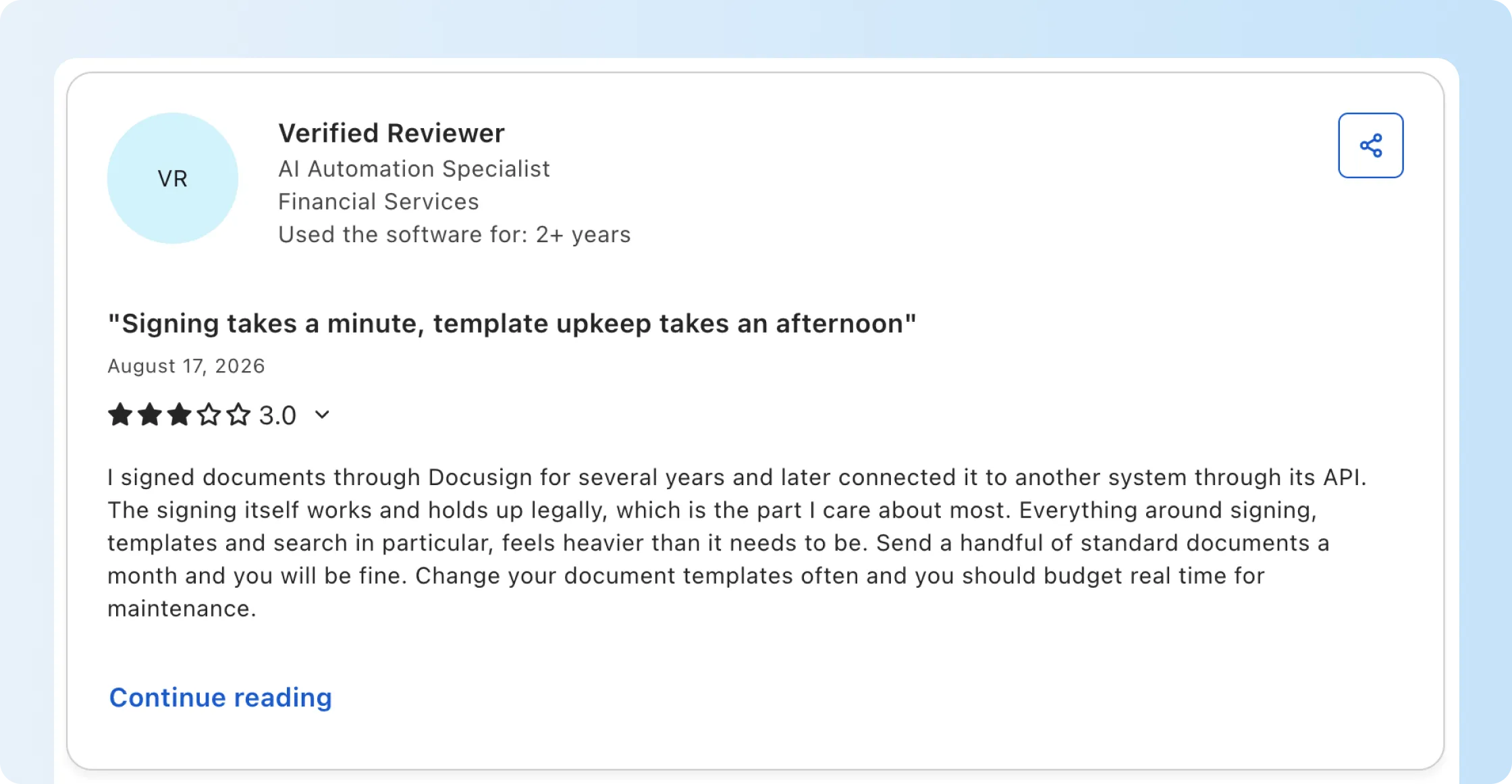
A Docusign customer who connected its API to another system found that even small changes to a PDF's layout shifted manually positioned signature fields. The template then had to be rebuilt. The DocuSign reviewer appreciated the API documentation but found the ongoing template maintenance frustrating, especially when documents changed frequently.
Teams using the same PDF templates for long periods have fewer document changes to maintain. Products updating customer-facing contracts every few weeks need to test what happens to manually positioned signature fields when the layout changes.
When does Docusign API pricing make sense?
Docusign API pricing is easier to justify when a business already runs substantial signing through Docusign, needs capabilities on its Advanced or Enhanced tiers, and expects production volume to use a meaningful portion of the contracted allowance.
Keeping an existing API integration with Docusign avoids the work of moving signing traffic to another provider. Advanced also includes Bulk Send, PowerForms, Recipient Connect, and signer attachments. For teams reviewing their regular eSignature subscriptions alongside API access, our Signeasy vs Docusign comparison covers the differences in features, sending limits, and seat costs.
The economics become less straightforward when one feature forces a large plan jump. An application sending 30 envelopes a month but requiring embedded signing, for example, reaches Enhanced despite relatively low volume. Similarly, a product expecting variable or fast-growing traffic has to request additional-envelope pricing because public Developer API overage rates are not listed.
That is the point where comparing another API pricing model becomes useful because the same integration maps differently to another vendor's volume and feature structure.
Already using Docusign API and considering a switch? We'll review your integration, sending volume, and any applicable Docusign migration or contract-buyout terms.
How Docusign API pricing compares with other eSignature APIs
Docusign API pricing starts lower than several subscription-based alternatives, but providers calculate usage differently. Some count envelopes when they're sent, while others use completed requests, document allowances, or usage-based billing. The table below compares production API prices, included volumes, and the pricing differences that affect ongoing costs.
These APIs count usage differently. Docusign tracks sent envelopes, Signeasy counts completed requests, and other providers use document or signature-request allowances. Those units need to be compared using the same production workflow. Our eSignature API comparison covers additional providers and their pricing models.
PandaDoc offers a lower published API entry price, while Zoho Sign uses per-envelope credits. Because providers count usage differently, compare the same production workflow before choosing a plan.
How Signeasy API pricing compares with Docusign
Signeasy API charges for completed signature requests. If a document is declined or voided before all recipients finish signing, it doesn't consume a paid credit. Docusign generally counts envelopes when they're sent, even if the recipients never complete signing, subject to contract terms. This difference becomes particularly useful for applications where some signing requests remain incomplete. Signeasy's Intermediate plan costs $125/month with annual billing and includes embedded signing, embedded sending, and webhooks, while Docusign lists embedded signing on its custom-priced Enhanced plans.
Signeasy prices production API use separately from its web-app subscriptions. Its published API plans are:
- Starter: free sandbox with limited test credits.
- Intermediate: USD 125/month, USD 1,499 billed annually, with 1,000 production eSignature requests.
- Advanced: USD 250/month, USD 2,999 billed annually, with 2,000 production eSignature requests.
- Build Your Plan: custom pricing for higher volumes and specialized requirements.
Say your application sends 100 envelopes and recipients complete 70. Docusign would generally count all 100 against the sending allowance, while Signeasy would deduct 70 completed-request credits. Docusign's exact billing terms are governed by the customer's contract.
Signeasy API vs Docusign API
Docusign Starter costs less for basic API integrations, but it doesn't include embedded signing. Signeasy Intermediate includes embedded signing, merge fields, reusable templates, and webhooks, while Docusign requires an Enhanced quote for an in-app signing experience. Compare plans against the document workflows your application needs to support, rather than relying on the lowest starting price.
Signeasy Advanced costs $2,999/year for 2,000 completed requests annually. Docusign Advanced costs $5,760/year and starts at 100 sent envelopes per month. These allowances use different billing units and periods. Docusign Advanced also includes Bulk Send, PowerForms, Recipient Connect, and signer attachments, so teams should compare those features alongside actual sending volume.
Comparing Docusign and Signeasy for signing inside your app? We'll demonstrate embedded sending and signing, then explain the request-credit model.
What makes the Signeasy API developer-friendly?
Our API v3 gives developers a documented path from testing to production. It uses OAuth 2.0 for authentication, with guides for generating a test API key, using our Postman collection, and exploring endpoints. The API v3 update also covers improvements to security, authentication, and performance.
Signeasy also provides API samples and SDK support for Python, Java, and Node.js. Developers can use these resources to handle document uploads, create signature requests, assign recipients, and retrieve document statuses within their applications.
Developers can test authentication and signing requests in our sandbox without consuming paid production credits. Once the integration works, our go-live guide explains how to create a live application and generate a production access token.
The API supports several workflows developers can build into their applications:
- Embedded signing: Recipients can sign through an iframe or pop-up without leaving the application or receiving a separate signing email. Their email address is still required in the API request for audit-trail purposes.
- Webhooks: Notify the application when recipients view, sign, decline, or complete a request, helping teams update document status without repeatedly polling the API.
- Merge fields: Populate contracts using information already stored in an application, reducing manual preparation for recurring onboarding documents, sales contracts, and customer agreements.
Signeasy also supports signing through WebViews for mobile applications. For teams handling sensitive documents, OAuth authentication, encrypted document handling, and audit trails help keep the signing workflow secure. Signeasy also maintains SOC 2 certification.
In our customer implementations, 72% of customers have gone live in under 72 hours. The timeline for a new integration depends on its authentication requirements, signing workflows, and production testing.
For example, LetsVenture integrated our API into its equity platform so users could sign documents without leaving the application. The integration reduced manual paperwork and helped its HR team manage documents for hundreds of people. LetsVenture's co-founder described the customer experience as two to three times better after implementation. Read the LetsVenture customer story for details.
For businesses switching from another API provider, we offer white-glove migration assistance and a competitor contract buyout program. Our team can review existing templates, authentication, webhooks, application code, and applicable buyout terms before planning the migration.
How Rappi and Property Masters use Signeasy API
See how Rappi uses Signeasy API to automate partner agreements and how Property Masters connects signature requests with vendor onboarding.