


Managing a contract means checking what's pending, chasing a signature, digging up a term, or catching a renewal before it slips by. Most of that means stepping out of whatever you're doing to log into a separate tool, just to answer one question.
Contract teams are already solving that problem by moving their everyday work into Claude, ChatGPT, and other AI tools that can act on their behalf, not just answer questions. Communication, research, analysis, and acting on decisions have already shifted to AI tools and assistants.
Signeasy Model Context Protocol (MCP) brings contracts into this rhythm of everyday work. It lets teams work inside the tools they already use, and bring AI directly into their everyday tasks, instead of opening yet another assistant for yet another job. They can ask which contracts are pending a signature or renewing soon, look up what a specific term says, or send a reminder to someone who hasn't signed.
In this blog, we look at what Signeasy MCP does for exactly that job: connecting your eSignature and contract management workflows directly into Claude and ChatGPT.
What is Signeasy MCP?
MCP (the Model Context Protocol) lets AI assistants connect to outside tools. Signeasy MCP is a connector that lets Claude and ChatGPT securely access your Signeasy account.
Once connected, you can work with your eSignatures and contracts in plain language. Signeasy MCP pulls the answer straight from your actual Signeasy account, right there in the conversation.
What you can do with Signeasy MCP
Signeasy MCP brings the core aspects of eSignature and contract work into Claude and ChatGPT. You can find information, take action, create routines, and ask questions about your contracts. Let’s get into what can be done for each:
Check and track contracts
You no longer need to switch tabs or open Signeasy for routine checks or quick data pulls. Just ask, right inside your AI tool. Some scenarios include:You can also ask for the results as a CSV or Google Sheet, to work on it with your team or share with stakeholders.
- Checking what's still waiting for your signature
- Checking what's waiting on someone else before following up
- Getting a quick list of everything signed in the last week
- Checking what expired last quarter
- Seeing what's renewing in the next 30 days
- Seeing which templates are available before starting a new request
- Checking how many envelope credits are left
You can also ask for the results as a CSV or Google Sheet, to work on it with your team or share with stakeholders.
Take action and set up processes
- Send a reminder to someone who hasn't signed
- Approve a pending request
- Cancel a pending request
- Start a new signature request from a template, and preview it before anyone gets an email
Find answers to questions
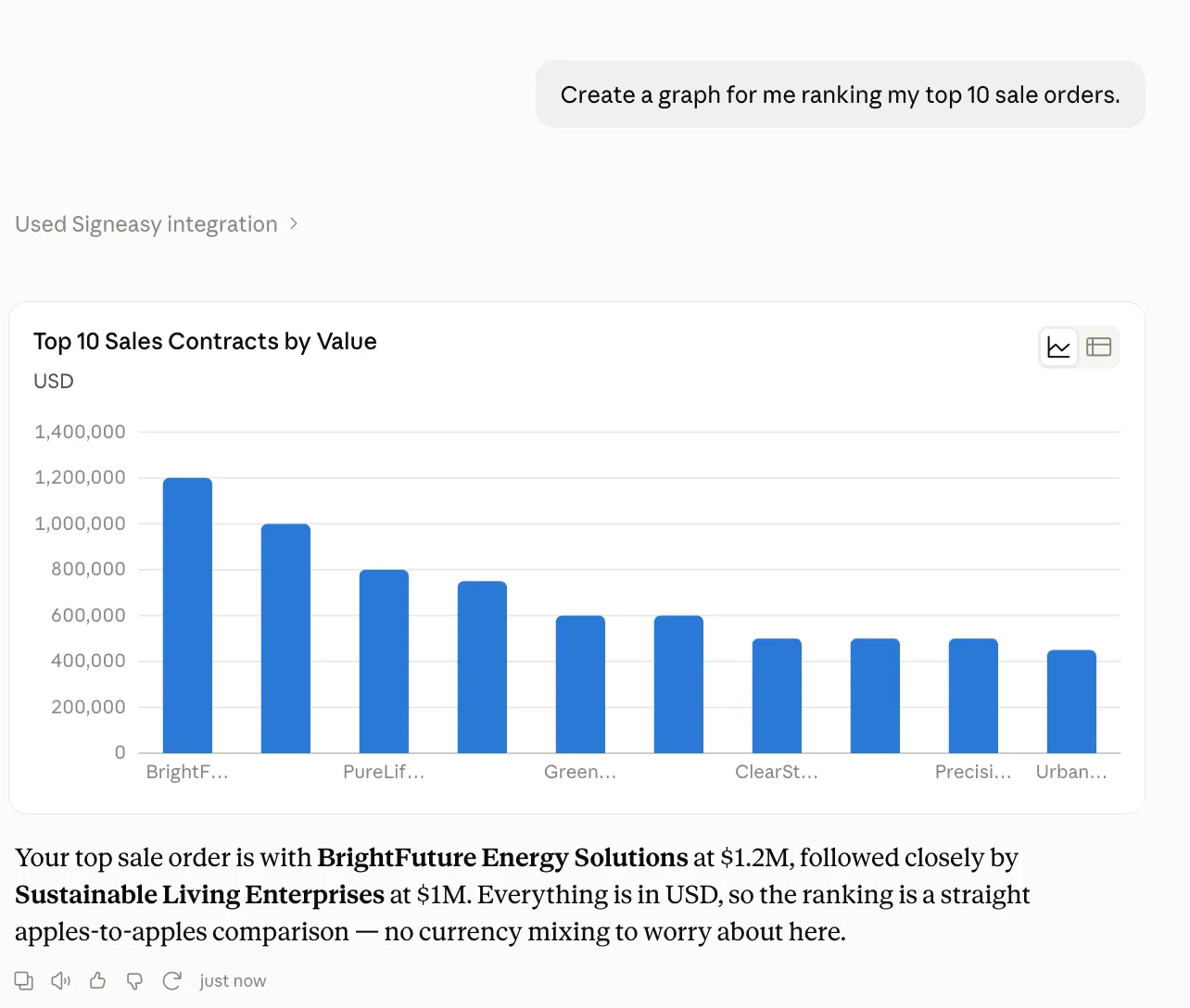
This is where Signeasy MCP goes beyond eSignature. Your AI-analyzed contract repository is queryable in plain language, like:
- What does a specific term mean?
- How many NDAs do I have?
- What's the total value of my service agreements?
- Which contracts mention a specific clause?
- Which contracts involve a given vendor?
Automate recurring activities and status updates
With Claude Cowork's scheduled tasks, you can turn any of these checks into something that runs on its own, no need to ask each time.
- A daily summary of contracts renewing soon
- A weekly digest of what's still unsigned or expired
- An automatic flag when a renewal notice window is about to close
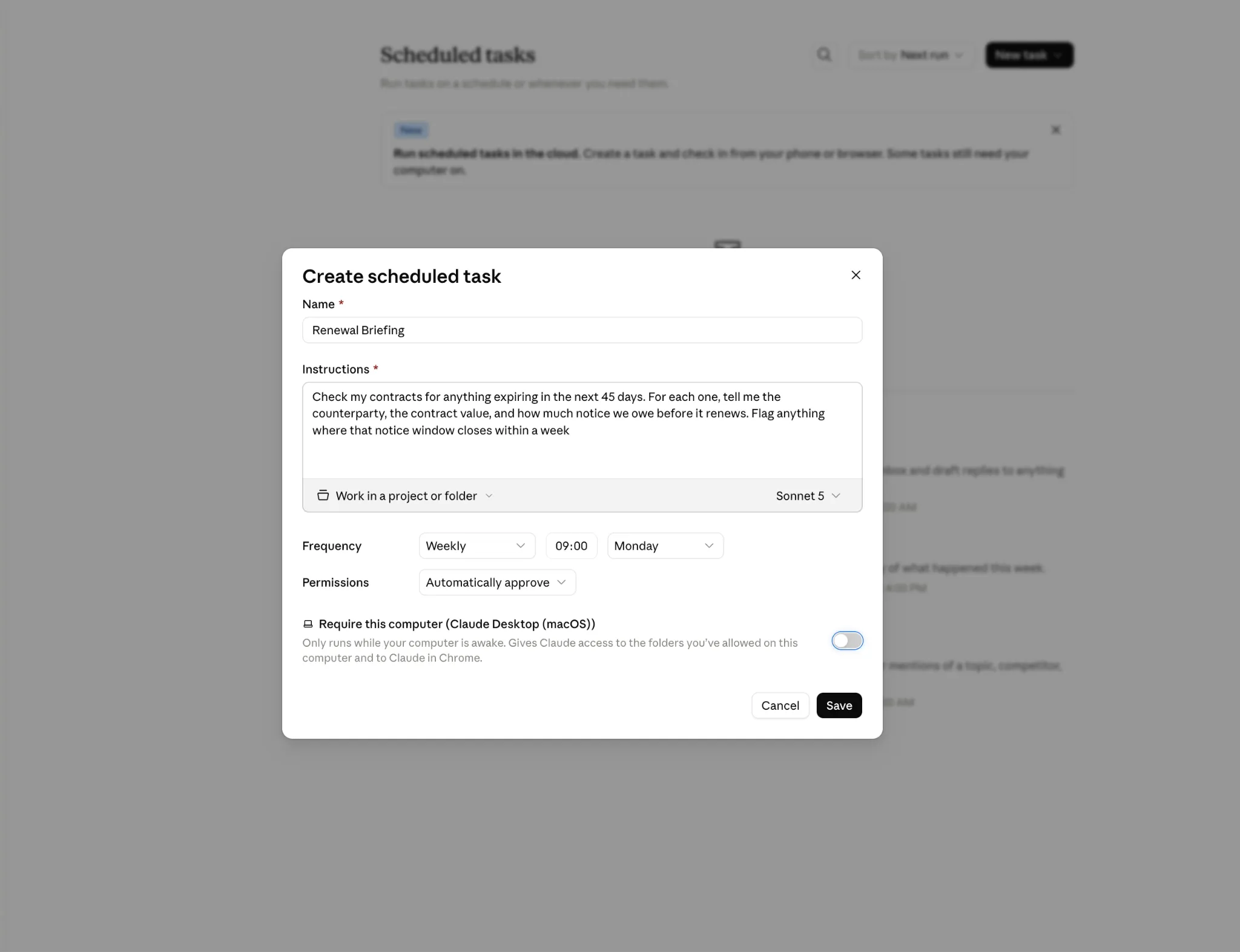
Scheduled routines don't have to stay inside the chat. They run inside your AI tool, with access to whatever else you've connected, whether that's Slack, email, or another tool. That way, updates can land directly where your team already checks in. For example:
- A weekly summary posted to a shared Slack channel, so the whole team sees what's signed, pending, and renewing without asking
- A bi-weekly email alert to a sales manager, flagging which deals are stuck waiting on a signature
- A same-day alert when an unsigned contract crosses a specific value threshold, so it doesn't sit unnoticed until the next weekly digest
- A weekly email or slack alert to each account owner, listing only the contracts assigned to them
How contract teams put Signeasy MCP to work
Finance can manage renewals without opening a spreadsheet. A finance lead asks which vendor contracts renew soonest, then follows up in the same conversation asking which of those carry auto-renewal clauses. One stands out as overdue for a better rate and gets flagged for renegotiation, all without a separate search.
Legal teams field fewer status-check questions. Colleagues no longer need to ping Legal to check what a term says or when something expires. They can ask Signeasy MCP directly, freeing Legal's time for the questions that actually need a lawyer's judgment.
Sales keeps deals moving toward revenue. A rep checks what's still pending a prospect's signature before a call and sends a reminder without leaving the conversation about the deal itself, so a slow signature never becomes the reason revenue stalls.
HR keeps onboarding on schedule. An HR manager checks which offer letters are still unsigned and nudges a candidate before the offer goes cold.
Procurement gets vendor terms at a glance. Someone in procurement asks which vendor contracts include a specific payment term or notice period, across every workspace they can access, instead of opening each document one by one.
In every case, contracts show up inside the place teams already chose to work.
Security, compliance, and guardrails
Connecting an AI assistant to your contracts is only worth doing if it's trustworthy, so nothing about Signeasy's permission model changes just because the interface did.
- Same roles, same access: Signeasy's existing workspace roles and permission levels carry over exactly. If you can't see a document in Signeasy, Claude or ChatGPT can't see it either.
- Every action is logged: Anything done through Signeasy MCP is treated as an API call and appears in Signeasy's audit trail exactly as if it happened in the app, because to Signeasy's systems, it did.
- Confirmation before anything changes: Actions that send an email or change your account, such as approving a request, sending a reminder, or editing signer details, ask you to confirm first. Confirm each one individually, or choose to always allow a specific action going forward.
- Your credentials stay with Signeasy: Authentication uses OAuth 2.0 with PKCE. Claude and ChatGPT never see your Signeasy password, and no copy of your data is stored on their end.
Where Signeasy MCP works
Signeasy MCP is available as a connector on both Claude and ChatGPT. For detailed instructions, refer to the Signeasy MCP guide.
Note: Signeasy MCP needs to be enabled on your account before you can use it.
- If you're an existing customer, reach out to your customer success manager.
- If you're new to Signeasy, contact us to get started.
Getting started with Signeasy MCP on Claude and ChatGPT
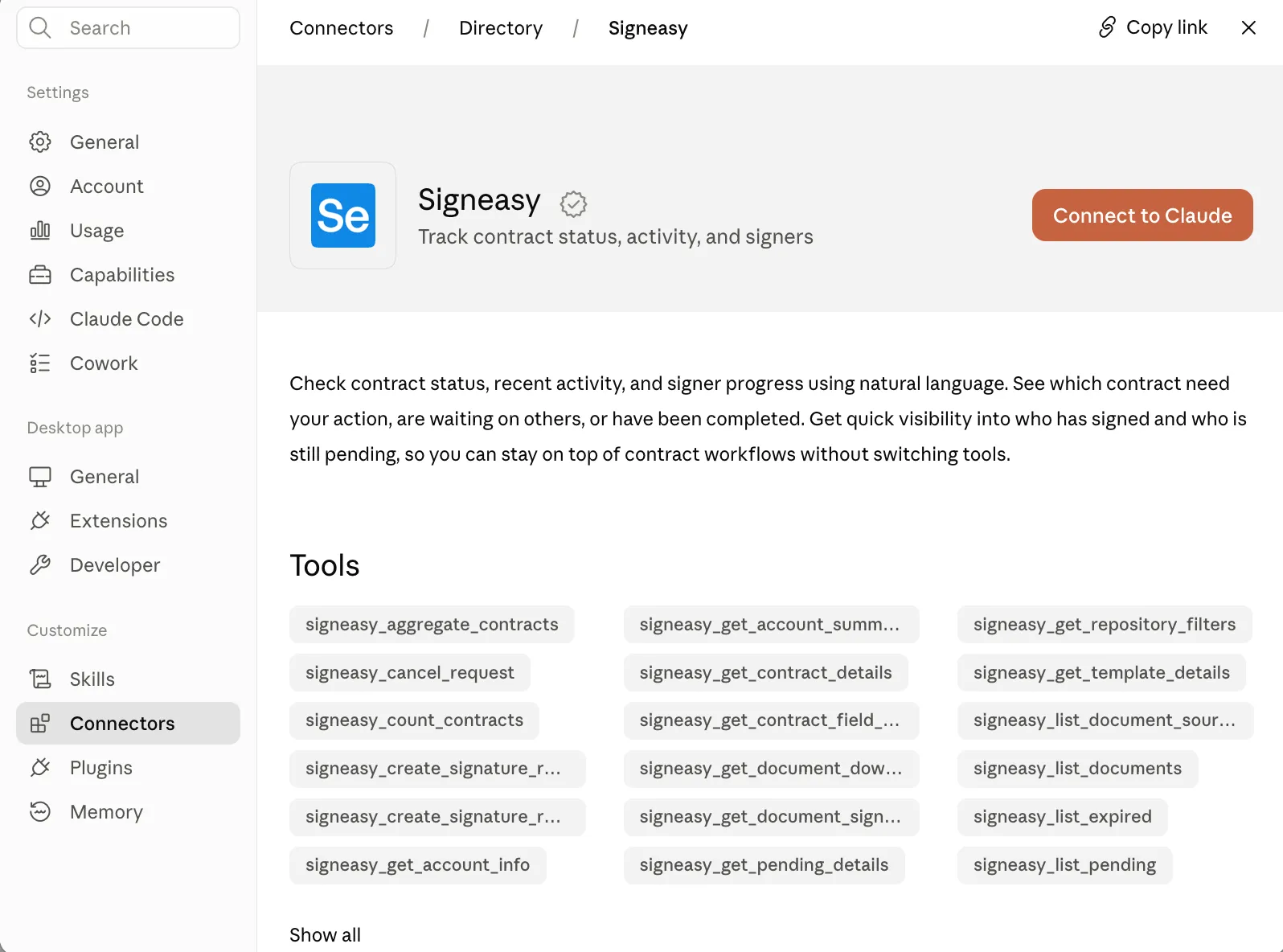
For Claude:
- Make sure you're signed up to a paid plan
- Go to Settings
- Go to Connectors, search for “Signeasy”
- Sign in with your Signeasy account when prompted.
- Review the permissions and approve the connection.
For ChatGPT:
- Make sure you're signed up to a paid plan
- Open Settings
- Go to Plugins, search for Signeasy
- Sign in with your Signeasy account when prompted
- Review the permissions and approve the connection.
You only need to connect once. After that, Claude or ChatGPT stays connected until you disconnect it or your authorization expires.
What's next
Signeasy MCP integrates contract workflows into Claude and ChatGPT. It allows Finance, Sales, and Legal to manage contracts, check statuses, and handle renewals directly within their everyday AI stack, keeping security, permissions, and audit logs fully intact.
This is a first step. We think there's a lot more we can do to make your eSignature and contract workflows useful across the tools you use every day. We'll keep building. For now, we hope this makes managing contracts a bit smoother with Signeasy.
Learn more:
- Read Signeasy MCP Docs.
- Talk To Sales if you’d like to get this for your business.
- If you already have a Signeasy account, contact your customer success manager or write to support@signeasy.com about turning it on for your team.