


Yes, Docusign supports HIPAA-compliant eSignature workflows through eligible Enhanced plans when a signed Business Associate Agreement (BAA) and appropriate healthcare safeguards are in place. Its Personal, Standard, and Business Pro eSignature plans do not include HIPAA support through a BAA.
A Docusign HIPAA compliant setup also depends on how protected health information (PHI) is accessed, signed, transmitted, and retained. This guide explains Docusign's requirements, security capabilities, and what to compare before using it for patient documents.
Is electronic signature allowed under HIPAA?
Yes. Electronic signatures are allowed under HIPAA. The HIPAA Security Rule does not generally require healthcare documents to use a particular electronic or digital signature method.
The U.S. Department of Health and Human Services (HHS) confirms that electronic signatures are not mandatory under the Security Rule, although organizations may use them as appropriate safeguards.
For everyday patient paperwork, there are two separate requirements:
- Signature validity: The signature must meet the applicable legal requirements, including evidence of the signer's intent and any relevant consent requirements.
- PHI protection: The organization must protect patient information through appropriate access controls, security measures, and vendor agreements.
For example, collecting a patient's signature on a treatment consent form is legally different from ensuring that the completed form is stored and shared only with authorized people. Both matter when using electronic signatures in healthcare.
Healthcare claims attachments have separate requirements. In March 2026, CMS finalized electronic signature standards for certain claims attachment transactions. The rule took effect on May 26, 2026, with compliance required by May 26, 2028. These standards don't impose the same signing requirements on ordinary patient consent forms.
What do you need before using Docusign with PHI?
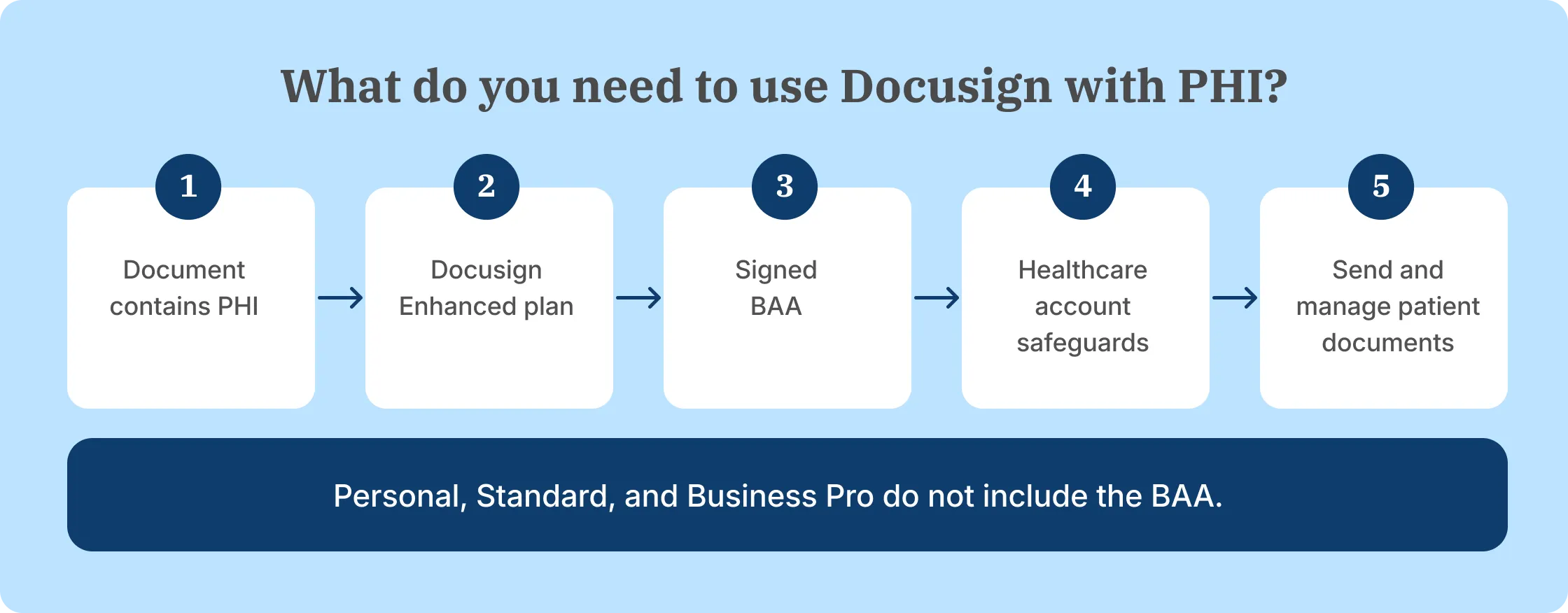
A HIPAA compliant Docusign setup requires an eligible plan and a signed Business Associate Agreement before the service processes PHI on the organization’s behalf. Healthcare organizations also need to configure the account and their internal procedures for the documents being handled.
These requirements have different purposes. The BAA establishes Docusign's obligations as a business associate, while the eligible plan provides access to the relevant HIPAA-supporting service.
Business Associate Agreement
A Business Associate Agreement is required when a vendor creates, receives, maintains, or transmits PHI on behalf of a HIPAA-covered entity or another business associate.
Docusign explains that it becomes a business associate when healthcare providers use its service for documents containing PHI. Even if Docusign does not inspect the document contents, maintaining encrypted PHI as part of the service brings business associate responsibilities.
A BAA defines the vendor's responsibilities when handling electronic protected health information (ePHI), including:
- Permitted uses and disclosures of PHI.
- Safeguards to protect electronic PHI.
- Reporting security incidents and breaches as required.
- Responsibilities involving subcontractors.
- Handling PHI when the service relationship ends.
A signed BAA must be in place before a Docusign HIPAA compliant workflow begins. The HHS guidance on cloud services explains this requirement.
For a closer explanation of the contract itself, see our HIPAA Business Associate Agreement guide.
Eligible Docusign plan
Healthcare organizations need a qualifying plan with BAA support before processing PHI through the Docusign platform. Docusign's standard plans Personal, Standard, and Business Pro do not include this support. Healthcare teams must contact Docusign sales to arrange an eligible Enhanced plan and signed BAA.
Here is how HIPAA support differs across its eSignature plans:
Docusign's Enhanced plans support HIPAA-related compliance obligations and offer additional account administration and security options.
How much does a HIPAA-enabled Docusign plan cost?
Docusign does not publish a fixed price for its HIPAA-enabled Enhanced plans. Healthcare buyers need a custom quote that confirms BAA availability and the services included. The prices shown for Docusign's regular self-serve business plans do not cover the required HIPAA setup.
Ask Docusign to confirm the number of paid users, included sending volume, identity verification charges, integration requirements, data residency options, and any additional services in the quote.
Docusign's annual Standard and Business Pro eSignature plans include 100 envelopes per paid seat per year, but neither includes HIPAA support through a BAA. Enhanced plans have contract-specific envelope allowances, so healthcare teams should confirm their sending limits in the sales quote.
If you're comparing those options, see the HIPAA setup and discuss the documents your team sends.
How does a Docusign HIPAA compliant setup work?
A Docusign HIPAA compliant workflow uses security and signing controls that support a healthcare organization’s HIPAA obligations. Its healthcare solution includes authentication, data protection, audit records, and integrations.
Those capabilities support the workflow, but the healthcare organization must decide how to configure and use them. The main controls are explained below.
Signer authentication
Docusign offers several ways to check a recipient's identity before granting access to a document.
Docusign sends each signing request to the recipient's email address. Additional authentication methods include access codes, SMS passcodes, phone authentication, knowledge-based authentication, and government-issued ID verification. Availability and charges depend on the selected method and subscription.
A healthcare organization should select the method according to the information being accessed and the risk involved. For example, a routine administrative acknowledgment may require a different identity check from a sensitive medical records authorization.
Staff account authentication and recipient authentication also serve different purposes. Multi-factor authentication for employees protects account access; recipient verification confirms the identity of the person opening or signing a particular request.
Encryption and data protection
Docusign uses encryption, access controls, and other technical safeguards to protect documents and its signing infrastructure.
For a Docusign HIPAA compliant workflow, healthcare organizations must also protect PHI throughout the signing process. That includes:
- Encryption in transit and at rest: Protecting electronic information while it moves between systems and while it is stored.
- Access to PHI: Restricting documents and account permissions to authorized users.
- Retention and deletion: Setting policies for completed documents and removing records according to applicable requirements.
- Privacy and integrations: Assessing connected systems, subprocessors, and other places where PHI is transferred or maintained.
Docusign's HIPAA eSignature guidance addresses these areas and explains that healthcare customers control their account retention policies.
Encryption protects data, but it does not replace the organization's responsibility to prevent unauthorized access or inappropriate disclosures.
Audit trails and document integrity
Docusign records the events associated with a signing request and generates a Certificate of Completion when it is finished.
The record can include recipient activity, timestamps, IP addresses, and other transaction details. Docusign also applies a digital seal to completed documents so subsequent changes are detectable.
For a healthcare team, these records help explain who participated in a signing transaction and when the document was completed. They are useful when reviewing a disputed consent form or reconstructing the signing history during an internal investigation.
In a Docusign HIPAA compliant workflow, audit trails support accountability and document integrity. It does not independently establish that every HIPAA requirement has been met.
Organizations assessing electronic signature verification should look at the signed record and its accompanying activity history together.
For teams comparing similar controls, see Signeasy's signer verification and completed-document records.
How should healthcare organizations use Docusign with PHI?
A Docusign HIPAA compliant workflow should only be used for PHI after the appropriate BAA, Enhanced plan, and security procedures are in place. Docusign supplies the signing technology; the healthcare organization remains responsible for the way employees, patients, and connected systems handle the information.
Healthcare teams should check the following areas for compliance gaps before sending documents containing PHI:
- Confirm the BAA and plan: Establish the applicable agreement and eligible Enhanced subscription before processing PHI.
- Assess the risks: Identify which documents contain PHI, who receives them, and where completed copies are stored.
- Limit employee access: Give staff the permissions needed for their roles and remove access when responsibilities change.
- Choose signer verification: Apply identity checks appropriate to the patient document and the organization's policies.
- Manage document retention: Establish when signed documents should be retained, archived, or deleted under applicable federal and state requirements.
- Review integrations: Check how completed forms reach the EHR or practice management system, who can access them, and how the information is protected during transfer.
- Train employees: Show staff how to handle patient names, dates of birth, and insurance information in documents and notifications, and what to do if a form reaches the wrong recipient.
- Monitor activity: Review account access, signing records, and unusual activity to identify possible security incidents and investigate potential data breaches.
These responsibilities apply whether an organization uses Docusign or another HIPAA-compliant eSignature solution.
They also extend beyond the software subscription. A clinic's workflow remains exposed if an employee sends patient records to the wrong recipient or stores completed documents in an unauthorized location, regardless of the vendor's security features.
Which healthcare forms can you use with Docusign?
A Docusign HIPAA compliant setup supports electronic signing for common healthcare forms, including documents containing PHI.
Examples include:
- Patient intake forms and registration documents.
- Treatment and procedure consent forms.
- Health information release authorizations.
- Medical records request and release forms.
- HIPAA acknowledgments and related disclosure forms.
- Patient rights and responsibilities acknowledgments.
- Notice of Privacy Practices acknowledgments.
These document types have different signing requirements. A HIPAA authorization form, for example, must include the information required by the HIPAA Privacy Rule. Collecting a signature alone doesn't make an incomplete authorization valid.
Healthcare teams can also use eSignatures for vendor contracts, employee onboarding, and administrative documents. Those documents do not all contain PHI, so the relevant compliance obligations depend on the information being handled.
Healthcare teams also need to consider how signed patient records are stored and shared, particularly when completed forms move between employees or healthcare systems.
When staff repeatedly send these forms, preparation and follow-up matter alongside security. Book a Demo to see how Signeasy handles reusable document templates and reminders for outstanding signatures.
Can Docusign connect with EHR systems?
Yes. Docusign supports integrations with electronic health record (EHR) systems through supported solutions, APIs, and implementation partners.
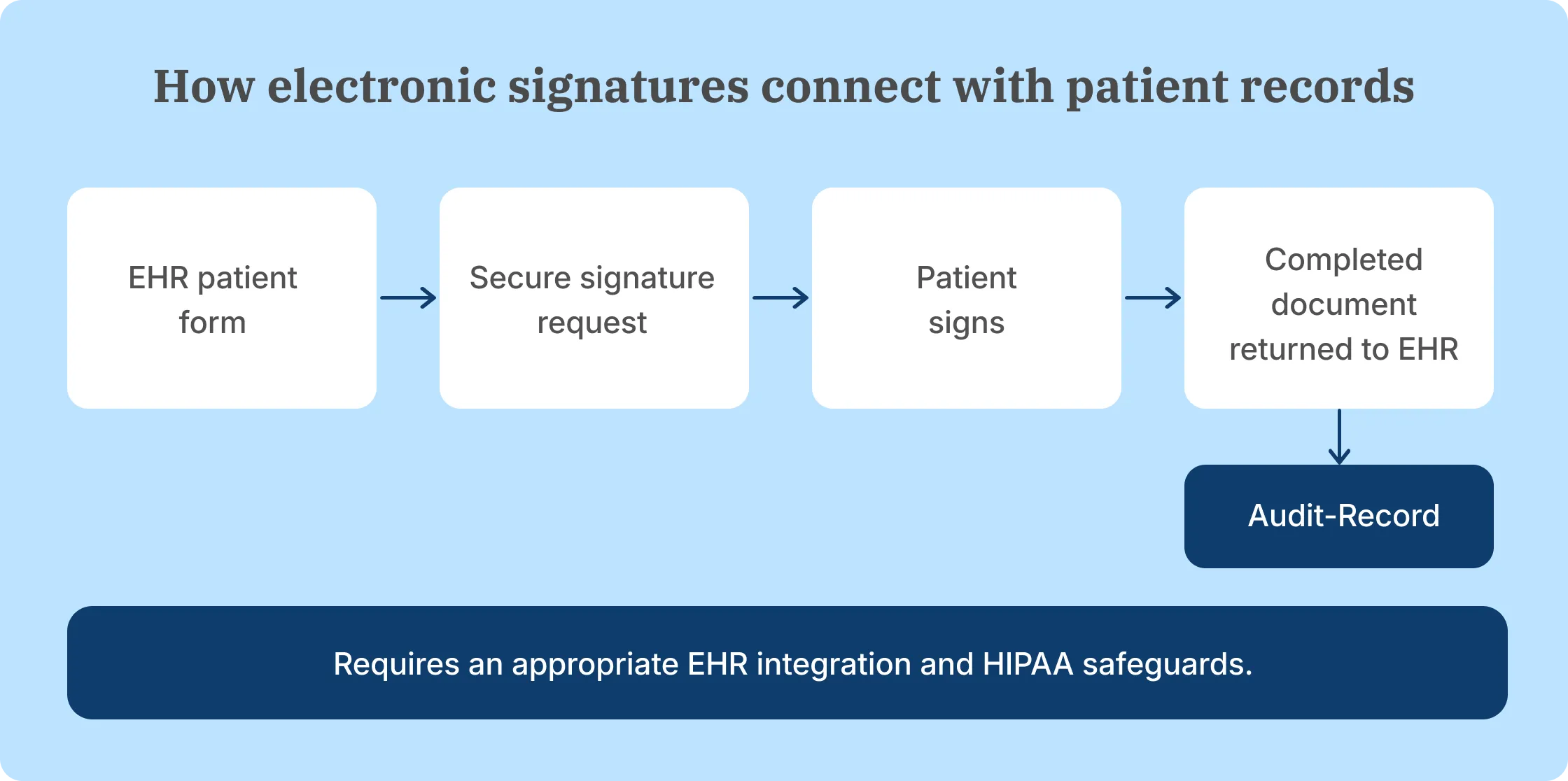
With an appropriate integration, a healthcare organization can prepare a patient form from its existing workflow, send it for electronic signature, and return the completed document to the correct patient record.
The workflow generally follows these steps:
- The patient form is prepared in or retrieved from the EHR workflow.
- Docusign sends the form to the authorized recipient for signature.
- The patient completes the required fields and signs.
- The completed document and relevant signing information return to the connected system.
Docusign describes this approach in its healthcare patient forms guide.
A Docusign HIPAA compliant account does not automatically include an EHR integration. The organization needs to account for the specific EHR system, integration method, access permissions, implementation work, and protection of PHI as it moves between systems.
For clinics and healthcare businesses comparing how these steps fit their systems, our healthcare eSignature guide also covers the considerations around patient access and document handling.
Why Signeasy is the best eSignature platform for growing healthcare teams
Signeasy's eSignature software fits growing healthcare businesses that regularly prepare patient forms, collect signatures, and track completed documents. HIPAA support is available through an eligible account setup and signed BAA, allowing these teams to use Signeasy for documents containing PHI.
Like Docusign, Signeasy offers a sales-assisted HIPAA configuration and a BAA. The more useful buying differences are the signing workflow, controls included in the selected plan, document volume, integrations, and overall subscription cost.
HIPAA support for healthcare teams
Signeasy offers HIPAA compliance support as an add-on to Business Pro or through a sales-led Build Your Plan subscription.
Business Pro costs $30 per seat per month with annual billing before the HIPAA add-on. Build Your Plan uses custom pricing and is positioned for businesses with 5 or more seats or higher-volume requirements. Signeasy's pricing identifies both HIPAA options.
The process also requires a BAA. Once the agreement is executed and the HIPAA configuration is activated, Signeasy applies additional controls to PHI-related workflows.
These include secure access links for completed documents instead of attaching signed PDFs to emails, restrictions on copying additional recipients, and safeguards against exposing PHI in document titles or messages.
That setup is important for clinics sending patient documents to people outside the organization. It helps keep completed paperwork within the intended recipient workflow while staff continue to manage the required internal access and retention policies.
Security controls for eSignature workflows
Signeasy supports healthcare signing with document encryption, audit trails, access controls, and recipient verification options.
On Business Pro, relevant capabilities include signer two-factor authentication, roles and permissions, team usage reporting, and approval workflows. Healthcare teams still need the HIPAA add-on or an appropriate custom plan before using those features for PHI-related workflows.
Completed signature requests also include an audit trail, giving authorized staff a record of document activity.
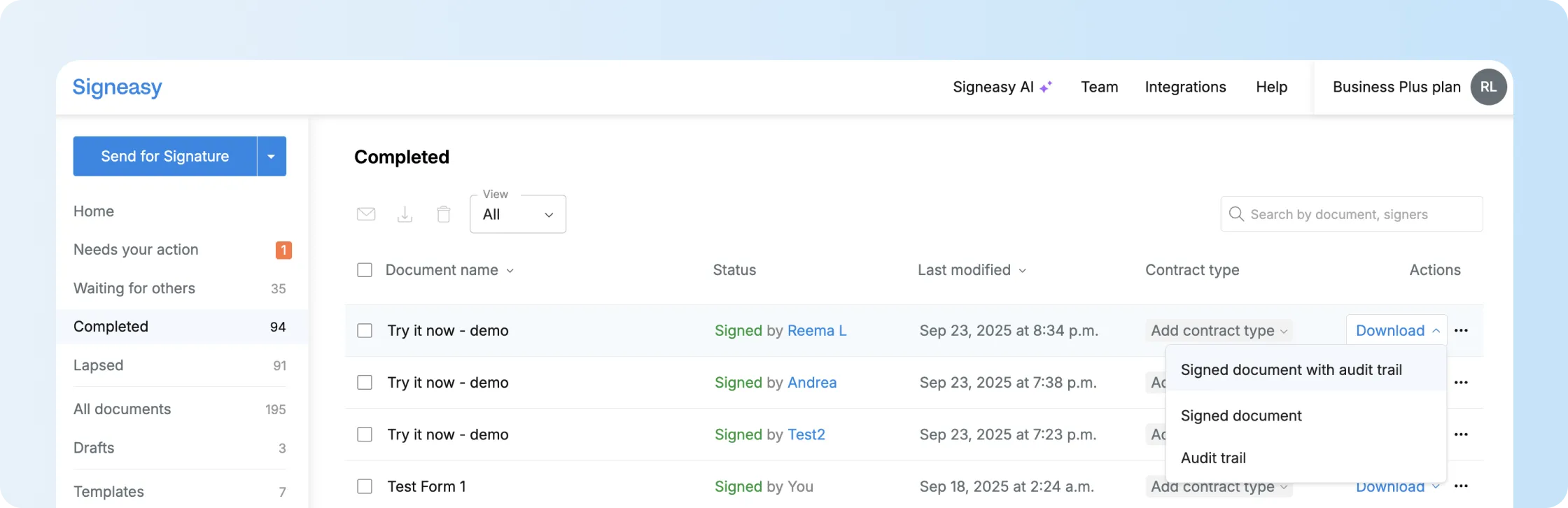
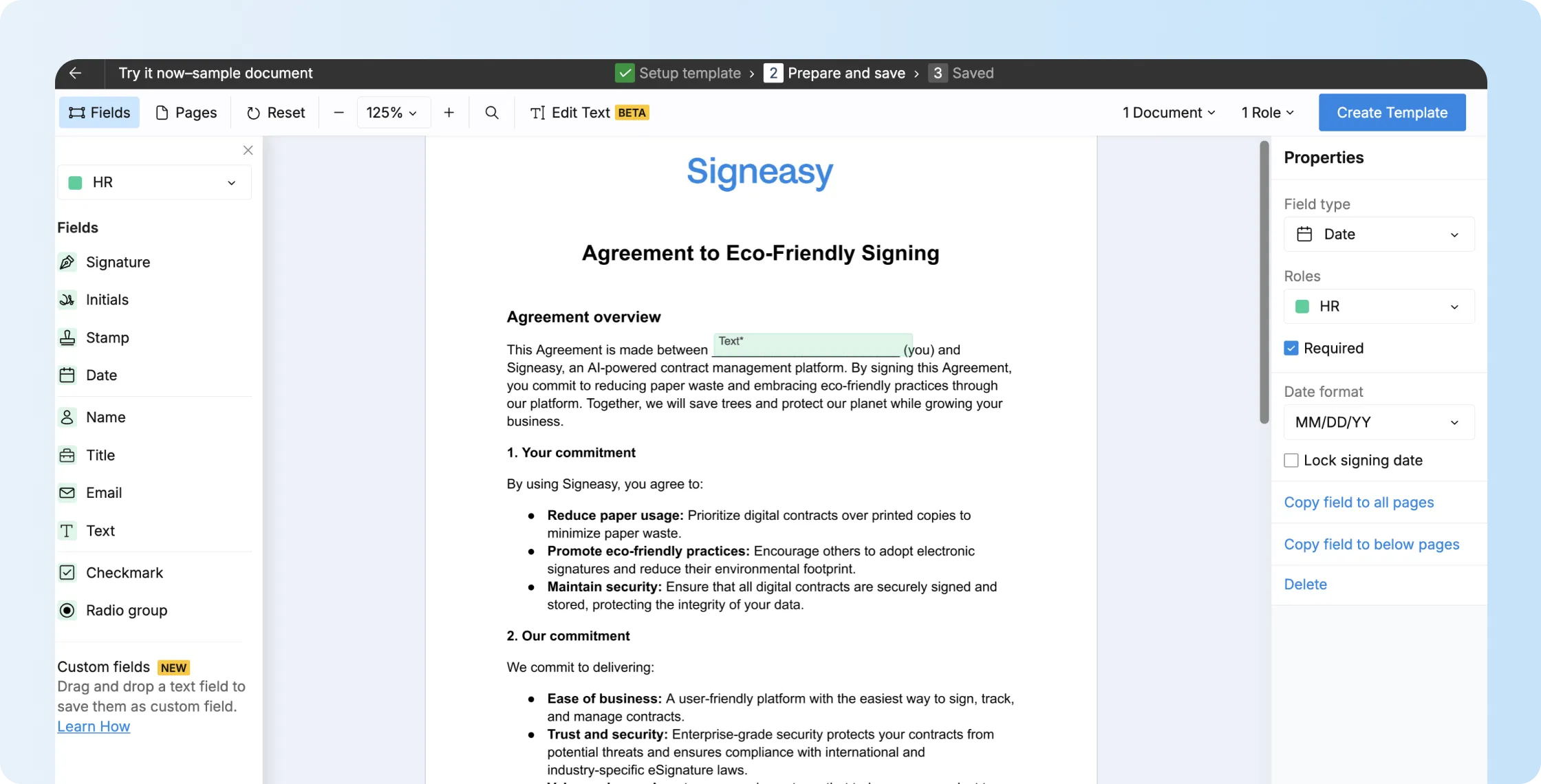
For repeat patient forms, reusable templates are another useful feature. Staff can save the document preparation setup and assign the required fields to the correct recipients.
Healthcare teams can review the related controls in our security overview and compliance information.
For a demonstration using a healthcare form without actual patient data, see the signing process and account controls.
How sending volume affects healthcare eSignature costs
Healthcare teams sending recurring patient forms need to compare the sending allowances and total cost of their HIPAA-enabled subscriptions. Docusign Enhanced has contract-specific envelope allowances, while Signeasy Business Pro includes unlimited regular document sends with HIPAA support arranged separately through sales.
The cost comparison should include paid seats, the HIPAA add-on or custom-plan quote, expected signing volume, and any integrations the organization needs.
One example of this workload comes from Camen Behavioral Services, an applied behavior analysis provider.
The team prepares approximately 300 individualized behavior plans every six months, each running 30–50 pages. Before moving to electronic signatures, parents had to visit the office to sign the paperwork.
With Signeasy, the team began sending plans electronically so parents could review and sign them remotely. The customer also described using signature notifications and reusable templates to reduce document preparation work.
That experience shows why document volume and repeatable signing steps belong in the cost comparison alongside the subscription price. It is a customer workflow example, not evidence that every deployment automatically meets HIPAA requirements.
Chupik Counseling also used Signeasy to collect patient consent forms as it moved to telehealth. Patients signed documents remotely using reusable templates, and therapists received the completed forms for filing.
Docusign fits organizations that depend on its broader integration ecosystem, specific identity verification methods, or existing Docusign-based healthcare integrations. Both providers require a proper HIPAA setup, so the decision should come down to the actual documents, sending volume, connected systems, and quoted costs.